AboutTermsPrivacyContact
 
Updating
Pioneer ARC

Pioneer ARC

Released: 2015-10-10
Pioneer ARC - QR Code
Version 2.4.3
4+
Download on the App Store
Version 2.4.3
4+
Download on the App Store
Released: 2015-10-10

iPhone Screenshots

Screenshot
Screenshot
Screenshot
Screenshot
Screenshot

Description

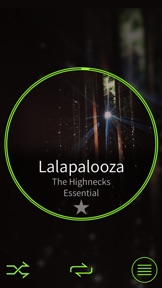
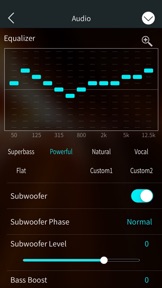
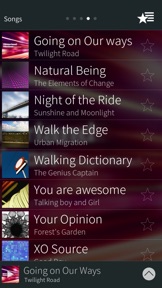
Pioneer’s Advanced Remote Control (Pioneer ARC) app converts your iPhone* into a powerful touchscreen remote control, which allows you to control and customise your compatible Pioneer car stereo.
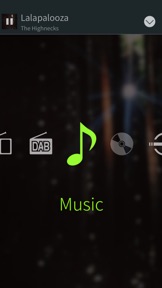
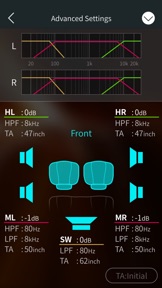
Pioneer ARC lets you browse your favourite music, switch sources (FM, DAB, Bluetooth Audio, etc.), launch 3rd party apps, customise the illumination colours and audio settings of your Pioneer system.
Pioneer ARC features are depending on the compatible Pioneer headunit itself.
*The Pioneer ARC app is compatible with iPhone 5/5c/5s/6/6 Plus/6s/6s Plus/SE/7/7 Plus/8/8 Plus/X, running iOS 8.0 and above.
Compatible Pioneer products:
-Source Control / Audio Settings / Illumination settings / Bluetooth management
DEH-S60*0BS
DEH-S50*0BT/DEH-X50BT/DEH-X50BR
MVH-S501BS
MVH-X30BT/MVH-X30BR
MVH-S600BS/MVH-S605BT /MVH-S61*BT
FH-S70*BS/FH-S70*BT
-Source Control / Audio Settings / Bluetooth management
DEH-S40*0BT/DEH-S040BT
MVH-S30*BT/MVH-S030BT
MVH-S40*BT
FH-S500BT/FH-S501BT/FH-S509BT
FH-S505BT(Mexico)/FH-S51BT
-Source Control / Audio Settings
MVH-S220DAB
MVH-S12UI / MVH-S120UI / MVH-S125UI
DEH-S400DAB / DEH-S410DAB
DEH-S20*0UI / DEH-S21*0UI/DEH-S210UI
DEH-X10/DEH-X10BR
MVH-S200DAB / MVH-S210DAB
MVH-S10*UI / MVH-S11*UI/G, MVH-S11UI
DEH-X49**BT/DEH-4900DAB
DEH-X39**BT/DEH-3900BT
DEH-X29**UI
MVH-X39*BT/MVH-390BT
MVH-290DAB
MVH-X19*UI/MVH-190UI
-Source Control / Audio Settings / Illumination settings
DEH-S220UI / MVH-S2250UI
FH-X830BHS / FH-X840DAB
FH-X73* BT/FH-X730BS
FH-X78*BT
DEH-X8800BHS
DEH-X7800BHS/DEH-X7800DAB/DEH-X7850BT
DEH-X6800BS, DEH-X6850BT /DEH-X6900BT/DEH-X5900BT
MVH-X690BS
MVH-X580BS/MVH-X58*BT/MVH-X580DAB
-Source Control
DEH-X68**BT/DEH-X6800DAB
DEH-X5800BT/DEH-X5800HD
DEH-X48**BT/DEH-4800BT/DEH-4800DAB
DEH-X38**UI
DEH-X28**UI/DEH-2800UI/DEH-2800DAB
MVH-X38*BT
MVH-280DAB
MVH-X18*UI/MVH-180UI

What's New in Version 2.4.3

Minor bug fixes

Seller

Name

Pioneer Corporation

URL

Information

Categories

Version

2.4.3

Size

63.3 MB

Game Center

No

VPP Device Licensing

Yes

Rating

Rated: 4+

Compatibility

iOS 11.0 or later

Devices

iPhone 5s, iPhone 6, iPhone 6 Plus, iPhone 6s, iPhone 6s Plus, iPhone SE, iPhone 7, iPhone 7 Plus, iPhone 8, iPhone 8 Plus, iPhone X, iPhone XR, iPhone XS, iPhone XS Max, iPhone 11, iPhone 11 Pro, iPhone 11 Pro Max, iPhone SE (2nd generation), iPhone 12, iPhone 12 Pro, iPhone 12 Pro Max, iPhone 12 mini, iPhone 13, iPhone 13 Pro, iPhone 13 Pro Max, iPhone 13 mini, iPhone SE (3rd generation), iPhone 14, iPhone 14 Plus, iPhone 14 Pro, iPhone 14 Pro Max, iPhone 15, iPhone 15 Plus, iPhone 15 Pro, iPhone 15 Pro Max, iPhone 16, iPhone 16Plus, iPhone 16Pro, iPhone 16ProMax, iPhone 16e, iPad (5th Generation) Wi-Fi, iPad (5th Generation) Wi-Fi + Cellular, iPad (6th generation) Wi-Fi, iPad (6th generation) Wi-Fi + Cellular, iPad Pro, iPad Pro (Cellular), iPad Pro (9.7-inch), iPad Pro (9.7-inch) (Cellular), iPad Pro 12.9-inch (2nd generation), iPad Pro 12.9-inch (2nd generation) Wi-Fi + Cellular, iPad Pro (10.5-inch), iPad Pro (10.5-inch) Wi-Fi + Cellular, iPad Pro (11-inch), iPad Pro (11-inch) Wi-Fi + Cellular, iPad Pro 12.9-inch (3rd generation), iPad Pro 12.9-inch (3rd generation) Wi-Fi + Cellular, iPad Air, iPad Air (Cellular), iPad Air 2, iPad Air 2 (Cellular), iPad Air (3rd generation), iPad Air (3rd generation) Wi-Fi + Cellular, iPad mini Retina, iPad mini Retina (Cellular), iPad mini 3, iPad mini 3 (Cellular), iPad mini 4, iPad mini 4 (Cellular), iPad mini (5th Generation), iPad mini (5th Generation) Wi-Fi + Cellular, iPad (7th generation) Wi-Fi + Cellular, iPad Pro 11-inch (2nd generation), iPad Pro 11-inch (2nd generation) Wi-Fi + Cellular, iPad Pro 12.9-inch (4th generation), iPad Pro 12.9-inch (4th generation) Wi-Fi + Cellular, iPad Air (4th Generation) (Wi-Fi), iPad Air (4th Generation) (Wi-Fi + Cellular), iPad (8th generation) Wi-Fi, iPad (8th generation) Wi-Fi + Cellular, iPad Pro 11-inch (3rd generation), iPad Pro 11-inch (3rd generation) Wi-Fi + Cellular, iPad Pro 12.9-inch (5th Generation), iPad Pro 12.9-inch (5th Generation) Wi-Fi + Cellular, iPad (9th Generation), iPad (9th Generation) Wi-Fi + Cellular, iPad mini (6th Generation), iPad mini (6th Generation) Wi-Fi + Cellular, iPad Air (5th generation), iPad Air (5th generation) Wi-Fi + Cellular, iPad Pro 11-inch (4th generation), iPad Pro 11-inch (4th generation) Wi-Fi + Cellular, iPad Pro 12.9-inch (6th generation), iPad Pro 12.9-inch (6th generation) Wi-Fi + Cellular, iPad (10th generation), iPad (10th generation) Wi-Fi + Cellular, iPad Air 11-inch (M2) Wi-Fi, iPad Air 13-inch (M2) Wi-Fi, iPad Air 13-inch (M2) Wi-Fi + Cellular, iPad Pro 11-inch (M4) Wi-Fi, iPad Pro 11-inch (M4) Wi-Fi + Cellular, iPad Pro 13-inch (M4) Wi-Fi, iPad Pro 13-inch (M4) Wi-Fi + Cellular, iPad A16, iPad A16Cellular, iPad Air11M3, iPad Air11M3Cellular, iPad Air13M3, iPad Air13M3Cellular, iPad MiniA17Pro, iPad MiniA17ProCellular, iPod touch (6th Generation), iPod touch (7th generation)

Languages

English, Arabic, Chinese, Dutch, French, German, Hebrew, Indonesian, Italian, Japanese, Persian, Portuguese, Russian, Spanish, Thai, Turkish

App Store: Customer Ratings

Ratings & Reviews

2.0 of 5 (42 Ratings)

App Store: Customer Reviews

2023-04-11

Poor backward compatibilty

DEH-X7800DAB
Come on Pioneer, bad vibes. Liked your products for 40 years.
Please don't let me down now. ;-)
Lazytesterssuck
Version 2.4.2
2021-08-16

No Volume Display

A multi-millionaire company that couldn't careless about their customer opinion/feelings when it comes down to this app. Last updated more then one year ago yet shows no interest in any of our complains! Where is the point on having a volume control which doesn't show the volume number on it?? are we supposed to just guess it by the sound?! Come on Pioneer show some respect towards your customers and work on this app or bring back a physical remote control. You are taking our options away with no intend to help whatsoever!!! What happened to you guys??
Raphaelbds
Version 2.3.3
2021-08-04

Don’t need it.

You really don’t need it to play music on the Pioneer stereo it plays automatically when you plug your phone in, as long as it’s not an Apple product…then it won’t work at all!
Completely pointless app.
Boconcepts
Version 2.2.0
2021-01-19

Not working after iOS update

When I 1st used this app it worked fine. I could control the sound and change the colour of my stereo. It now just says it’s not connected even though my phone is connected to the stereo as I’m playing my music!
King Shal
Version 2.4.1
2020-11-21

Just not fit for purpose

It should be so simple to control the radio from the app. Should be.
This app is just not fir for purpose. I have started to look at other manufacturers now for a car radio with an app that works.
Bob Clewley
Version 2.2.1
2020-10-03

Astonishingly poor

This app has always been a little shonky. Now it just does not work at all!
Longwayround
Version 1.0.3
2020-08-26

What’s happened?

It used to work fine via Bluetooth but has stopped working. Any ideas??
bangtwister
2020-08-11

Don’t really get the point?

Downloaded the app for the iPhone 11. Pioneer head-unit already sync’d via Bluetooth to the phone and works fine playing music, etc.
The ARC software seems to only function when connected via wire - which entirely defeats the object of having the phone in a cradle and not trailing wires across your dash.
You have the message ‘Not connected’ displayed at the top of the app, despite your stereo actually playing music fine from your phone. As the app believes you are not connected, you have hardly any options to control the head-unit - which I thought was the whole point of the app itself?
It probably works great if you’re happy to be wired in - but with a weird yes/no/possibly working philosophy over Bluetooth, I’ve uninstalled it.
Unzen
2020-07-30

Disappointed

First time downloading the app it all worked great but since then it will not reconnect with the unit rendering it totally useless
daleh84
2020-07-22

Good app

Works great with iPhone 8 iOS 13.5.1
Easy to connect and if you read the app tutorial then simple to use
Gra4am723
2020-07-03

Does not work!!!

Come on Pioneer I expect better from your company... this app does not work
Xtype22D
2020-05-09

Useless

Says it’s connected by Bluetooth but will not connect to app on iPhone 8...
Waste off time don’t bother....
738301
2020-04-18

Connection problems

Can’t connect my iPhone 11 to my pioneer head unit with usb
jb2988
2019-06-21

Better than expected

After reading the reviews I didn’t hold much hope for this app, however having just fitted my new MVH-X580BT headunit it works better than expected with my iPhone XR. The app doesn’t seem to work properly over USB, but works perfectly over Bluetooth and offers a wealth of settings & adjustments for sound, display, etc. I suspect people’s experiences differ so much as some headunits do a lot more via the app than others, luckily mine is one of the newer ones that does pretty much everything.
Rich_D
2019-04-27

Does not work. Apple please delete.

I bought a pioneer mvh-s110ub with the expectation it would work with iphone over usb. I have an iPhone X on IOS 12 and the headunit doesn’t recognise the iPhone with the app open.
It doesn’t allow audio over usb even without the app. I get error ‘n/a usb’ on the headunit.
Terrible app and headunit. Get a Sony instead.
webjames
2018-12-27

Arc Pioneer App

Doesn’t work at all!!👎. Only thing that does work is the “pause” but that all it does.
mrmikeonabike
2018-06-25

Iphone 7 plus and pioneer mvh-190ub

I cannot use my pioneer mvh-190ub with iphone 7 plus, not connected
cristaxi
2018-05-10

Poor

So limited and unintuitive. Not worth the effort from either party.
Shortandy
2018-04-09

Doesn’t work now

Did an ios update and now the app doesn’t connect to the phone. Iphone 7 on 11.2.6
Cheesegeezer
2018-03-11

Volume control in app

You cannot control the volume control of the songs playing with this app!!!!
Think that’s a major function greatly missed off from this app....
Please,please,please sort that out as an update
Sectek
2018-03-04

3 stars

No longer working since I did a software update.
X Charlie07 X
2018-02-21

Love this app

It’s so detail app and easy to set sound setting! Love this app and love pioneer!
my nuke
2017-07-09

Potentially great

I have a new Pioneer MVH-X580DAB installed and to start with it connected to ARC, an excellent app with surprising and highly useful features.
After a couple of days it wouldn't connect anymore to the ARC, although it will connect to the phone ok. So I can play music via itunes or spotify, but disappointingly unable to use the app to adjust volume, sound or display.
Ive rebooted my phone, forgotten bt devices, and it will not connect to the app. Surely it should be easier than this yo operate?
Sidetops
2017-04-15

Ultimately frustrating yet so much potential

The Potential.
Such great head units with great features, supplemented by the potential to control them with this app.
The Great Stuff.
The app itself is reasonably intuitive, the stuff that isn't obvious is easy once the instructions are read!
The stuff that it can do, it does pretty well and there is plenty of those and they do what they promise on the cover.
But here is where the positive ends.
The Issue
The app is not ipad optimised and won't let you past the safety message. This is incredibly ironic, no doubt a safety feature, yet most iPads are fixed in the car and are safer than a hand held phone which unfortunately is how so many are used.
Why doesn't it work on the iPad?
Pioneer are entirely focused on their own agenda and are ignoring the customer voice - this is a pretty basic error in a consumer driven market.
Further evidenced by the lack of ways in which to engage with Pioneer over this app.
We are not installing iphones in our car systems, we are installing iPads, from minis to pro's in our cars. We use iphones and having the iphone app is great, but we NEED an ipad version of the app.
No doubt, Pioneer will point out that this is an iphone app and not an ipad app so we shouldn't be surprised that it doesn't work on an iPad.
BUT this is not good enough.
COME ON PIONEER, live up to your name, listen to your customers, it would be nice to see your headunits work with ipads as well.
SONY's do, KENWOOD's do, so why don't yours?
Kind regards
A Frustrated User (Still hopeful though)
askbugsy
2017-02-14

Very handy

I really like that I can set up my header unit using this app instead of having to rtfm with a torch out in the car on a dark winter's night. It connects faultlessly with the stereo every time which is good. All I would ask is that there was some guidance as to how to use this app - it's very much guesswork, once I find how to do something I can't remember how I got there the next time I try 😳. Overall though I think this is a great companion app for a car stereo. The stereo is very good too (MVH-X580DAB).
FoxiJax
2016-12-01

Pointless app

This app doesn't real do anything that using the phone itself wouldn't do, and it doesn't make selecting music to play any easier. Having to use two fingers to adjust the volume is just rubbish, especially for an in-car app.
leonbpage
2016-09-30

Portrait rotation bug on iPad

The app works if rotated in landscape connected via bluetooth to my MVH-X580DAB otherwise it's impossible to dismiss the warning dialog in portrait. Apart from this bug it's a useful app for setting audio settings.
PizzaCake
2016-04-11

Not a bad little app...

As above, the app is cute and works, playing my synced music but I like to listen to other apps while driving, which unfortunately this doesn't support. Would be a brilliant addition. Hopefully the developers see this 😊😊
Dj ToneZ