
AboutTermsPrivacyContact
 
Updating
LEPSI - Watch MAGNETISM

LEPSI - Watch MAGNETISM

Released: 2016-04-09
© Lepsi
LEPSI - Watch MAGNETISM - QR Code
Version 1.12
4+
Download on the App Store
Version 1.12
4+
Download on the App Store
Released: 2016-04-09
© Lepsi

iPhone Screenshots

Screenshot
Screenshot
Screenshot
Screenshot

iPad Screenshots

Screenshot
Screenshot
Screenshot

Description

LEPSI Watch Magnetism - THE FIRST APP THAT TELLS YOU IF YOUR WATCH IS MAGNETIZED
This app is aimed to mechanical watch lovers who'd like to know if their watches are magnetized or not.
How can I tell that my watch is magnetized?
If your watch is running fast or slow, this can be a sign of magnetism. To be sure, this app has been made for you. With LEPSI Watch MAGNETISM, you can run a diagnostic on your watch’s magnetism in a few seconds.
First detect the position of the magnetic sensor on your iPhone/iPad (you only have to do this the first time):
1. Place your iPhone/iPad on a table
2. Place a magnet above the iPhone/iPad and move it around the screen without touching the device.
3. Observe the magnetic strength displayed by the app
4. The higher the number, the closer the magnet is to the sensor.
5. Once you’ve found the sensor, double click on the identified area.
6. The sensor’s position will be represented by a circle.
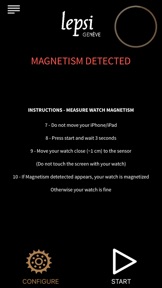
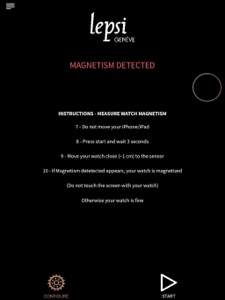
After you have pinpointed the sensor, you can measure your watch’s magnetism:
1. Click on Start and wait 3 seconds.
2. Put your watch about 1 cm away from the sensor without having it touch the screen.
3. If the message Magnetism detected shows up, your watch is magnetized and if not, your watch is fine.
And that's all !!!

What's New in Version 1.12

This app has been updated by Apple to display the Apple Watch app icon.
Magnetism sensibility has been decreased to match most manufacture standard.

Seller

Name

LEPSI SARL

Information

Developer

Categories

Version

1.12

Size

22.6 MB

Game Center

No

VPP Device Licensing

Yes

Rating

Rated: 4+

Compatibility

iOS 8.0 or later

Devices

iPhone 4S, iPhone 5, iPhone 5c, iPhone 5s, iPhone 6, iPhone 6 Plus, iPhone 6s, iPhone 6s Plus, iPhone SE, iPhone 7, iPhone 7 Plus, iPhone 8, iPhone 8 Plus, iPhone X, iPhone XR, iPhone XS, iPhone XS Max, iPhone 11, iPhone 11 Pro, iPhone 11 Pro Max, iPhone SE (2nd generation), iPhone 12, iPhone 12 Pro, iPhone 12 Pro Max, iPhone 12 mini, iPhone 13, iPhone 13 Pro, iPhone 13 Pro Max, iPhone 13 mini, iPhone SE (3rd generation), iPhone 14, iPhone 14 Plus, iPhone 14 Pro, iPhone 14 Pro Max, iPad 2 (Wi-Fi), iPad 2 (3G), iPad (3rd Generation) (Wi-Fi), iPad (3rd Generation) (4G), iPad (4th Generation) (Wi-Fi), iPad (4th Generation) (4G), iPad (5th Generation) Wi-Fi, iPad (5th Generation) Wi-Fi + Cellular, iPad (6th generation) Wi-Fi, iPad (6th generation) Wi-Fi + Cellular, iPad Pro, iPad Pro (Cellular), iPad Pro (9.7-inch), iPad Pro (9.7-inch) (Cellular), iPad Pro 12.9-inch (2nd generation), iPad Pro 12.9-inch (2nd generation) Wi-Fi + Cellular, iPad Pro (10.5-inch), iPad Pro (10.5-inch) Wi-Fi + Cellular, iPad Pro (11-inch), iPad Pro (11-inch) Wi-Fi + Cellular, iPad Pro 12.9-inch (3rd generation), iPad Pro 12.9-inch (3rd generation) Wi-Fi + Cellular, iPad Air, iPad Air (Cellular), iPad Air 2, iPad Air 2 (Cellular), iPad Air (3rd generation), iPad Air (3rd generation) Wi-Fi + Cellular, iPad mini (Wi-Fi), iPad mini (4G), iPad mini Retina, iPad mini Retina (Cellular), iPad mini 3, iPad mini 3 (Cellular), iPad mini 4, iPad mini 4 (Cellular), iPad mini (5th Generation), iPad mini (5th Generation) Wi-Fi + Cellular, iPad (7th generation) Wi-Fi + Cellular, iPad Pro 11-inch (2nd generation), iPad Pro 11-inch (2nd generation) Wi-Fi + Cellular, iPad Pro 12.9-inch (4th generation), iPad Pro 12.9-inch (4th generation) Wi-Fi + Cellular, iPad Air (4th Generation) (Wi-Fi), iPad Air (4th Generation) (Wi-Fi + Cellular), iPad (8th generation) Wi-Fi, iPad (8th generation) Wi-Fi + Cellular, iPad Pro 11-inch (3rd generation), iPad Pro 11-inch (3rd generation) Wi-Fi + Cellular, iPad Pro 12.9-inch (5th Generation), iPad Pro 12.9-inch (5th Generation) Wi-Fi + Cellular, iPad (9th Generation), iPad (9th Generation) Wi-Fi + Cellular, iPad mini (6th Generation), iPad mini (6th Generation) Wi-Fi + Cellular, iPad Air (5th generation), iPad Air (5th generation) Wi-Fi + Cellular, iPad Pro 11-inch (4th generation), iPad Pro 11-inch (4th generation) Wi-Fi + Cellular, iPad Pro 12.9-inch (6th generation), iPad Pro 12.9-inch (6th generation) Wi-Fi + Cellular, iPad (10th generation), iPad (10th generation) Wi-Fi + Cellular, iPod touch (5th generation), iPod touch (6th Generation), iPod touch (7th generation)

Languages

English, Chinese, French, German, Japanese

App Store: Customer Ratings

Ratings & Reviews

3.6 of 5 (9 Ratings)

App Store: Customer Reviews

2023-03-13

Not convinced

My watch suddenly started to gain 4 minutes every hour. Searched the net for possible answers, and found this app being mentioned.
Sure enough it showed my watch as being ‘ magnetised’. The watch would even cause the pointer on a map compass to move, showing there was magnetism present. Before I purchased a demagnetiser, I checked a local watch repairer to see if they had a demagnetiser.
He offered his service for free, but before trying to demagnetise the watch, he had a look inside the watch and found the hair spring had dislodged from its mounting, indicating the watch had been knocked or dropped.
He put the spring back in place, and the watch is working fine again.
When checking my other watches for magnetism using the app, they ALL showed magnetism was present, despite them running ok.
The app even showed magnetism when I held the strap over the sensor !
Upon further research it appears that most mechanical watches will have some form of magnetism present.
So before purchasing a demagnetiser, take the watch to a watch repairer who can confirm at a glance if, like my watch, the hair spring has just jumped out of position.
Even quartz watches I have show up as having magnetism !
I’m not saying the app doesn’t do it’s job, but the magnetism issue it shows up, may not be the actual issue with the watch.
Credited
2022-09-01

Useful to see if your watch is magnetised.

I love the simplicity of this very useful app and that it is very easy to calibrate. You only need to calibrate the app once by moving a magnet close over the screen but without touching the screen, the higher the number the better. The part of the screen that shows the highest number is where you should double tap the screen. When you have double tapped the screen a circle will appear to show that this is the area where the sensor is. Now just follow the onscreen instructions to see if your watch, spring-bars, bracelet, clasp, tools for your watch, screwdriver, screws, etc, are magnetised. If you move a watch about 1 centimetre above the circle and the message “Magnetism Detected” shows on the screen, then your watch is magnetised, if there is no message then your watch is fine. Brilliantly useful app that is quick and easy to set-up, and that is worth a 5 star rating. Best of all it is free!
The Faithful Penguin
Version 1.11
2020-06-13

Very useful

Extremely useful app - big help sorting a watch several times and tracing how it got magnetised - but do not use near any large metal objects as will show as ‘magnetised’.
You Gillespie
Version 1.12
2020-01-19

Mr

As far as this app is concerned, everything metallic in my home, including my watch, is magnetised.
Fvdscg
2018-07-03

Lacks Accuracy

Having tried this for a couple of days I am not confident of its accuracy. The point at which the magnetism of the watch is detected shifts from the top right to the top left of the app's a screen. It begs the question 'Why bother to configure the app if the magnetic point shifts?' There is also the question regarding at what point (a number) should you be confident that the magnetism in the watch will be detected. This is a configuration issue for which there is no guidance. Moving a magnet around merely demonstrates the lack of precision that characterises everything about this app. One might logically ask 'Why do you have to search for the magnetic hot spot on the iphone. Surely all iphones are the same? Finally the app does not always work. I am no further solving the vexed problem of magnetism in my mechanical watches!
Macaplan
2017-06-03

Great tool.

Works well, but agree with other reviewer that a numeric value to indicate the level of magnetism would be good addition.
Matt6r
2016-10-25

Works as described

Excellent app. Works as described.
Perhaps should add a numeric counter though, as in configuration mode.
Blade_uk
2016-06-12

Fantastic!

This is just so useful.
The other Brian Turner