AboutTermsPrivacyContact
 
Updating
Lumariver Depth of Field

Lumariver Depth of Field

Released: 2016-04-19
© 2016 - 2020 Xarepo AB
Lumariver Depth of Field - QR Code
Version 1.0.7
4+
Download on the App Store
Version 1.0.7
4+
Download on the App Store
Released: 2016-04-19
© 2016 - 2020 Xarepo AB

iPhone Screenshots

Screenshot
Screenshot
Screenshot
Screenshot
Screenshot

iPad Screenshots

Screenshot
Screenshot
Screenshot
Screenshot
Screenshot

Description

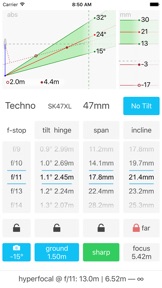
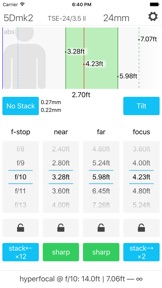
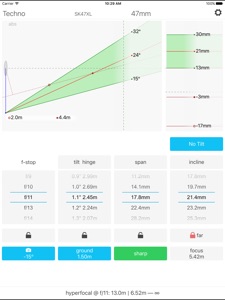
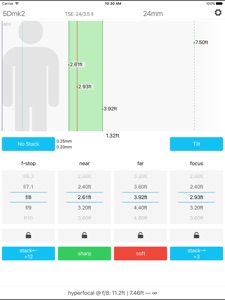
The Lumariver Depth of Field Calculator is an app that helps you maximize the sharpness of your photographs. It’s primarily intended for landscape, architecture and all other genres where the goal is to have a sharp image front to back. Rather than being a calculator for theoretical exercises it’s designed for being a practical tool in the field, and it has a thorough user manual that describes real use cases. The user interface is optimized for one-hand operation using scrollers.
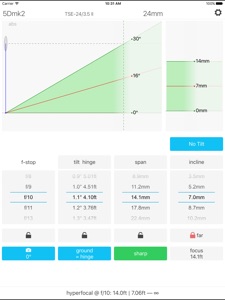
In addition to the normal depth of field calculator it supports tilted depth of field (tilt-shift lenses, Scheimpflug principle) as well as focus stacking. The functions you don't intend to use can be turned off to keep the user interface as clean and simple as possible. Custom circle of confusion sizes can be set, which in addition to a fixed number may be relative to airy disc diameter and/or pixel pitch. It even supports dual circle of confusion sizes, one “sharp” and one “soft” to make it easy to do controlled trade-offs in difficult situations. By entering your own camera(s) and lenses once you have them easily accessible by name making the workflow efficient in the field.
Distances can be shown either in meters or in decimal feet.

What's New in Version 1.0.7

v1.0.7
- Fixed: settings could be lost on devices with little space left.
- Fixed: tilt sensor would not work on iOS 13.
- Improved: better layout on iPhone X.
- Maintenance: further library upgrades for better support of newer devices.

Seller

Name

Xarepo AB

Information

Developer

Categories

Version

1.0.7

Size

12.4 MB

Game Center

No

VPP Device Licensing

Yes

Rating

Rated: 4+

Compatibility

iOS 10.0 or later

Devices

iPhone 5, iPhone 5c, iPhone 5s, iPhone 6, iPhone 6 Plus, iPhone 6s, iPhone 6s Plus, iPhone SE, iPhone 7, iPhone 7 Plus, iPhone 8, iPhone 8 Plus, iPhone X, iPhone XR, iPhone XS, iPhone XS Max, iPhone 11, iPhone 11 Pro, iPhone 11 Pro Max, iPhone SE (2nd generation), iPad (4th Generation) (Wi-Fi), iPad (4th Generation) (4G), iPad (5th Generation) Wi-Fi, iPad (5th Generation) Wi-Fi + Cellular, iPad (6th generation) Wi-Fi, iPad (6th generation) Wi-Fi + Cellular, iPad Pro, iPad Pro (Cellular), iPad Pro (9.7-inch), iPad Pro (9.7-inch) (Cellular), iPad Pro 12.9-inch (2nd generation), iPad Pro 12.9-inch (2nd generation) Wi-Fi + Cellular, iPad Pro (10.5-inch), iPad Pro (10.5-inch) Wi-Fi + Cellular, iPad Pro (11-inch), iPad Pro (11-inch) Wi-Fi + Cellular, iPad Pro 12.9-inch (3rd generation), iPad Pro 12.9-inch (3rd generation) Wi-Fi + Cellular, iPad Air, iPad Air (Cellular), iPad Air 2, iPad Air 2 (Cellular), iPad Air (3rd generation), iPad Air (3rd generation) Wi-Fi + Cellular, iPad mini Retina, iPad mini Retina (Cellular), iPad mini 3, iPad mini 3 (Cellular), iPad mini 4, iPad mini 4 (Cellular), iPad mini (5th Generation), iPad mini (5th Generation) Wi-Fi + Cellular, iPad (7th generation) Wi-Fi, iPad Pro 11-inch (2nd generation), iPad Pro 11-inch (2nd generation) Wi-Fi + Cellular, iPad Pro 12.9-inch (4th generation), iPad Pro 12.9-inch (4th generation) Wi-Fi + Cellular, iPod touch (6th Generation), iPod touch (7th generation), Apple Watch Series 4, Apple Watch Series 5

Languages

English

App Store: Customer Ratings

Ratings & Reviews

2.0 of 5 (1 Rating)

App Store: Customer Reviews

2016-04-25

Great DoF and tilt app

Best DoF app out there, and the tilt function is an added bonus. All in all highly recommended.
amphotostudio
Version 1.0.2