Updating


±0
#61 in Top Paid Apps > News
±0
#56 in Top Paid iPad Apps > News
iPhone Screenshots






Description
Speak News reads stories from RSS/Atom news feeds, web pages, Wikipedia pages, Twitter user feeds, hashtag searches or word searches, or Google News queries to you using text-to-speech. Speak News app is built for iPhone, iPad, and iPod touch. Use Siri to open Speak News and listen to news stories hands-free using the earphones remote control. Just say “Hey Siri, Open Speak News” and the app will start reading your current news stories.
Complete Features
• Use Siri to open the app and listen to stories.
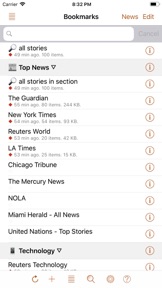
• Bookmarks can be RSS/Atom news feeds, web pages, Wikipedia pages, Twitter user feeds, hashtag searches or word searches, Google News queries, or Speak News keyword queries. Speak News queries can be created and performed while offline, searching the stories cached on the device.
• Import bookmarks from a Feedly OPML feed library URL.
• Multitasking allows updating news feeds in the background while reading or listening to news in the foreground.
• Automatically selects appropriate international speech voices based on story language.
• Toolbar functions in a feed view include Play/Pause, Stop, Previous, Next, Update All Feeds, View Mode, Share, Settings.
• Share news headlines and links, or entire news feeds through the standard iOS Share social media activities view, including Message, Mail, Notes, Reminders, Twitter, Google+, OneNote, Wunderlist, Flipboard, Facebook, Pinterest, Evernote, etc.
• Current story info and Play/Pause, Previous, Next functions are available in the media player controls in the device's lock screen and Control Center.
• Speak News automatically rotates through available voices for the current language for each story. This gives more variety and distinction in the sequence of spoken news stories. For instance, in English, this gives U.S. , U.K. Ireland, New Zealand, and Australian voices.
• All stories are saved on your device for later reading and listening while offline.
• Efficient text-only story display makes loading and reading faster, and saves money on your cell phone plan by downloading minimal data.
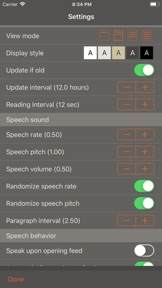
• Display Styles include White, Light Gray, Sepia, Dark Gray, Dark Red, and Black. The "dark mode" Black and Dark Red styles are ideal for reading in dark environments.
• All text is responsive to the user's preferred text size as set in Settings > Display & Brightness > Text Size, and Settings > General > Accessibility > Larger Text.
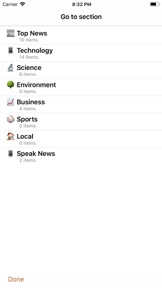
• Toolbar functions in the Bookmarks view include New Bookmark, Go To Section, Find, Settings, Library, and Edit.
• Today Widget displays scrolling list of stories from current feed.
• Use the remote control on earphones to speak and pause stories, move to next or previous stories, or select a new RSS feed from your bookmarks.
• Create your own bookmarks and bookmark sections.
• Import bookmarks from Imaja’s Speak News RSS Feeds Library featuring a broad selection of essential and informative news feeds.
• Settings includes many controls for news story display, auto-reload, speech and auto-scrolling behavior, and user-interface sounds.
• Keyboard shortcuts are supported for Speak News functions for use with external Bluetooth keyboards.
• RSS feed details are viewable in the Edit Bookmark view.
• Word Usage action displays statistics on word frequencies in a story or a complete feed.
• Speak News supports a custom URL scheme for adding bookmarks.
Remote Control with Earphones
Tap the center button:
• One time to play or pause the speech.
• Two times to skip to the next story.
• Three times to skip to the previous story.
• Five times to enter Bookmark Selection Mode. In Bookmark Selection Mode, listen for the desired bookmark name and tap one time to open and start speaking the feed.
Settings
Use the Settings view to configure the text display, graphic style and behavior of Speak News.
Visit imaja.com/speaknews for more details and screenshots.
Follow @SpeakNewsApp on Twitter.
What's New in Version 2.12.8
Improvements to Speak News:
* Improved speech pacing for news article title, author and date.
Seller
Name
Imaja
Information
Developer
Categories
Version
2.12.8
Size
25.8 MB
Game Center
No
VPP Device Licensing
Yes
Rating
Rated: 4+
Compatibility
iOS 8.0 or later
Devices
iPhone 11 Pro Max, iPad Air 2 (Cellular), iPad mini Retina (Cellular), iPad Pro (11-inch), iPad (5th Generation) Wi-Fi, iPad (6th generation) Wi-Fi, iPod touch (6th Generation), iPad Pro (11-inch) Wi-Fi + Cellular, iPad (6th generation) Wi-Fi + Cellular, iPad Pro 12.9-inch (3rd generation), iPad (5th Generation) Wi-Fi + Cellular, iPad mini (5th Generation) Wi-Fi + Cellular, iPad mini (5th Generation), iPad Pro, iPad mini 3, iPad mini 4 (Cellular), iPad mini 4, iPhone 11, iPod touch (7th generation), iPad mini 3 (Cellular), iPad Air, iPad Air 2, iPad Pro 12.9-inch (2nd generation), iPad Pro (Cellular), iPad Pro (9.7-inch) (Cellular), iPad Pro (10.5-inch) Wi-Fi + Cellular, iPad Pro (9.7-inch), iPad mini Retina, iPad Air (Cellular), iPad Air (3rd generation) Wi-Fi + Cellular, iPhone 6 Plus, iPad Air (3rd generation), iPad Pro (10.5-inch), iPad Pro 12.9-inch (2nd generation) Wi-Fi + Cellular, iPhone 6, iPhone XR, iPhone XS, iPhone 6s, iPhone SE, iPhone 7 Plus, iPhone 6s Plus, iPhone 5s, iPhone X, iPhone 8, iPhone XS Max, iPhone 8 Plus, iPhone 7, iPhone 5, iPad (7th generation) Wi-Fi, iPhone 5c, iPad (7th generation) Wi-Fi + Cellular, iPad Air3, iPad Air3Cellular, iPad Mini5, iPad Mini5Cellular, iPhone 11 Pro, iPad Pro 12.9-inch (3rd generation) Wi-Fi + Cellular
Languages
English
App Store: Customer Ratings
Ratings & Reviews
0.0 of 5 (No rating)
App Store: Customer Reviews
No Entry