AboutTermsPrivacyContact
 
Updating
Video & TV Cast + LG Smart TV

Video & TV Cast + LG Smart TV

Released: 2016-06-23
© 2kit consulting
Video & TV Cast + LG Smart TV - QR Code
Version 1.11
17+
Download on the App Store
Version 1.11
17+
Download on the App Store
Released: 2016-06-23
© 2kit consulting

iPhone Screenshots

Screenshot
Screenshot
Screenshot
Screenshot
Screenshot

iPad Screenshots

Screenshot
Screenshot
Screenshot
Screenshot
Screenshot

Description

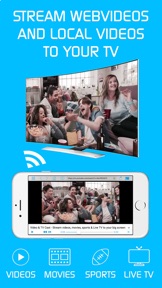
Watch any web-video, online movie, livestream or live tv show on your LG Smart TV. Enjoy the show on your big screen with the no#1 web video streamer.
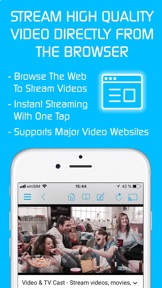
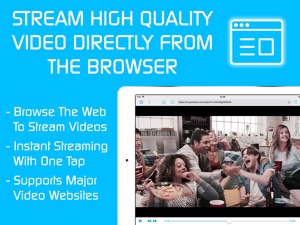
With Video & TV Cast for LG Smart TV you can browse the web and stream any web video, online movie, livestream or live tv show you want on your LG Smart TV. Mp4, m3u8, hls livestreams and also video-over-https are supported.
There is no time limit at all! You can watch videos of 2 minutes or 2 hours or even more. Just open Video & TV Cast, navigate to a website, wait for link detection and send the video with a single tap to your LG Smart TV. The discovered link will be shown below the browser. A tap on the link will start the show. You don't need to install a big media server like Plex or any other third party software.
>>> Important Notes
* To enable video casting please open the LG App Store (LG Smart World / LG Content Store) on your TV, search for 'TV Cast' and install the companion app.
* Please enter the ip-address of your iPhone/iPad by using the number pad and up/down/left/right keys on your TV Remote or scroll wheel on your Magic Remote. Just enter the numbers, no need to press the enter key.
* iTunes movies, Flash video and DRM protected videos like Amazon Prime, Netflix, Hulu, Vudu, DirecTV, Xfinity, HBO now are not supported!
* Please test your favorite videos with the free edition before upgrading!
* Please use the hardware remote of your LG for controlling the TV app and video playback.
* The app streams only the video part of a website and not the whole website content (No screen or tab mirroring!).
* Sometimes it is necessary to play the video on your iPad or iPhone first before it gets discovered by the app for streaming. It may also be neccessary to start casting multiple times until it works with specific videos.
* If a specific video is not working, please check the FAQ on the app startpage. If that does not help you, please drop us an email before leaving a negative comment on the App Store. We will try to add support for that website as soon as possible.
>>> PRO FEATURES
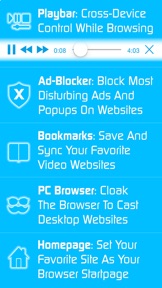
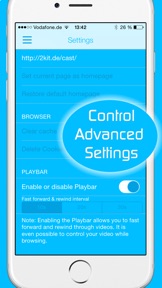
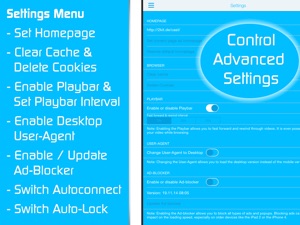
* Remote Playbar: Use the Playbar for advanced video control while browsing, including video scrubbing, forward, rewind, play, pause, stop. The playbar works on all LG Smart TVs.
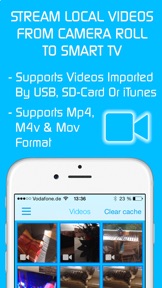
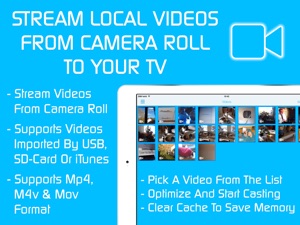
* Local Videos: Cast your camera roll videos from an iPhone or iPad. Supports mp4, m4v and mov videos that were saved to the camera roll via Apples SD-Card/USB Adapter, iTunes Desktop Software or third party apps.
* Ad-Blocker + No Sponsoring Ads: The Pro app version has no ads and the Ad-Blocker blocks ads & popups on most websites that you visit. You can update, enable/disable ad-blocking at any time in the settings.
* Bookmarks: Save unlimited website bookmarks. Synchronize and transfer them between different TV Cast apps and iOS devices by using backup and restore via iCloud.
* Desktop Mode: Change the browser user-agent and cloak your iPhone/iPad as a desktop PC to load the desktop website instead of a mobile website. Please note that this will NOT enable video casting on websites that serve Flash videos in desktop mode.
* Change Homepage: Set your personal homepage in the settings
Disclaimer: This app is not affiliated with LG Electronics or any other trademark mentioned here.

What's New in Version 1.11

- Bug fixes
Please rate us on the App Store == It‘s very quick and will help us improve this app to provide you with better features and services.

Seller

Name

Kraus und Karnath GbR 2Kit Consulting

Information

Categories

Version

1.11

Size

19.1 MB

Game Center

No

VPP Device Licensing

Yes

Rating

Rated 17+ for the following:
Unrestricted Web Access

Compatibility

iOS 9.0 or later

Devices

iPhone 11 Pro Max, iPad Air 2 (Cellular), iPad mini Retina (Cellular), iPad Pro (11-inch), iPad (5th Generation) Wi-Fi, iPad (6th generation) Wi-Fi, iPod touch (6th Generation), iPad Pro (11-inch) Wi-Fi + Cellular, iPad (6th generation) Wi-Fi + Cellular, iPad Pro 12.9-inch (3rd generation), iPad (5th Generation) Wi-Fi + Cellular, iPad mini (5th Generation) Wi-Fi + Cellular, iPad mini (5th Generation), iPad Pro, iPad mini 3, iPad mini 4 (Cellular), iPad mini 4, iPhone 11, iPod touch (7th generation), iPad mini 3 (Cellular), iPad Air, iPad Air 2, iPad Pro 12.9-inch (2nd generation), iPad Pro (Cellular), iPad Pro (9.7-inch) (Cellular), iPad Pro (10.5-inch) Wi-Fi + Cellular, iPad Pro (9.7-inch), iPad mini Retina, iPad Air (Cellular), iPad Air (3rd generation) Wi-Fi + Cellular, iPhone 6 Plus, iPad Air (3rd generation), iPad Pro (10.5-inch), iPad Pro 12.9-inch (2nd generation) Wi-Fi + Cellular, iPhone 6, iPhone XR, iPhone XS, iPhone 6s, iPhone SE, iPhone 7 Plus, iPhone 6s Plus, iPhone 5s, iPhone X, iPhone 8, iPhone XS Max, iPhone 8 Plus, iPhone 7, iPhone 5, iPad (7th generation) Wi-Fi, iPhone 5c, iPad (7th generation) Wi-Fi + Cellular, iPad Air3, iPad Air3Cellular, iPad Mini5, iPad Mini5Cellular, iPhone 11 Pro, iPad Pro 12.9-inch (3rd generation) Wi-Fi + Cellular

Languages

English

App Store: Customer Ratings

Ratings & Reviews

5.0 of 5 (1 Rating)

App Store: Customer Reviews

2019-02-10

It works!

Great!
Hair1983
Version 1.10
2019-01-16

It won’t play

Hello
geeboy0101
Version 1.10
2019-01-05

Good app

Simple to use and ultimate bundle is good value, would be better if you just had one app for all devices....then 5 starts
Dazzzerr
Version 1.10
2018-12-04

Rubbish

Does not work. Just buffered all the time. Really disappointing.
hhaasf
Version 1.10
2018-09-16

Disappointing

The videos don’t play. Very poor app.
Mint_120
Version 1.9
2018-09-01

Awful app. Nothing supported

This app is awful. Nothing supported on it and doesn’t work
danbrown83
Version 1.9
2018-06-09

Watching boxing great app

Great app
Spillard
Version 1.8
2018-06-08

Decent so far

Had a bit of problems at the start although after plugging in my Ethernet cable all was gd.
GodzZz v JAY
Version 1.8
2018-06-01

Total crap

Complete rubbish absurdly overly complicated and hopeless to use
jon cs
Version 1.8
2018-04-29

Top App

Excellent casting👌👌👌
mess-iah1
Version 1.6
2018-03-12

Absolutely useless

Absolutely useless
habari61
Version 1.6
2017-12-21

Not working

I bought this app for my LG smart TV. This app not connecting
Athik
Version 1.6
2017-11-02

Wow!

Best streaming app ever and I’ve tried them all! Would give 6 or more stars if I could!
Kaiserdavid
Version 1.6
2017-08-13

Y

Very good
belyaal
Version 1.5
2017-07-24

Rubbish

Absolute junk still cannot block ads
Fossiebear
Version 1.4
2017-03-15

Rubbish

Rubbish
Internationalist888
Version 1.3
2017-01-22

Not good

Only allows you to cast web videos even though it states support for local videos - this does not include those purchase on iTunes - only those you take yourself - probably should have read up on what local videos meant !
Padams112
Version 1.2
2016-12-16

Not working

Waste of time and unfortunately money.
Lakisd
Version 1.2
2016-08-27

Decent

Good app - does what it should and the LG TV one is easy to use and rarely doesn't cast, unlike the Fire TV one which rarely connects.
I recommend it!
Joeisgoodnumber1
Version 1.2
2016-08-01

Working just fine

It worked as it should.
I've used on ipad and iphone 6s, no problems so far.
Dzionis_
Version 1.2
2016-07-30

Waste of money

What a piece of rubbish.Don't waste you hard earned money on this very poor product
Spannerdog
Version 1.2