Updating

Santander Business Banking
Released: 2016-09-04
© Copyright 2016 Santander Bank, N.A. All rights reserved.


iPhone Screenshots



iPad Screenshots


Description
SANTANDER BUSINESS BANKING APP
Now you can manage your money anywhere, anytime with the new Santander Business Banking app. It’s fast, simple and convenient. You can use the app to check real-time balances, make transfers between your accounts, pay bills and deposit checks. It’s the new branch in your pocket!
The app is available free to Santander Bank customers in the United States with a Business Online Banking account.
Bank easier than ever with these app features:
Account Management
• Log in to the app by using your Online Organization ID, User ID, and Password.
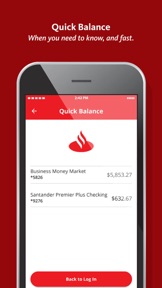
• Check real-time balances without logging in by setting up "Quick Balance" feature.
• Make transfers between your business and personal accounts. Restrictions apply. Please see the Business Online Banking Agreement for details.
• View recent activity on your business accounts.
Stay Secure
• Touch ID® or Face ID® - Log in with just your fingerprint or facial recognition. If you share your device with other individuals, please note that any fingerprints stored on your device may be used to log in to Santander Business Mobile Banking and access your account.
Deposit Checks
• Simplified check deposit flow, camera enhancements, and step-by-step instructions. Mobile deposits are subject to limits and other restrictions. Please see the Business Online Banking Agreement for details.
Pay Bills
• Schedule and authorize payments.
• Pay eBills.
Contact Us
• Contact Santander Customer Service with one-touch calling.
• Get directions to the nearest Santander branch or ATM.
To use the Business Banking App, you must first enroll and log in to Business Online Banking and accept the Business Online Banking Agreement. Message and data rates may apply.
Get started if you have a Business account with Santander Bank; download the App today and bank on the go.
iPhone, iPad, Touch ID, and Face ID are registered trademarks of Apple Inc. Santander Bank N.A., Member FDIC
©2020 Santander Bank, N.A. All rights reserved.
What's New in Version 2.3
This release comes with a new simplified login and security enhancements that continue to safeguard your accounts.
We value your feedback and would like comments on how we can continue improving your Business Mobile Banking experience.
Information
Developer
Categories
Version
2.3
Size
194.7 MB
Game Center
No
VPP Device Licensing
Yes
Rating
Rated: 4+
Compatibility
iOS 10.0 or later
Devices
iPhone 5, iPhone 5c, iPhone 5s, iPhone 6, iPhone 6 Plus, iPhone 6s, iPhone 6s Plus, iPhone SE, iPhone 7, iPhone 7 Plus, iPhone 8, iPhone 8 Plus, iPhone X, iPhone XR, iPhone XS, iPhone XS Max, iPhone 11, iPhone 11 Pro, iPhone 11 Pro Max, iPad (4th Generation) (Wi-Fi), iPad (4th Generation) (4G), iPad (5th Generation) Wi-Fi, iPad (5th Generation) Wi-Fi + Cellular, iPad (6th generation) Wi-Fi, iPad (6th generation) Wi-Fi + Cellular, iPad Pro, iPad Pro (Cellular), iPad Pro (9.7-inch), iPad Pro (9.7-inch) (Cellular), iPad Pro 12.9-inch (2nd generation), iPad Pro 12.9-inch (2nd generation) Wi-Fi + Cellular, iPad Pro (10.5-inch), iPad Pro (10.5-inch) Wi-Fi + Cellular, iPad Pro (11-inch), iPad Pro (11-inch) Wi-Fi + Cellular, iPad Pro 12.9-inch (3rd generation), iPad Pro 12.9-inch (3rd generation) Wi-Fi + Cellular, iPad Air, iPad Air (Cellular), iPad Air 2, iPad Air 2 (Cellular), iPad Air (3rd generation), iPad Air (3rd generation) Wi-Fi + Cellular, iPad mini Retina, iPad mini Retina (Cellular), iPad mini 3, iPad mini 3 (Cellular), iPad mini 4, iPad mini 4 (Cellular), iPad mini (5th Generation), iPad mini (5th Generation) Wi-Fi + Cellular, iPad (7th generation) Wi-Fi + Cellular, iPod touch (6th Generation), iPod touch (7th generation)
Languages
English, French, Spanish
App Store: Customer Ratings
Ratings & Reviews
0.0 of 5 (No rating)
App Store: Customer Reviews
No Entry