Updating


iPhone Screenshots



iPad Screenshots



Description
Lion Vault lock up your private photos and videos.
Don’t risk your private pictures, secret videos or photo albums falling into the wrong hands or being deleted! Download Lion Vault and keep your personal files safe and secure.
Lion Vault keeps your personal photos and videos private by locking them behind passcode, giving you control over who sees what. Your friends, family, and coworkers will be able to look at your public photo gallery.
Lion Vault is the best place to hide your personal photos and videos for the following reasons:
1. Security
• Create a decoy passcode that open a decoy Lion Vault when someone pressures you to open your Lion Vault
• Break-in report: Stops the snoopers at the door, and snaps a shot of them every time they try to get in
• Flip to lock: Lion Vault will automatically exit to the login page when you flip your iPhone
• Shake to lock: Shake your iPhone to instantly switch on the lock
• Built-in private web browser, browse the internet privately without leaving any traces
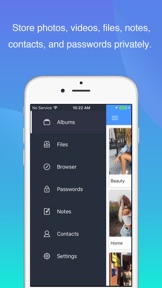
• Store photos, videos, files, notes, contacts and passwords privately in one place
2. Convenience:
• Transfer photos, videos&files between PC and iPhone throw WiFi
• Custom Albums: Lion Vault lets you increase your privacy by setting passwords for individual albums. You can also choose your own album cover images.
• Create and name custom albums
• Full-screen viewing for photos and videos
• Rotate and zoom features
• Slideshow feature
• Take photos directly in Lion Vault with the integrated camera
• Unhide pictures and videos from Lion Vault as you like
• Your recent apps list will only show a splash screen
• Clean and simple interface
Take control of your privacy!
How to use
========================
1. Open Lion Vault and select the pictures you want to hide
2. Delete the imported pictures from your Photo app
3. Make sure the imported pictures are also deleted from your PhotoStream
Help & Support
========================
Problems? Wait! Contact us at guizhanbu@126.com before leaving a bad review.
FAQ
========================
Q: What happens when I import photos into Lion Vault?
A: Photos will be copied to Lion Vault and locked. You can then safely delete them from your photo gallery and Photo Stream.
Q: Can Lion Vault lock videos?
A: Yes, if you place videos into Lion Vault, they are locked behind passcode.
Q: How can I retrieve my passcode?
A: You won't be able to recover your passcode if you forgot it.
Q: Can I take pictures out of this secret vault?
A: Yes, you can unhide pictures with only a couple of taps.
What's New in Version 2.7
1. Modify Login page
Note: After updating, you need to reset the password
Information
Developer
Categories
Version
2.7
Size
31.4 MB
Game Center
No
VPP Device Licensing
Yes
Rating
Rated: 4+
Compatibility
iOS 8.0 or later
Devices
iPhone 4S, iPhone 5, iPhone 5c, iPhone 5s, iPhone 6, iPhone 6 Plus, iPhone 6s, iPhone 6s Plus, iPhone SE, iPhone 7, iPhone 7 Plus, iPhone 8, iPhone 8 Plus, iPhone X, iPhone XR, iPhone XS, iPhone XS Max, iPhone 11, iPhone 11 Pro, iPhone 11 Pro Max, iPhone SE (2nd generation), iPhone 12, iPhone 12 Pro, iPhone 12 Pro Max, iPhone 12 mini, iPad 2 (Wi-Fi), iPad 2 (3G), iPad (3rd Generation) (Wi-Fi), iPad (3rd Generation) (4G), iPad (4th Generation) (Wi-Fi), iPad (4th Generation) (4G), iPad (5th Generation) Wi-Fi, iPad (5th Generation) Wi-Fi + Cellular, iPad (6th generation) Wi-Fi, iPad (6th generation) Wi-Fi + Cellular, iPad Pro, iPad Pro (Cellular), iPad Pro (9.7-inch), iPad Pro (9.7-inch) (Cellular), iPad Pro 12.9-inch (2nd generation), iPad Pro 12.9-inch (2nd generation) Wi-Fi + Cellular, iPad Pro (10.5-inch), iPad Pro (10.5-inch) Wi-Fi + Cellular, iPad Pro (11-inch), iPad Pro (11-inch) Wi-Fi + Cellular, iPad Pro 12.9-inch (3rd generation), iPad Pro 12.9-inch (3rd generation) Wi-Fi + Cellular, iPad Air, iPad Air (Cellular), iPad Air 2, iPad Air 2 (Cellular), iPad Air (3rd generation), iPad Air (3rd generation) Wi-Fi + Cellular, iPad mini (Wi-Fi), iPad mini (4G), iPad mini Retina, iPad mini Retina (Cellular), iPad mini 3, iPad mini 3 (Cellular), iPad mini 4, iPad mini 4 (Cellular), iPad mini (5th Generation), iPad mini (5th Generation) Wi-Fi + Cellular, iPad (7th generation) Wi-Fi, iPad Pro 11-inch (2nd generation), iPad Pro 11-inch (2nd generation) Wi-Fi + Cellular, iPad Pro 12.9-inch (4th generation), iPad Pro 12.9-inch (4th generation) Wi-Fi + Cellular, iPad Air (4th Generation) (Wi-Fi), iPad Air (4th Generation) (Wi-Fi + Cellular), iPad (8th generation) Wi-Fi, iPad (8th generation) Wi-Fi + Cellular, iPod touch (5th generation), iPod touch (6th Generation), iPod touch (7th generation)
Languages
English, Chinese, French, German, Japanese
App Store: Customer Ratings
Ratings & Reviews
4.0 of 5 (14 Ratings)
App Store: Customer Reviews
No Entry