Updating



iPhone Screenshots


iPad Screenshots


Description
MyToday is a diary you can easily write everything on.
the app is for those who love writing diary.
Start with MyToday.
How to use MYTODAY:
• You can create today's diary by selecting the top area of the main screen.
• Select the camera icon to take a picture and attach it immediately.
• When you select the picture icon, you can attach up to 10 pictures from the camera roll.
• The location icon can add your current location or specific location information.
• If you touch the expansion icon, you can write and edit pictures on a wide screen.
• You can edit or delete the created list in the main screen by swiping left.
• You can use the full editing function by swiping the created list on the main screen to the right.
• On a 3D Touch-enabled device, you can edit or delete the list directly by tapping the list.
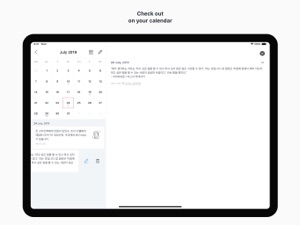
• You can check the diary by date by selecting the calendar icon in the upper right corner.
• You can find the diary by using the search icon in the upper left corner.
• Swipe up the calendar on the calendar screen to view the list on a wider screen.
• You can move the month with the left and right swipe gestures on the calendar screen, and you can see the previous year or the following year through the year view icon at the top.
• Drop box backup and recovery is possible in the settings.
• You can back up data by e-mail in Settings.
• Notifications are available daily in Settings.
• You can check the written text only by yourself. You can make your passwords safer by setting passwords.
• For more information on backing up and restoring your data, please check the developer website.
Thank you for using My Today. :)
What's New in Version 2.0.6
• A minor error has been fixed.
Seller
Name
Yun Sun Kwon
Information
Developer
Categories
Version
2.0.6
Size
60.4 MB
Game Center
No
VPP Device Licensing
Yes
Rating
Rated: 4+
Compatibility
iOS 13.0 or later
Devices
iPhone 5s, iPhone 6, iPhone 6 Plus, iPhone 6s, iPhone 6s Plus, iPhone SE, iPhone 7, iPhone 7 Plus, iPhone 8, iPhone 8 Plus, iPhone X, iPhone XR, iPhone XS, iPhone XS Max, iPhone 11, iPhone 11 Pro, iPhone 11 Pro Max, iPhone SE (2nd generation), iPhone 12, iPhone 12 Pro, iPhone 12 Pro Max, iPhone 12 mini, iPhone 13, iPhone 13 Pro, iPhone 13 Pro Max, iPhone 13 mini, iPad (5th Generation) Wi-Fi, iPad (5th Generation) Wi-Fi + Cellular, iPad (6th generation) Wi-Fi, iPad (6th generation) Wi-Fi + Cellular, iPad Pro, iPad Pro (Cellular), iPad Pro (9.7-inch), iPad Pro (9.7-inch) (Cellular), iPad Pro 12.9-inch (2nd generation), iPad Pro 12.9-inch (2nd generation) Wi-Fi + Cellular, iPad Pro (10.5-inch), iPad Pro (10.5-inch) Wi-Fi + Cellular, iPad Pro (11-inch), iPad Pro (11-inch) Wi-Fi + Cellular, iPad Pro 12.9-inch (3rd generation), iPad Pro 12.9-inch (3rd generation) Wi-Fi + Cellular, iPad Air, iPad Air (Cellular), iPad Air 2, iPad Air 2 (Cellular), iPad Air (3rd generation), iPad Air (3rd generation) Wi-Fi + Cellular, iPad mini Retina, iPad mini Retina (Cellular), iPad mini 3, iPad mini 3 (Cellular), iPad mini 4, iPad mini 4 (Cellular), iPad mini (5th Generation), iPad mini (5th Generation) Wi-Fi + Cellular, iPad (7th generation) Wi-Fi + Cellular, iPad Pro 11-inch (2nd generation), iPad Pro 11-inch (2nd generation) Wi-Fi + Cellular, iPad Pro 12.9-inch (4th generation), iPad Pro 12.9-inch (4th generation) Wi-Fi + Cellular, iPad Air (4th Generation) (Wi-Fi), iPad Air (4th Generation) (Wi-Fi + Cellular), iPad (8th generation) Wi-Fi, iPad (8th generation) Wi-Fi + Cellular, iPad Pro 11-inch (3rd generation), iPad Pro 11-inch (3rd generation) Wi-Fi + Cellular, iPad Pro 12.9-inch (5th Generation), iPad Pro 12.9-inch (5th Generation) Wi-Fi + Cellular, iPad (9th Generation), iPad (9th Generation) Wi-Fi + Cellular, iPad mini (6th Generation), iPad mini (6th Generation) Wi-Fi + Cellular, iPod touch (6th Generation), iPod touch (7th generation)
Languages
English, Korean
App Store: Customer Ratings
Ratings & Reviews
0.0 of 5 (No rating)
App Store: Customer Reviews
No Entry