AboutTermsPrivacyContact
 
Updating
Calibre Companion

Calibre Companion

Released: 2016-11-07
© Samuel Cohen
Calibre Companion - QR Code
Version 2.0.15
4+
Download on the App Store
Version 2.0.15
4+
Download on the App Store
Released: 2016-11-07
© Samuel Cohen

iPhone Screenshots

Screenshot
Screenshot
Screenshot
Screenshot
Screenshot

iPad Screenshots

Screenshot
Screenshot
Screenshot
Screenshot
Screenshot

Description

Calibre Companion (CC), recommended by calibre developers, is three applications in one:
- a superb device-based calibre library organiser
- a high-performance WiFi-based calibre device emulator
- a calibre content server and cloud provider client (Dropbox and Microsoft OneDrive)
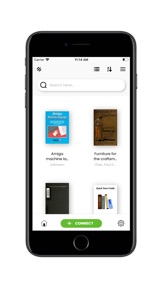
1) CC is a device-based calibre library organiser. Once you put books on your device using one of the connection methods described below you can:
- view a book's metadata (author, tags, series, rating, dates, etc.).
- sort and group books by their metadata.
- see book lists by cover or by list.
- mark books read and sync this information with calibre.
- launch your book reader application to read a book
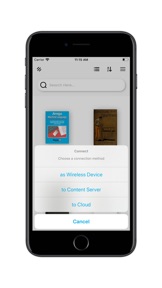
2) CC can connect to calibre over WiFi and be detected by calibre as a device. Once connected, you use calibre to move books to and from your device. Calibre automatically updates all the book metadata stored by CC to match the latest in your library.
3) CC can connect to calibre’s content server or to your cloud provider to browse your library and download books to your device. Supports Dropbox and Microsoft OneDrive.
For more information see our FAQ (http://cc_faq.multipie.co.uk/)
Privacy Policy: http://faq.calibrecompanion.co/index.php?solution_id=1077
Terms of Service: https://calibrecompanion.co/terms-of-service/
Notes: CC is not a reader app. You must install and use one of the many excellent reader apps available. You must also already use calibre to manage your library of ebooks.

What's New in Version 2.0.15

-Fixed content server book issue
-Fixed custom port issue

Seller

Name

Gold Tree Consulting LLC

Information

Categories

Version

2.0.15

Size

117.6 MB

Game Center

No

VPP Device Licensing

Yes

Rating

Rated: 4+

Compatibility

iOS 11.0 or later

Devices

iPhone 5s, iPhone 6, iPhone 6 Plus, iPhone 6s, iPhone 6s Plus, iPhone SE, iPhone 7, iPhone 7 Plus, iPhone 8, iPhone 8 Plus, iPhone X, iPhone XR, iPhone XS, iPhone XS Max, iPhone 11, iPhone 11 Pro, iPhone 11 Pro Max, iPhone SE (2nd generation), iPhone 12, iPhone 12 Pro, iPhone 12 Pro Max, iPhone 12 mini, iPhone 13, iPhone 13 Pro, iPhone 13 Pro Max, iPhone 13 mini, iPhone SE (3rd generation), iPhone 14, iPhone 14 Plus, iPhone 14 Pro, iPhone 14 Pro Max, iPhone 15, iPhone 15 Plus, iPhone 15 Pro, iPhone 15 Pro Max, iPhone 16, iPhone 16Plus, iPhone 16Pro, iPhone 16ProMax, iPad (5th Generation) Wi-Fi, iPad (5th Generation) Wi-Fi + Cellular, iPad (6th generation) Wi-Fi, iPad (6th generation) Wi-Fi + Cellular, iPad Pro, iPad Pro (Cellular), iPad Pro (9.7-inch), iPad Pro (9.7-inch) (Cellular), iPad Pro 12.9-inch (2nd generation), iPad Pro 12.9-inch (2nd generation) Wi-Fi + Cellular, iPad Pro (10.5-inch), iPad Pro (10.5-inch) Wi-Fi + Cellular, iPad Pro (11-inch), iPad Pro (11-inch) Wi-Fi + Cellular, iPad Pro 12.9-inch (3rd generation), iPad Pro 12.9-inch (3rd generation) Wi-Fi + Cellular, iPad Air, iPad Air (Cellular), iPad Air 2, iPad Air 2 (Cellular), iPad Air (3rd generation), iPad Air (3rd generation) Wi-Fi + Cellular, iPad mini Retina, iPad mini Retina (Cellular), iPad mini 3, iPad mini 3 (Cellular), iPad mini 4, iPad mini 4 (Cellular), iPad mini (5th Generation), iPad mini (5th Generation) Wi-Fi + Cellular, iPad (7th generation) Wi-Fi + Cellular, iPad Pro 11-inch (2nd generation), iPad Pro 11-inch (2nd generation) Wi-Fi + Cellular, iPad Pro 12.9-inch (4th generation), iPad Pro 12.9-inch (4th generation) Wi-Fi + Cellular, iPad Air (4th Generation) (Wi-Fi), iPad Air (4th Generation) (Wi-Fi + Cellular), iPad (8th generation) Wi-Fi, iPad (8th generation) Wi-Fi + Cellular, iPad Pro 11-inch (3rd generation), iPad Pro 11-inch (3rd generation) Wi-Fi + Cellular, iPad Pro 12.9-inch (5th Generation), iPad Pro 12.9-inch (5th Generation) Wi-Fi + Cellular, iPad (9th Generation), iPad (9th Generation) Wi-Fi + Cellular, iPad mini (6th Generation), iPad mini (6th Generation) Wi-Fi + Cellular, iPad Air (5th generation), iPad Air (5th generation) Wi-Fi + Cellular, iPad Pro 11-inch (4th generation), iPad Pro 11-inch (4th generation) Wi-Fi + Cellular, iPad Pro 12.9-inch (6th generation), iPad Pro 12.9-inch (6th generation) Wi-Fi + Cellular, iPad (10th generation), iPad (10th generation) Wi-Fi + Cellular, iPad Air 11-inch (M2) Wi-Fi, iPad Air 13-inch (M2) Wi-Fi, iPad Air 13-inch (M2) Wi-Fi + Cellular, iPad Pro 11-inch (M4) Wi-Fi, iPad Pro 11-inch (M4) Wi-Fi + Cellular, iPad Pro 13-inch (M4) Wi-Fi, iPad Pro 13-inch (M4) Wi-Fi + Cellular, iPad MiniA17Pro, iPad MiniA17ProCellular, iPod touch (6th Generation), iPod touch (7th generation)

Languages

English

App Store: Customer Ratings

Ratings & Reviews

3.4 of 5 (39 Ratings)

App Store: Customer Reviews

2023-01-13

The #1 serious book management app

This is not for casual users it’s a comprehensive book/document management app for those with larger libraries who want to organise their content & synchronise it with their PC.
I use it for manuals & technical documents (often in PDF format).
In my experience, the developer is very responsive & open to suggestions. I have tried numerous others & this was by far the best, for me anyway.
It does require some investment of time to get the most out of it, which may be the reason for lower scores by some, although I would probably agree it’s not always the most intuitive, this is probably, partly due to the breadth of functionality.
MSI-tekkie
2021-01-10

Failed at first hurdle

Not user friendly and overdone with adverts. I wanted to connect to a NAS library. Gave up quite quickly in frustration . I guess this does something for someone, but I could not work out what.
kliomnpghtsde
Version 2.0.0
2020-07-01

Calibre Companion

Fantastic app. I have Apple devices and trying to get books on my devices is a always a nightmare, but not anymore. Loving it.
Yelrisha
Version v1.1.1
2020-05-18

Good overall app. Don’t like the fact that I paid for it and now have to pay subs

It’s a good app but it’s poor that I paid for it only a few months back and yet I still have to subscribe. Regardless of if the app was sold to someone else there should be a good will gesture at least not to have to endure ads when you paid for it so recently.
Pauljd70
Version 2.0.15
2020-03-26

Go Premium annoying

Very good app.
Not sure about the new interface - lots of space taken by things you don’t care about then the comment that you might want to read you scroll to at the very bottom.
But no, I don’t want to be navigating around the premium subscription questions every time it starts up.
deacon king
Version v1.3.0
2020-03-23

Awful design principles

Too much white in centre of attention space; eyes naturally look to the middle. This new update has pushed book icons to the side. Moreover there’s now a subscription model. Why?
squashbugs
Version 2.0.2
2020-03-13

Older Version

Kind of hacked, preferred the older version interface, but with the joys of updates I now have this and no way to get back. Might have been nicer to bring this out as a new version so people could choose if the wanted this white space interface and if they wanted to pay a subscription.
But then I guess you knew that when you submitted it as an update that most people would be automatically upgraded to your subscription version.
I pay various subscriptions for software, but a library manager for a handful of books is probably a push despite its ease of use with Calibre.
Hey ho, back to copying to Marvin
skgettingold
Version 2.0.1
2020-01-05

Awful now with no app support

The original designers transferred the app on and now it’s awful. It wipes library, or doesn’t update at all. It can’t sort anymore and there is no support at all. And to make matters worse the new developer wants to charge a subscription for it! Absolute rubbish.
Josieb1
Version 1.0.0
2019-10-04

Password issue

Great app , but upgrade to v2 means i cannot use password protected connection to the Content Server. This is because the password ‘ok’ button is disabled.
Also it is not clear how the new subscription service will work.
Please fix the password issue asap.
This impacts the rating of the app!
AndyKeph
Version v1.3.2
2019-09-27

Brilliant

This little app allows books to be transferred to an IPad via the Calibre server function, itself a nifty program. Excellent, have moved 100+ books so far, which can now be read in Books.
asectb
Version 2.0.6
2019-09-19

From hero to zero

Why has this update wiped my database?
tryis
Version 2.0.4
2019-09-18

Lost library

This update has lost the books that I had in calibre on my iPad!
daisydandelion
Version 1.0.1
2019-05-05

Waste of Money

Daft that I can’t connect to my library on iCloud? Only options are Dropbox (more expense) and OneDrive.
The alternative is to connect to PC but this won’t always be on.
How it works isn’t explained in the blurb before purchase.
DavaAs
2018-10-25

All you have to do is read the instructions

First time I tried this I failed. Second time I realised I didn’t read the instructions. It’s actually easy to use and a fab way to have a truly organised and interactive library. Love it.
MOZambia64
2018-10-14

Useless

How do I get a refund?
Shell Engineer
2018-08-12

Essential for Calibre & IOS users

This app easily allows me to grab any of the technical ebooks in my Dropbox hosted library to read on my ipad. Highly recommended.
G.D.J.Bentley
2018-08-10

Works well

Once set up it works very well. There is a learning curve. It works well with Mac Calibre.
drc108
2017-08-30

Fiddly to set up

Initial experience of setting this up was not good. It's not that intuitive and to get help you need to sign up to an external forum but it seems that once you have things in place it could be OK.
I will update my review as I use the app more. I hope my experience improves.
Jimmski
2017-04-11

Invaluable for Calibre users

Works so well with my Calibre library which I keep on Dropbox, and with Marvin which is my preferred e-reader on iPad.
strikealight
2016-11-13

Brilliant

Why haven't I discovered this app before? Just what I wanted. I have a large calibre library stored on Dropbox and this app connects lightening fast to it with fast search by all categories and tags with easy downloading to my ipad. Simple, fast and it works. Many thanks for developing.
Yarrow28
2016-11-09

The best way to manage your ebook library!

Calibre is the most advanced and feature packed way to manage your ebook collection and this app now enables me to transfer my huge library to my iPhone with ease.
The app works well over my wireless network and allows me to easily sync updated metadata between my iOS devices.
If you use Calibre then this app is a must buy.
Jamie Lord