Updating


iPhone Screenshots

iPad Screenshots



Description
PitchCenter is an innovative tuner that combines helpful visual feedback with a huge collection of adjustable settings to help you with your intonation. Use it as a simple tuner to check your intonation quickly, or dive into its extensive set of graphs and visualizations to work on your intonation in the practice room.
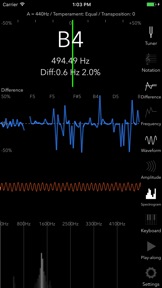
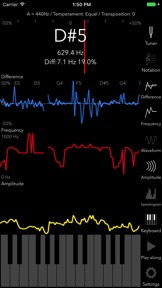
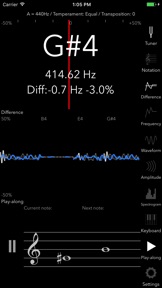
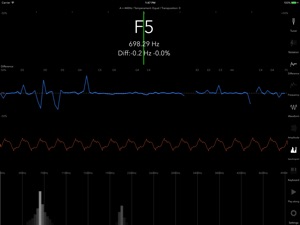
PitchCenter is made up of 9 different "panels." Each panel displays tuning information in a different way and can be displayed or hidden using the buttons in the sidebar. These panels include:
- Tuner view: Standard tuner view including a needle, plus text with the note being played, the frequency of that note in Hz, and the difference between that frequency and what an "in-tune" note should be.
- Notation View: The notation view displays the current note on a staff.
- Difference Graph: displays pitch (measured in the difference in cents from "in-tune") over time.
- Frequency Graph: shows the frequency of the pitch over time.
- Waveform View: shows a real-time picture of the current sound wave.
- Amplitude Graph: displays the amplitude (or volume) over time.
- Spectrogram: displays a visual representation of the prevalence of certain frequencies in the sound wave.
- Keyboard: allows you to play pitches using a built-in synthesizer.
- Play-along: PitchCenter features a play-along feature that can generate sequences of notes that will be played by the built-in synthesizer. You can then play along with the synthesizer, trying to stay in-tune with the notes being played by the app.
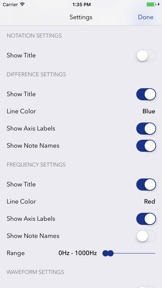
PitchCenter and its panels are highly customizable, including settings for:
- Equal and just intonation
- Frequency calibration (default is A=440)
- Clef preference (treble, bass, alto, tenor)
- Transposition (any arbitrary transposition -- not just the common C, Eb, Bb, and F)
- Color and speed preferences for all the graphs
- Note ranges for the tuner, graphs, and play-along
- and more!
PitchCenter comes with a full manual (accessible from the Settings screen) to help you use all of its features.
Questions or comments about the app? Send an email to info@pitchcenterapp.com
If you love the app, leave a review!
What's New in Version 2023.4.0
2023.3:
Make "Disable auto-lock" an in-app setting
2023.3:
Fixed a bug where temperament settings would not appear
2023.x:
PitchCenter has been rebuilt from the ground up to provide a new easy-to-use, highly-customizable tuning experience.
In particular, look for tons of new options on the settings page.
If you experience any issues, please get in touch at info@pitchcenterapp.com
Seller
Name
John Nastos
Information
Developer
Categories
Version
2023.4.0
Size
4.7 MB
Game Center
No
VPP Device Licensing
Yes
Rating
Rated: 4+
Compatibility
iOS 15.0 or later
Devices
iPhone 5s, iPhone 6, iPhone 6 Plus, iPhone 6s, iPhone 6s Plus, iPhone SE, iPhone 7, iPhone 7 Plus, iPhone 8, iPhone 8 Plus, iPhone X, iPhone XR, iPhone XS, iPhone XS Max, iPhone 11, iPhone 11 Pro, iPhone 11 Pro Max, iPhone SE (2nd generation), iPhone 12, iPhone 12 Pro, iPhone 12 Pro Max, iPhone 12 mini, iPhone 13, iPhone 13 Pro, iPhone 13 Pro Max, iPhone 13 mini, iPhone SE (3rd generation), iPhone 14, iPhone 14 Plus, iPhone 14 Pro, iPhone 14 Pro Max, iPhone 15, iPhone 15 Plus, iPhone 15 Pro, iPhone 15 Pro Max, iPhone 16, iPhone 16 Plus, iPhone 16 Pro, iPhone 16 Pro Max, iPhone 16e, iPhone 17, iPhone 17Pro, iPhone 17ProMax, iPhone Air, iPad (5th Generation) Wi-Fi, iPad (5th Generation) Wi-Fi + Cellular, iPad (6th generation) Wi-Fi, iPad (6th generation) Wi-Fi + Cellular, iPad Pro, iPad Pro (Cellular), iPad Pro (9.7-inch), iPad Pro (9.7-inch) (Cellular), iPad Pro 12.9-inch (2nd generation), iPad Pro 12.9-inch (2nd generation) Wi-Fi + Cellular, iPad Pro (10.5-inch), iPad Pro (10.5-inch) Wi-Fi + Cellular, iPad Pro (11-inch), iPad Pro (11-inch) Wi-Fi + Cellular, iPad Pro 12.9-inch (3rd generation), iPad Pro 12.9-inch (3rd generation) Wi-Fi + Cellular, iPad Air, iPad Air (Cellular), iPad Air 2, iPad Air 2 (Cellular), iPad Air (3rd generation), iPad Air (3rd generation) Wi-Fi + Cellular, iPad mini Retina, iPad mini Retina (Cellular), iPad mini 3, iPad mini 3 (Cellular), iPad mini 4, iPad mini 4 (Cellular), iPad mini (5th Generation), iPad mini (5th Generation) Wi-Fi + Cellular, iPad (7th generation) Wi-Fi + Cellular, iPad Pro 11-inch (2nd generation), iPad Pro 11-inch (2nd generation) Wi-Fi + Cellular, iPad Pro 12.9-inch (4th generation), iPad Pro 12.9-inch (4th generation) Wi-Fi + Cellular, iPad Air (4th Generation) (Wi-Fi), iPad Air (4th Generation) (Wi-Fi + Cellular), iPad (8th generation) Wi-Fi, iPad (8th generation) Wi-Fi + Cellular, iPad Pro 11-inch (3rd generation), iPad Pro 11-inch (3rd generation) Wi-Fi + Cellular, iPad Pro 12.9-inch (5th Generation), iPad Pro 12.9-inch (5th Generation) Wi-Fi + Cellular, iPad (9th Generation), iPad (9th Generation) Wi-Fi + Cellular, iPad mini (6th Generation), iPad mini (6th Generation) Wi-Fi + Cellular, iPad Air (5th generation), iPad Air (5th generation) Wi-Fi + Cellular, iPad Pro 11-inch (4th generation), iPad Pro 11-inch (4th generation) Wi-Fi + Cellular, iPad Pro 12.9-inch (6th generation), iPad Pro 12.9-inch (6th generation) Wi-Fi + Cellular, iPad (10th generation), iPad (10th generation) Wi-Fi + Cellular, iPad Air 11-inch (M2) Wi-Fi, iPad Air 13-inch (M2) Wi-Fi, iPad Air 13-inch (M2) Wi-Fi + Cellular, iPad Pro 11-inch (M4) Wi-Fi, iPad Pro 11-inch (M4) Wi-Fi + Cellular, iPad Pro 13-inch (M4) Wi-Fi, iPad Pro 13-inch (M4) Wi-Fi + Cellular, iPad mini (A17 Pro) Wi-Fi, iPad mini (A17 Pro) Wi-Fi + Cellular, iPad (A16) Wi-Fi, iPad (A16) Wi-Fi + Cellular, iPad Air 11-inch (M3) Wi-Fi, iPad Air 11-inch (M3) Wi-Fi + Cellular, iPad Air 13-inch (M3) Wi-Fi, iPad Air 13-inch (M3) Wi-Fi + Cellular, iPad Pro11M5, iPad Pro11M5Cellular, iPad Pro13M5, iPad Pro13M5Cellular, iPod touch (6th Generation), iPod touch (7th generation)
Languages
English
App Store: Customer Ratings
Ratings & Reviews
0.0 of 5 (No rating)
App Store: Customer Reviews
No Entry