AboutTermsPrivacyContact
 
Updating
Voicepaper Text to Speech TTS

Voicepaper Text to Speech TTS

Released: 2017-09-14
© NON UMEMOTO
Voicepaper Text to Speech TTS - QR Code
Version 3.8.5
4+
Download on the App Store
Version 3.8.5
4+
Download on the App Store
Released: 2017-09-14
© NON UMEMOTO

iPhone Screenshots

Screenshot
Screenshot
Screenshot
Screenshot
Screenshot
Screenshot
Screenshot
Screenshot
Screenshot
Screenshot

Description

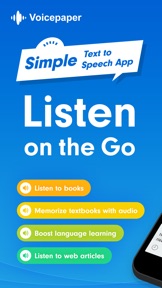
Free text-to-speech app with no ads. Scan text from books or web pages and listen instantly with 100+ voices in 25+ languages.
Perfect for:
• Learners who want to study efficiently
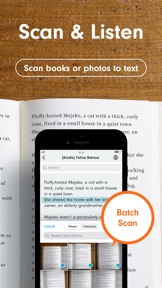
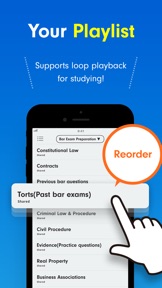
Scan textbooks using your camera or screenshots and convert them to text. Use repeat playback for memorization, or create playlists to listen in order.
• Readers who want to read more
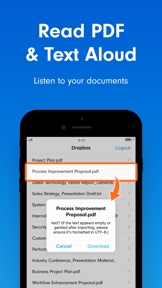
Listen to books and novels during your spare moments. Import PDFs or web articles and absorb information by ear.
• Language learners
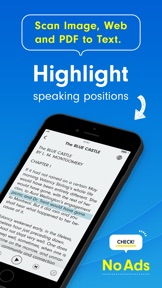
Text is highlighted during playback, so you can read with both your eyes and ears. Even when multiple languages appear in one text, the app automatically switches voices.
Main Features
・OCR from camera, images, and screenshots
・Highlight and auto-scroll during playback
・One-tap speed adjustment
・Double-tap to play from any position
・Background playback & remote control
Import Text From
・Create or paste text manually
・OCR from camera, images, or screenshots
・Scan web pages via the browser share menu
・Import from Notes apps via sharing
・Dropbox
・Evernote
・iCloud Drive
・Instapaper
Supported File Types
text, pdf, image, epub, markdown, word (.docx)
File App Integration
Access via the system “Files” button when these apps are installed:
Google Drive, OneDrive, Box, pCloud, Obsidian, Nextcloud, and many others.
Playlist Features
・Playlist repeat
・Shuffle playback
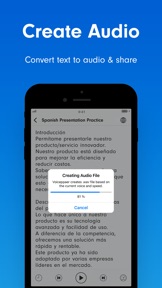
・Export playlist as audio files
・Duplicate playlists
・Move texts between playlists
Useful Tools
・Edit titles and text
・In-text search
・Loop playback
・Sleep timer
・Adjustable font size
・Bookmarks within text
・Auto-paste copied text
・Auto voice switching based on language detection
・Auto language switching for multilingual text
・Bulk translation of text
・Share text or web links
・Backup and restore data
・Dark Mode support
・Personal Voice support (English / Chinese)
Customizable Settings
・Remember playback position on/off
・Pause for a few seconds at chosen symbols
・Play while background music is on
・Set different voices and speeds per language
・Customize pronunciations
・Randomize voice selection
・Replace specific characters upon import
・Auto-sync Instapaper or Evernote at launch
Intuitive Controls
・Long-press title to reorder
・Swipe left on title to delete
・Swipe right on title to move to top or another playlist
・Swipe left on playlist to delete, rename, or copy
・Undo accidental deletions
Premium Version
・Unlimited listening
・Playback speeds above 1.6×
・Audio-file export
Privacy & Terms
https://intercom.help/voicepaper-ce4adc785260/articles/12806434-terms-privacy

What's New in Version 3.8.5

Hello, I've fixed the daily rhythm.
This update mainly focuses on overall search and playback improvements.
New
- Cross-playlist search is now available
- Improved the add position in lists and the confirmation alert
- Show the recovery time for free playback
Fix
- Mismatch between playback state and auto-play decision when going back/forward
- Auto-play immediately after a search jump
- Restored “Stop at end of current text”
- Next-page detection and false positives on shared web pages
- Unstable overwrite on first save and scroll position memory
- Delay in reflecting pause words / pronunciation registrations
- Language switch not applied when creating audio files
At last, you can search across all playlists. You can now search across all playlists. I also focused on making the results easy to read. Use the button at the top right of the playlist.
Also, the change to the add position for new items is now easier to understand.
In addition, I now show the time when free playback fully recovers.
Other improvements include restoring the stop-at-end timer, and preventing playback from starting when you tap the back button while stopped, plus many small fixes.

Seller

Information

Developer

Categories

Version

3.8.5

Size

106.1 MB

Game Center

No

VPP Device Licensing

Yes

Rating

Rated: 4+

Compatibility

iOS 15.6 or later

Devices

iPhone 5s, iPhone 6, iPhone 6 Plus, iPhone 6s, iPhone 6s Plus, iPhone SE, iPhone 7, iPhone 7 Plus, iPhone 8, iPhone 8 Plus, iPhone X, iPhone XR, iPhone XS, iPhone XS Max, iPhone 11, iPhone 11 Pro, iPhone 11 Pro Max, iPhone SE (2nd generation), iPhone 12, iPhone 12 Pro, iPhone 12 Pro Max, iPhone 12 mini, iPhone 13, iPhone 13 Pro, iPhone 13 Pro Max, iPhone 13 mini, iPhone SE (3rd generation), iPhone 14, iPhone 14 Plus, iPhone 14 Pro, iPhone 14 Pro Max, iPhone 15, iPhone 15 Plus, iPhone 15 Pro, iPhone 15 Pro Max, iPhone 16, iPhone 16 Plus, iPhone 16 Pro, iPhone 16 Pro Max, iPhone 16e, iPhone 17, iPhone 17Pro, iPhone 17ProMax, iPhone Air, iPad (5th Generation) Wi-Fi, iPad (5th Generation) Wi-Fi + Cellular, iPad (6th generation) Wi-Fi, iPad (6th generation) Wi-Fi + Cellular, iPad Pro, iPad Pro (Cellular), iPad Pro (9.7-inch), iPad Pro (9.7-inch) (Cellular), iPad Pro 12.9-inch (2nd generation), iPad Pro 12.9-inch (2nd generation) Wi-Fi + Cellular, iPad Pro (10.5-inch), iPad Pro (10.5-inch) Wi-Fi + Cellular, iPad Pro (11-inch), iPad Pro (11-inch) Wi-Fi + Cellular, iPad Pro 12.9-inch (3rd generation), iPad Pro 12.9-inch (3rd generation) Wi-Fi + Cellular, iPad Air, iPad Air (Cellular), iPad Air 2, iPad Air 2 (Cellular), iPad Air (3rd generation), iPad Air (3rd generation) Wi-Fi + Cellular, iPad mini Retina, iPad mini Retina (Cellular), iPad mini 3, iPad mini 3 (Cellular), iPad mini 4, iPad mini 4 (Cellular), iPad mini (5th Generation), iPad mini (5th Generation) Wi-Fi + Cellular, iPad (7th generation) Wi-Fi + Cellular, iPad Pro 11-inch (2nd generation), iPad Pro 11-inch (2nd generation) Wi-Fi + Cellular, iPad Pro 12.9-inch (4th generation), iPad Pro 12.9-inch (4th generation) Wi-Fi + Cellular, iPad Air (4th Generation) (Wi-Fi), iPad Air (4th Generation) (Wi-Fi + Cellular), iPad (8th generation) Wi-Fi, iPad (8th generation) Wi-Fi + Cellular, iPad Pro 11-inch (3rd generation), iPad Pro 11-inch (3rd generation) Wi-Fi + Cellular, iPad Pro 12.9-inch (5th Generation), iPad Pro 12.9-inch (5th Generation) Wi-Fi + Cellular, iPad (9th Generation), iPad (9th Generation) Wi-Fi + Cellular, iPad mini (6th Generation), iPad mini (6th Generation) Wi-Fi + Cellular, iPad Air (5th generation), iPad Air (5th generation) Wi-Fi + Cellular, iPad Pro 11-inch (4th generation), iPad Pro 11-inch (4th generation) Wi-Fi + Cellular, iPad Pro 12.9-inch (6th generation), iPad Pro 12.9-inch (6th generation) Wi-Fi + Cellular, iPad (10th generation), iPad (10th generation) Wi-Fi + Cellular, iPad Air 11-inch (M2) Wi-Fi, iPad Air 13-inch (M2) Wi-Fi, iPad Air 13-inch (M2) Wi-Fi + Cellular, iPad Pro 11-inch (M4) Wi-Fi, iPad Pro 11-inch (M4) Wi-Fi + Cellular, iPad Pro 13-inch (M4) Wi-Fi, iPad Pro 13-inch (M4) Wi-Fi + Cellular, iPad mini (A17 Pro) Wi-Fi, iPad mini (A17 Pro) Wi-Fi + Cellular, iPad (A16) Wi-Fi, iPad (A16) Wi-Fi + Cellular, iPad Air 11-inch (M3) Wi-Fi, iPad Air 11-inch (M3) Wi-Fi + Cellular, iPad Air 13-inch (M3) Wi-Fi, iPad Air 13-inch (M3) Wi-Fi + Cellular, iPad Pro11M5, iPad Pro11M5Cellular, iPad Pro13M5, iPad Pro13M5Cellular, iPod touch (6th Generation), iPod touch (7th generation)

Languages

English, Arabic, Chinese, Dutch, French, German, Hebrew, Hindi, Indonesian, Italian, Japanese, Korean, Polish, Portuguese, Russian, Spanish, Thai, Turkish, Vietnamese

App Store: Customer Ratings

Ratings & Reviews

4.0 of 5 (18 Ratings)

App Store: Customer Reviews

2018-05-26

Essential

Literally my most used app
Ben Aston
Version 1.6.5