AboutTermsPrivacyContact
 
Updating
PocketMoney

PocketMoney

Released: 2017-09-13
© 2017, Giuseppe Tondini
PocketMoney - QR Code
Version 1.1.9
4+
Download on the App Store
Version 1.1.9
4+
Download on the App Store
Released: 2017-09-13
© 2017, Giuseppe Tondini

iPhone Screenshots

Screenshot
Screenshot
Screenshot
Screenshot
Screenshot

iPad Screenshots

Screenshot
Screenshot
Screenshot
Screenshot
Screenshot

Description

**** PocketMoney GT is the successor to the original PocketMoney, with all new features and enhancements! ****
– Multi-currency
– Multilingual (15 different languages)
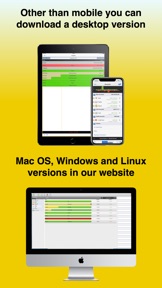
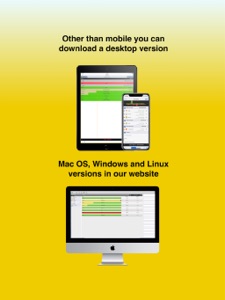
Note: PocketMoney is also available for desktop (Mac, Windows, Linux). Download out trial at www.pocketmoney.com
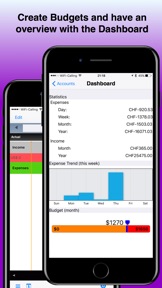
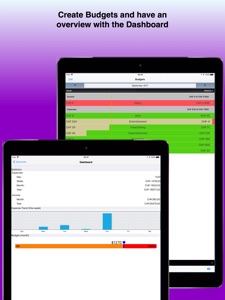
– All New Dashboard
– Charts and Sync Server Now Included
– Dropbox Backup & Restore
- iCloud Backup & Restore
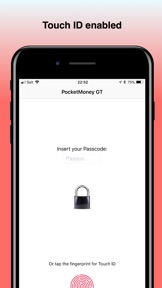
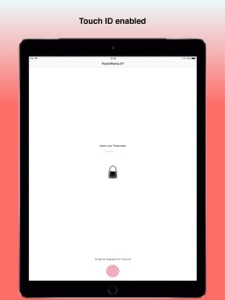
– Touch ID & Face ID
PocketMoney gives you the most features, at the least cost, in an effective user interface. Find out why AppAdvice.com says: “The app is easy to use that in fact, it is fast-becoming my most-used app on my iPad.”
Need to track your finances on multiple iPhones, iPads, iPods, other OS’s, or desktops? PocketMoney can do that, too. Sync multiple iOS or other OS’s devices together over Wi-Fi or to the PocketMoney desktop app on OS X, Windows, and Linux
The system is simple, and a minute a day using PocketMoney will help you navigate through the pitfalls of the current economy.
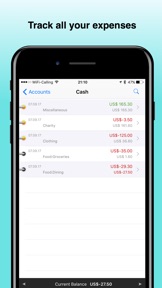
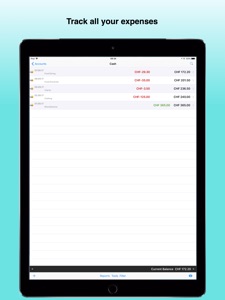
** Start by entering all your income and expenses as they happen across multiple accounts such as credit cards, savings, and checking accounts. PocketMoney can track thousands of transactions through many years of financial data with no performance loss. Transactions can be split across multiple categories, transferred across accounts and can also be scheduled to occur at regular intervals.
** PocketMoney makes this really easy by remembering previous transactions and auto-completing them as you type.
** Analyze your overall financial situation by using the built-in reporting features of PocketMoney. Charts can help you visualize overspending and target areas to cut back. Furthermore, your data can be exported to desktop applications such as Microsoft Money and Excel.
** If you use Quicken or Microsoft Money, then you can export your desktop data to PocketMoney, enter data on the road, then export changes back to your desktop app via QIF files. (Quicken Essentials doesn’t support QIF exports/imports.)
Features Include:
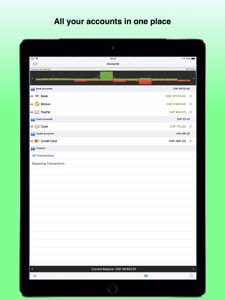
Accounts
=======
– Unlimited number of accounts and transactions
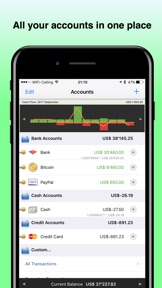
– Accounts include credit cards, checking, PayPal, overdraft, savings and more
– Bitcoin support
– Proven performance and responsiveness
– Repeating transactions with complex logic
– Autocomplete transactions
– Splits and Transfers
– Reconcile and rollup your accounts.
– Photo receipts
– Current, future, cleared balance displays
– Customized account ordering, grouping and graphics
– Customized transaction entry preferences
– Custom filters
Syncing
======
– PocketMoney Sync Client – sync your finances over Wi-Fi to PocketMoney for Desktops (www.catamount.com for OS X, Windows, & Linux versions).
– PocketMoney Sync Server – Keep your data in sync over Wi-Fi between multiple iOS devices without the need for PocketMoney for Desktops.
Budgets
=======
– Income and expense budgeting
– Daily, Weekly, bi-weekly, monthly, bi-monthly, quarterly, semi-annual, and annual budgets
– iBeam to show current location of budget period
– Budget bars for each category
Reports and Charts
– Custom reporting for Accounts, Categories, Class and Payee
– Charts – Net Worth, Cash Flow and Category/Payee graphs
– Custom reporting and charting periods
– Print transaction register, receipts, and report details to AirPrint compatible printer
Interoperability
==========
– Email, web browser and SyncDocs backup/restore
– Transaction and photo sync between multiple iPhones
– Import – TDF, CSV, QIF, OFX/QFX
– Export – TDF, CSV, QIF, OFX/QFX
– PocketMoney’s iReceipt open standard allows other applications or websites to post transactions directly to PocketMoney to eliminate redundant data entry. (iReceipt supported by MPG, CheckPlease, BillMinder, and others)
Usability
=======
– Multi-currency
– Multilingual (15 different languages)
– Password protection
– Transaction search
– Themes, Fonts and colors
– Visually Impaired friendly
– Badge display for overdrawn accounts

What's New in Version 1.1.9

Bug fixes

Seller

Name

Giuseppe Tondini

Information

Categories

Version

1.1.9

Size

22.4 MB

Game Center

No

VPP Device Licensing

Yes

Rating

Rated: 4+

Compatibility

iOS 9.3 or later

Devices

iPhone 11 Pro Max, iPad Air 2 (Cellular), iPad mini Retina (Cellular), iPad Pro (11-inch), iPad (5th Generation) Wi-Fi, iPad (6th generation) Wi-Fi, iPod touch (6th Generation), iPad Pro (11-inch) Wi-Fi + Cellular, iPad (6th generation) Wi-Fi + Cellular, iPad Pro 12.9-inch (3rd generation), iPad (5th Generation) Wi-Fi + Cellular, iPad mini (5th Generation) Wi-Fi + Cellular, iPad mini (5th Generation), iPad Pro, iPad mini 3, iPad mini 4 (Cellular), iPad mini 4, iPhone 11, iPod touch (7th generation), iPad mini 3 (Cellular), iPad Air, iPad Air 2, iPad Pro 12.9-inch (2nd generation), iPad Pro (Cellular), iPad Pro (9.7-inch) (Cellular), iPad Pro (10.5-inch) Wi-Fi + Cellular, iPad Pro (9.7-inch), iPad mini Retina, iPad Air (Cellular), iPad Air (3rd generation) Wi-Fi + Cellular, iPhone 6 Plus, iPad Air (3rd generation), iPad Pro (10.5-inch), iPad Pro 12.9-inch (2nd generation) Wi-Fi + Cellular, iPhone 6, iPhone XR, iPhone XS, iPhone 6s, iPhone SE, iPhone 7 Plus, iPhone 6s Plus, iPhone 5s, iPhone X, iPhone 8, iPhone XS Max, iPhone 8 Plus, iPhone 7, iPhone 5, iPad (7th generation) Wi-Fi, iPhone 5c, iPad (7th generation) Wi-Fi + Cellular, iPad Air3, iPad Air3Cellular, iPad Mini5, iPad Mini5Cellular, iPhone 11 Pro, iPad Pro 12.9-inch (3rd generation) Wi-Fi + Cellular, Watch4

Languages

English, Chinese, Danish, Dutch, French, German, Greek, Hebrew, Italian, Japanese, Korean, Norwegian, Polish, Portuguese, Russian, Spanish, Swedish

App Store: Customer Ratings

Ratings & Reviews

3.5 of 5 (12 Ratings)

App Store: Customer Reviews

2019-03-12

Fabulous

After using the original app for many years and due to a technical problem lost it during transferring data to my new iPad I was mortified until I found it was available again.
It is easy to use does everything needed to keep track of spending whether it’s checking statements or keeping track of credit card spending and regular outgoings all under one roof
Can’t recommend this too much.
# wordy #
Version 1.1.9
2019-03-02

Disappointed

After having a few exchanges of emails where they’ve been a bit rude and accused me of threatening them I asked them not to contact me again and yet they continued to email having a go. They seemed to take offence and complain when I asked another question.
I wanted to have my credits entered before my debits. They explained I needed to manually go in and change the time on my entries. I just thought it was something that could be done automatically as apps are a lot more advanced.
I wasn’t the one that was rude or threatening. They apologised for not explaining something as English isn’t their native language!!!
I’ve used this programme on my iPhone and desktop and have contacted support quite a few times and never had a problem like I have now. I’ve never had someone have a go for asking a different question.
Pdr987
Version 1.1.9
2019-02-23

Time to move on

While the historic ownership chain is understood, nothing has really improved in the last year or so. There are too many long term bugs that have been reported and then left for too long with no resolution. e.g.
- Roundup function doesn’t work
- Moving a transfer to a different account moves one end but not the other leaving two orphaned ‘half transactions’ to be deleted and recreated.
- Random repeating transaction entries adopt the incorrect value (taken from the transaction previously entered) meaning the automatic entry facility is unusable because the values used aren’t predictable
- Deletion of accounts doesn’t delete them but hides them and crashes the app. (A subsequent ‘download of all data from server’ during synchronisation puts all of the deleted accounts back in the list requiring re-deletion)
- Adjustment of a repeating transaction means it disappears from one device after synchronisation.
There’s still a legacy of good capability here but development has been abandoned in favour of writing a new app.as a result, despite paying up front for the new version from the new team, parts of this app are unreliable while others are simply unusable with no hope of a fix.
A shame.
Feathers44
Version 1.1.9
2018-09-12

Brilliant Expense Tracker

This little app is inexpensive but comprehensive and brilliant in tracking daily bills. It synchronises via WiFi to update my old Quicken 2000 - I use a ‘drop file’ to my desktop and import it from their into Quicken rather than a complete sync of everything. Initially I transferred only my cost codes to my phone so I can enter data to the app account accurately. (Delete the app’s own ones first though). Great too if travelling abroad as you can upload everything on your return. An Indispensable App and I wouldn’t want to be without it now. I cannot wait until the new updated PC version is delivered - if it matches the iOS app I will be so happy.
TopDogc
Version 1.1.9
2018-06-30

Was great but QIF export has stopped working

I’ve sent the developers a request to fix this but have not heard back at all. Maybe they are no longer supporting this app?
Jay Tree
Version 1.1.9
2018-05-21

Poor Support

PocketMoney has been a great app, however the current owner’s support for the app is very poor. In the last couple few months support has failed to restore two functions in the app that were working, but no longer work. I am now looking for an alternative and recommend you do not buy this app.
I am referring to the currency rates, which no longer work for many ‘minor’ currencies and the QIF export which has the option to export using Western (ISO Latin 1) file encoding, however this no longer works and the developer is not willing to fix this functionality that was working until the last update.
Update - the Webster (ISO Latin 1) file encoding option now works again - I assume that this was fixed with the release of 1.1.9 last week. Thank you!
paulf666
Version 1.1.9
2018-01-22

Good, but maybe the supported OS should be updated?

In summary: great app on a standalone device - very handy and makes me more aware of where my money goes (when I am disciplined and use it!). A bit clumsy for synchronising between devices - especially if one is an old iPad (but allegedly supported).
I used the original Pocket Money and was very excited to see that someone has taken it on to keep it going. It is very easy to use and I have found it extremely handy when trying to keep track of spending when away from home.
Now that we have more iOS devices, I was really hoping to be able to synchronise easily between the main device (iPad) and our more-mobile devices (iPhones) to track our spending.
In response to my original review, the guys at GT got in touch (a bit hurt, for which I apologise) with a suggestion to make use of "Files" on my iPad - but this doesn't exist in iOS10.3.3. Instead, I had to export to desktop (iMac) then import from desktop using my phone. This has worked and I am pleased. I do not know how things will go when I try to add transactions on the phones - I fear it won't work the way I'd like it to but perhaps I'll just have to make one of the phones the main source.
It is a great bit of of software, but I cannot rate it more than 3* because the overall experience has been marred by the awkward sync process and the way the latest update chops the screen on the iPad. To be fair, the developer tried to explain about changes in XCode but I still don't quite follow: the App store says (or said) compatible with iOS9.3 and newer and iPads, so I would expect this to be the case.
JohnHuxinCanada
Version 1.1.6
2017-11-24

Have not found better

I have been a PocketMoney user since 2010 but, following the untimely death of its original developer in 2013, development stalled. I tried all manner of alternatives but never found one with the same functionality and ease of use. Despite the lack of development the app continued to function but, following acquisition by the present owner, the app gets better and better. Full sync across all iOS devices is flawless with either Dropbox or iCloud. It may not directly sync with Bank Accounts in the way some Apps do but those are considerably more expensive and require ongoing subscription. Highly recommended.
tiefbach
Version 1.1.2
2017-11-18

Best app for current account balancing

I had used the original pocket money by catamount for several years and really liked it. Took a mad notion to change from it a couple of months ago thinking there was something better that would do my job. Mistake! After downloading and trying at least 4 other apps including some pay for, I have now returned to pocketmoney. Does exactly what I want it to, should never have moved away from it!
Oakvale
Version 1.1.2
2017-09-21

Excellent App

So glad this app is being kept alive by the new owner. I have used this for many years to keep track of my finances and would be lost without it. A few bugs in this new version which seem to be quickly sorted out. Excellent service! Fully recommend.
Zarafet
Version 1.1.0
2017-09-21

Keeps Crashing

Not that impressed, am using it on my iPhone 7 and it keeps crashing, used it for 20 mins and it crashed about 8 times. Don't waste your money, as I did.
BattenT
Version 1.1.0