AboutTermsPrivacyContact
 
Updating
Leica DISTO Plan

Leica DISTO Plan

Released: 2018-06-07
© Leica-Geosystems AG
Leica DISTO Plan - QR Code
Version 2.0.0
4+
Download on the App Store
Version 2.0.0
4+
Download on the App Store
Released: 2018-06-07
© Leica-Geosystems AG

iPhone Screenshots

Screenshot
Screenshot
Screenshot
Screenshot
Screenshot

iPad Screenshots

Screenshot
Screenshot
Screenshot
Screenshot
Screenshot

Description

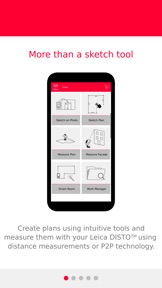
The new DISTO™ Plan app assists with the vital tasks of documenting and visualising measurements.
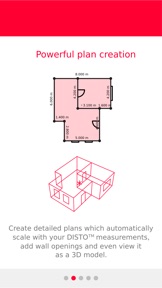
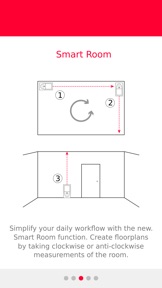
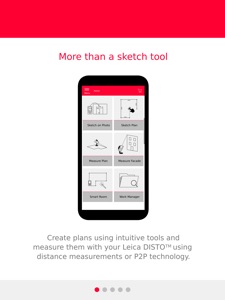
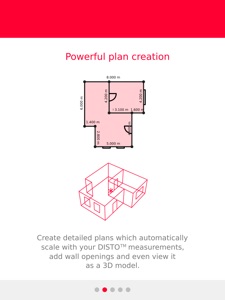
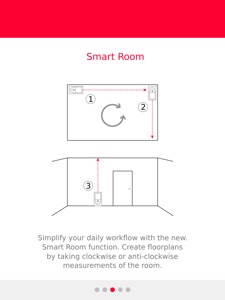
Fingers can be used to sketch a floorplan on a smartphone or tablet and corresponding measurements are easily assigned to each line of the plan. The app then automatically creates a scaled floorplan. Alternatively, the innovative Smart Room functionality in combination with a newly integrated sensor in the Leica DISTO™ X3 and X4 makes it possible to create accurate floor plans simply by taking clockwise or counter-clockwise measurements of a room.
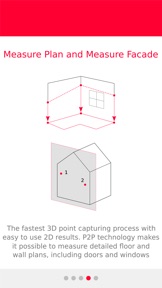
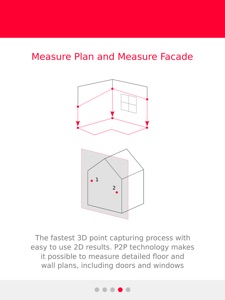
In combination with the DST 360 adapter or the DISTO™ S910, the app makes 3D measurement functionality available, allowing measurements to be captured in 2D or 3D.
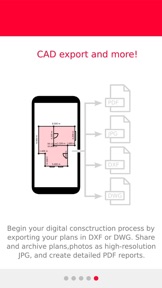
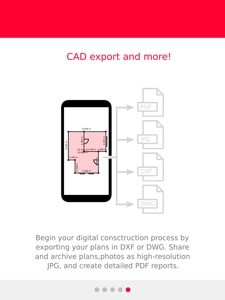
All measurements and floorplans can be exported as a CAD drawing or in a PDF format. The new app supports all Leica DISTO™ devices with Bluetooth® functionality.
The following Leica DISTO™ devices are supported:
Leica DISTO™ X3 ***Brand New***
Leica DISTO™ X4 ***Brand New***
Leica DISTO™ D2
Leica DISTO™ D1
Leica DISTO™ D110
Leica DISTO™ E7100i
Leica DISTO™ D510
Leica DISTO™ E7500i
Leica DISTO™ D810 touch
Leica DISTO™ S910
In-app purchases Terms and Conditions
• Subscriptions are auto-renewable billed on a monthly or yearly basis.
• Payment will be charged to iTunes Account at confirmation of purchase.
• Subscription automatically renews unless auto-renew is turned off at least 24-hours before the end of the current period.
• Account will be charged for renewal within 24-hours prior to the end of the current period.
• Subscriptions may be managed and auto-renewal may be turned off by going to the user's Account Settings after purchase.
• Any unused portion of a free trial period, if offered, will be forfeited when the user purchases a subscription to that publication, where applicable.
Privacy Policy:
https://leica-geosystems.com/global/privacy-policy
https://leica-geosystems.com/about-us/compliance-standards/legal-documents

What's New in Version 2.0.0

New P2P function “Earthworks” to calculate volumes
New “Hidden corners” calculation function in sketch
Snapping in P2P
Unlimited purchase package
High resolution JPG Export
Google maps in PDF Export Pro
GPS location in PDF Export Pro
Added Chinese (simplified)
Improved DISTO connectivity
Improved DISTO X3/X4 update process
Bugfixing and stabilization
Seller

Name

Leica Geosystems AG

Information

Categories

Version

2.0.0

Size

294.3 MB

Game Center

No

VPP Device Licensing

Yes

Rating

Rated: 4+

Compatibility

iOS 10.0 or later

Devices

iPad Pro (11-inch), iPad (5th Generation) Wi-Fi, iPad (6th generation) Wi-Fi, iPod touch (6th Generation), iPad Pro (11-inch) Wi-Fi + Cellular, iPad (6th generation) Wi-Fi + Cellular, iPad Pro 12.9-inch (3rd generation), iPad (5th Generation) Wi-Fi + Cellular, iPad mini (5th Generation) Wi-Fi + Cellular, iPad mini (5th Generation), iPad Pro, iPad mini 3, iPad mini 4 (Cellular), iPad mini 4, iPad Pro (Cellular), iPad Pro (9.7-inch) (Cellular), iPad Pro (10.5-inch) Wi-Fi + Cellular, iPad Pro (9.7-inch), iPad Air (3rd generation) Wi-Fi + Cellular, iPhone 6 Plus, iPad Air (3rd generation), iPad Pro (10.5-inch), iPad Pro 12.9-inch (2nd generation) Wi-Fi + Cellular, iPhone 6, iPhone XR, iPhone XS, iPhone 6s, iPhone SE, iPhone 7 Plus, iPhone 6s Plus, iPhone 5s, iPhone X, iPhone 8, iPhone XS Max, iPhone 8 Plus, iPhone 7, iPhone 5, iPad (7th generation) Wi-Fi, iPhone 5c, iPad (7th generation) Wi-Fi + Cellular, iPad Air3, iPad Air3Cellular, iPad Mini5, iPad Mini5Cellular, iPad Pro 12.9-inch (3rd generation) Wi-Fi + Cellular

Languages

English, French, German, Italian, Japanese, Portuguese, Spanish, Swedish

App Store: Customer Ratings

Ratings & Reviews

2.0 of 5 (9 Ratings)

App Store: Customer Reviews

2018-11-26

Crash

I really wanted this app to work. I have it on my iPad Pro for its large screen.
The app works fine while creating the plan but can’t pull the plans back up without it crashing instantly. So now all the data that I accumulated can’t be accessed. I can see it in file preview. But as soon as I select a plan it crashes so unusable.
TheworkshopBrighton
Version 1.1.1
2018-11-25

Don’t waste your time with this app

Love my laser, HATE this app Very glitchy and unreliable even in the basic for drawing a few lines and often does unexpected things just most of the time nothing , just get a pen and Paper and save your self the stress
why anyone in their right mind would spend for an upgraded version they need their head examined
Use lesss
Version 1.1.1
2018-08-28

Lacks important functions

I want to be able to change the name of the plans so I can go back to them and know where the sketch of the property was.
I want to be able to specify the name of each room so when it goes to create the pdf pro plan. I know which room the report is referring to.
I want to be able to change the orientation of the plan on the pdf document so that the measurements don’t all overlap and become unreadable.
I want to be able to attach measurements to walls by pulling the measurement out so it sits away from the wall but with guide lines. Looks much smarter.
I want to be able to produce a pdf plan that contains the floor area of each room.
I’d like the app to not only adjust to my measurements, but when adding multiple rooms together. Click the adjoining wall, select add new room. And then drag the room out from there. Sometimes when adding a new room they don’t connect and the resizing fails to connect the rooms up and there will be gaps between walls.
When producing the pdf pro report, I’d like more freedom with how my logo appears in the report. Currently it gets squashed rather than resized and looks awful.
This is a professional app that is aimed at professionals. But it is severely lacking in functionality. It needs to have a few small fundamental changes and it will be a very powerful tool for people in the property industry.
On the upside, I am very impressed with the ease of drawing plans and the Bluetooth functionality. However, the fact that I can’t export my plans in an easy to read format lets this app down. It needs a fix otherwise it cannot be used in a professional capacity.
Elk7270
Version 1.0.4