Description
Music Alarm Clock: Spotify Songs and Playlists
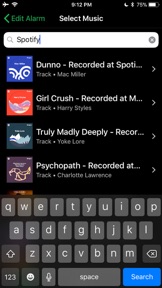
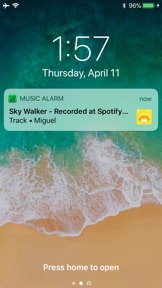
Wake up to your favorite Spotify Songs or Playlists!
Music Alarm Clock is the ONLY Alarm Clock for iPhone that supports Spotify music.
"It's Easy as 1-2-3":
1. Create a new Alarm.
2. Choose either one song or create a playlist of songs to shuffle.
3. Lock your screen, relax, and wake up on the right side of the bed!
DETAILS
• See willsaid.com/spotify for features and support, or email me directly at iam@willsaid.com.
• A paid Spotify premium account is NOT needed. A Free Spotify Account works!
• The Spotify Mobile App is NOT needed, since this uses the Web.
• Internet connectivity is required to find songs and "set" an alarm, but not needed when it goes off.
• Alarms go off for one minute max, but you can always chain multiple alarms together if you are a heavy sleeper. Spotify's API currently only lets the app play 30 seconds of each song, although entire songs are coming soon.
• As stated above, the app currently plays 30 second snippets of the best parts of songs, which should be more than enough to wake up.
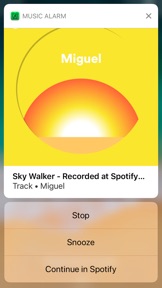
• Supports Snoozing, Days to Repeat, and the other features you'd expect from an alarm clock
• The maker of this app is not attached to Spotify in any way. The app simply plays Spotify Content from Spotify's API.
PLEASE NOTE:
• Most but not all Spotify songs are currently available on the app. This is outside my control, and up to which artists approve third party app usage of their content. The selection size has improved since Version 1 and is continuing to do so.
• Artists not on the app include Bob Marley, Ariana Grande, and Frank Ocean. Please email me BEFORE downloading the app if there's a specific song you are looking for and I can quickly check. Email me at iam@willsaid.com and I will get back to you very quickly.
What's New in Version 3.1
Thanks for supporting Music Alarm Clock!
I've been listening to your bug fixes and suggestions, and this version fixes all of the known bugs. The worst bug was causing playlists with 4 songs to repeatedly crash the app every time you opened it.
To report more bugs or suggest performance improvements, please email me at iam@willsaid.com and check out the support page at willsaid.com/spotify