AboutTermsPrivacyContact
 
Updating
PhotosUpload - FTP uploader

PhotosUpload - FTP uploader

Released: 2019-06-21
© 2023 Cesare Forelli
PhotosUpload - FTP uploader - QR Code
Version 1.4.2
4+
Download on the App Store
Version 1.4.2
4+
Download on the App Store
Released: 2019-06-21
© 2023 Cesare Forelli

iPhone Screenshots

Screenshot
Screenshot
Screenshot
Screenshot

iPad Screenshots

Screenshot
Screenshot
Screenshot
Screenshot

Description

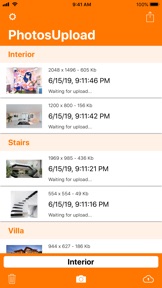
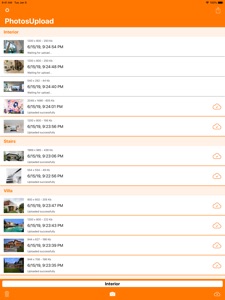
Use PhotosUpload to take pictures, add tags and upload them to a FTP server.
If your job includes taking photos and uploading them to a server in an organized way, PhotosUpload is the professional app you were looking for:
1. Shoot photos or select images from your Photo Library.
2. Add tags! They are optional, but very useful to group related photos together (they are included in file names, after the date and time).
3. When you are ready, upload your photos to a FTP server you configured.
There's no step 4!
PhotosUpload is easy to use, but versatile and reliable; it's been made to archive photos during multiple phases of the manufacturing process of industrial products, and it is now available for general use on iPhone and iPad, where it supports multitasking.
To avoid cluttering your Photo Library with "work-related" pictures, PhotosUpload does not automatically save the photos you take from inside the app to the device library; you can manually save one or all images there manually, though.
PhotosUpload stores your photos in a persistent local database, so a battery dying is not a problem. Images are not removed automatically after upload, but the app is not made to archive and search for photos, so you'll probably want to remove them manually, in batch, after upload; obviously you can do that at your convenience.
By design, photos are not sent again to the server after being successfully uploaded, but you can send them again manually, or apply a different tag and be prompted to re-upload them with a different file name that includes the new tag.
PhotosUpload is made for business and it truly values your data and privacy; obviously your photos, server details and tags never leave your device.
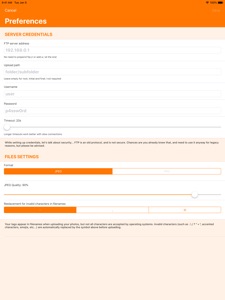
Please be advised that the usefulness of this app is directly connected to the availability of a custom FTP server (sFTP not supported); you don't need a permanent connection to this server in order to use the app (for instance, you can take photos offline while on the move and only upload them when you are connected to your company's network) but if you or your company do not have a dedicated server available to use as destination for the upload, PhotosUpload will be able to provide you little value.
When you upload, you can either store files in the root or in a specific sub-folder you created on your server (you can't create remote directories from inside the app); the app is not an FTP client, so you won't be able to retrieve remotely stored files.
I am available for support via email (support@cdf1982.com), or you can send me a tweet @cdf1982. And, if you like PhotosUpload, I'd be especially grateful if you find the time to leave a five star review and tell your friends about it! Thank you!

What's New in Version 1.4.2

A quick update improving speed when Capture mode is set to Sequence and with a fix for a bug that could cause the app to crash when canceling multiple times the re-upload of images (thank you Sean for reporting it!)
If PhotosUpload is useful to you and you have the time to leave a nice review, it helps a lot! –Cesare

Seller

Information

Categories

Version

1.4.2

Size

10.6 MB

Game Center

No

VPP Device Licensing

Yes

Rating

Rated: 4+

Compatibility

iOS 12.0 or later

Devices

iPhone 5s, iPhone 6, iPhone 6 Plus, iPhone 6s, iPhone 6s Plus, iPhone SE, iPhone 7, iPhone 7 Plus, iPhone 8, iPhone 8 Plus, iPhone X, iPhone XR, iPhone XS, iPhone XS Max, iPhone 11, iPhone 11 Pro, iPhone 11 Pro Max, iPhone SE (2nd generation), iPhone 12, iPhone 12 Pro, iPhone 12 Pro Max, iPhone 12 mini, iPhone 13, iPhone 13 Pro, iPhone 13 Pro Max, iPhone 13 mini, iPhone SE (3rd generation), iPhone 14, iPhone 14 Plus, iPhone 14 Pro, iPhone 14 Pro Max, iPhone 15, iPhone 15 Plus, iPhone 15 Pro, iPhone 15 Pro Max, iPhone 16, iPhone 16Plus, iPhone 16Pro, iPhone 16ProMax, iPad (5th Generation) Wi-Fi, iPad (5th Generation) Wi-Fi + Cellular, iPad (6th generation) Wi-Fi, iPad (6th generation) Wi-Fi + Cellular, iPad Pro, iPad Pro (Cellular), iPad Pro (9.7-inch), iPad Pro (9.7-inch) (Cellular), iPad Pro 12.9-inch (2nd generation), iPad Pro 12.9-inch (2nd generation) Wi-Fi + Cellular, iPad Pro (10.5-inch), iPad Pro (10.5-inch) Wi-Fi + Cellular, iPad Pro (11-inch), iPad Pro (11-inch) Wi-Fi + Cellular, iPad Pro 12.9-inch (3rd generation), iPad Pro 12.9-inch (3rd generation) Wi-Fi + Cellular, iPad Air, iPad Air (Cellular), iPad Air 2, iPad Air 2 (Cellular), iPad Air (3rd generation), iPad Air (3rd generation) Wi-Fi + Cellular, iPad mini Retina, iPad mini Retina (Cellular), iPad mini 3, iPad mini 3 (Cellular), iPad mini 4, iPad mini 4 (Cellular), iPad mini (5th Generation), iPad mini (5th Generation) Wi-Fi + Cellular, iPad (7th generation) Wi-Fi + Cellular, iPad Pro 11-inch (2nd generation), iPad Pro 11-inch (2nd generation) Wi-Fi + Cellular, iPad Pro 12.9-inch (4th generation), iPad Pro 12.9-inch (4th generation) Wi-Fi + Cellular, iPad Air (4th Generation) (Wi-Fi), iPad Air (4th Generation) (Wi-Fi + Cellular), iPad (8th generation) Wi-Fi, iPad (8th generation) Wi-Fi + Cellular, iPad Pro 11-inch (3rd generation), iPad Pro 11-inch (3rd generation) Wi-Fi + Cellular, iPad Pro 12.9-inch (5th Generation), iPad Pro 12.9-inch (5th Generation) Wi-Fi + Cellular, iPad (9th Generation), iPad (9th Generation) Wi-Fi + Cellular, iPad mini (6th Generation), iPad mini (6th Generation) Wi-Fi + Cellular, iPad Air (5th generation), iPad Air (5th generation) Wi-Fi + Cellular, iPad Pro 11-inch (4th generation), iPad Pro 11-inch (4th generation) Wi-Fi + Cellular, iPad Pro 12.9-inch (6th generation), iPad Pro 12.9-inch (6th generation) Wi-Fi + Cellular, iPad (10th generation), iPad (10th generation) Wi-Fi + Cellular, iPad Air 11-inch (M2) Wi-Fi, iPad Air 13-inch (M2) Wi-Fi, iPad Air 13-inch (M2) Wi-Fi + Cellular, iPad Pro 11-inch (M4) Wi-Fi, iPad Pro 11-inch (M4) Wi-Fi + Cellular, iPad Pro 13-inch (M4) Wi-Fi, iPad Pro 13-inch (M4) Wi-Fi + Cellular, iPad MiniA17Pro, iPad MiniA17ProCellular, iPod touch (6th Generation), iPod touch (7th generation)

Languages

English

App Store: Customer Ratings

Ratings & Reviews

5.0 of 5 (1 Rating)

App Store: Customer Reviews

2019-10-07

Just the job

Does exactly what says on the app, very useful and just what I was looking for Cheers
Panda Logistics
Version 1.1