Updating


iPhone Screenshots





iPad Screenshots




Description
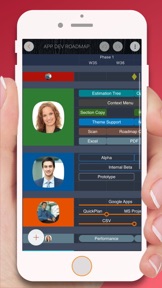
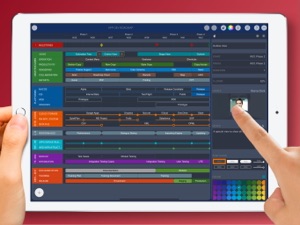
Roadmap app helps to visualize, maintain, and simplify your roadmap for the product, business strategy, and high-level project plans with the simple estimate - all at a glance. Natural gestures and powerful customizations let you manage roadmap plans as simple as you need them to be - without the complexity.
* 7 Day trial WITHOUT buying anything.
* Uniform app for the iPad and iPhone.
* Roadmap is NOT a project schedule app (the best project schedule app QuickPlan is at https://itunes.apple.com/app/id621375878).
### PRIVACY FOCUSED
User-generated roadmap documents are stored at the user's discretion on the devices or the iCloud Drive of the users.
### FREE TRIAL
With the free seven day trial, you can try all the features without buying anything. After the trial:
- You can continue to use the Roadmap app to view the documents for free.
- You can choose to purchase an auto-renewal subscription for full features.
### EXAMPLEs
https://roadmapgo.com/documents/examples
### SUPER EFFICIENT
Create a beautiful roadmap plan within a shorter time than expected!
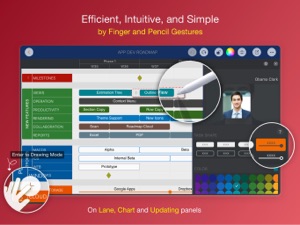
・ Natural and intuitive gestures use making roadmap creating be super-efficient.
・ Apple Pencil supports in Drawing Mode.
・ Well designed keyboard shortcuts.
・ Maintain in the chart and the inspector panels.
・ On a clean user interface.
### POWERFUL CUSTOMIZATIONs
Roadmap app provides powerful configuration options to help customize the appearance to make the user interface more business-friendly.
・ 15 Section Lane Display Styles.
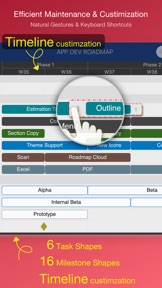
・ 6 Task Shapes (available when displaying tasks in small display size).
・ 16 Milestone Icons (available when displaying tasks in small display size).
・ Color.
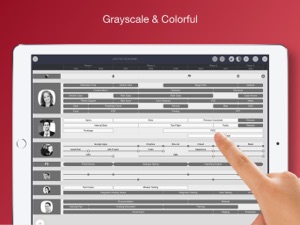
・ Grayscale and Colorful display styles.
・ Large and small taskbar size styles.
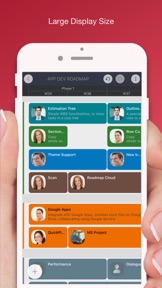
・ Taskbar Display Content Customization (available when displaying tasks in large display size).
・ Timeline customization - manually, by templates, and by text formula.
・ Additional fields: 6 single-line text fields, 2 multiple-lines text fields, and 3 URL fields. You can define how to use additional fields.
・ Task Fields Visibility.
・ Task fields TITLE customization.
・ "Automatic Bullet" and Date display options.
### MULTIPLE DOCUMENTs
Managing documents in multiple document groups
・ Local document group - Roadmap documents on the device
・ iCloud Drive document group - Roadmap documents on the iCloud Drive
・ Examples Group
With the capability to create, copy, move, clone, and remove documents by intuitive gestures and context menu.
### REPORTING
· Export to PDF and Image files
· Options to customize exporting
### INTEGRATIONs
· Export to QuickPlan (project schedule) file with powerful options to customize the timeline and content. With the options to
- Map a roadmap timeline cell to the calendar day, working day, week, and months in the QuickPlan project (The minimum task duration of QuickPlan is one day).
- Customize the project date
- Customize the content
· Export to (mobilinked) WBS
· Export to CSV file.
### SYNCHRONIZATION
Documents organized in the iCloud Drive group are on the iCloud Drive - sync across iOS and macOS devices.
### PRICING
Roadmap app requires a subscription. We offer a yearly subscription plan and a fully functional 7-day trial. The plans unlock the app on iOS devices only.
--- LEGAL ---
Duration and price of each subscription are displayed in Roadmap' storefront, updated at the time of purchase. Payment will be charged to iTunes account at confirmation of purchase. Subscriptions automatically renew unless auto-renew is turned off no later than 24 hours before the end of the current period. Subscriptions and auto-renewal can be managed/turned off in the iTunes account settings.
Terms of Use: https://roadmapgo.com/legal/terms-conditions
Privacy Policy: https://roadmapgo.com/legal/privacy-policy
--- macOS ---
Roadmap app is also available for the macOS, get the app at https://roadmapgo.com/getapps. "Roadmap for macOS" and "Roadmap for iOS" are separated apps.
What's New in Version 3.0
Roadmap app is being enhanced continuously.
This release improves the timeline customization via context menus (https://youtu.be/Ko-Vn5N31to).
Seller
Name
Jin Han
Information
Developer
Categories
Version
3.0
Size
49.8 MB
Game Center
No
VPP Device Licensing
Yes
Rating
Rated: 4+
Compatibility
iOS 11.0 or later
Devices
iPhone 5s, iPhone 6, iPhone 6 Plus, iPhone 6s, iPhone 6s Plus, iPhone SE, iPhone 7, iPhone 7 Plus, iPhone 8, iPhone 8 Plus, iPhone X, iPhone XR, iPhone XS, iPhone XS Max, iPhone 11, iPhone 11 Pro, iPhone 11 Pro Max, iPhone SE (2nd generation), iPhone 12, iPhone 12 Pro, iPhone 12 Pro Max, iPhone 12 mini, iPad (5th Generation) Wi-Fi, iPad (5th Generation) Wi-Fi + Cellular, iPad (6th generation) Wi-Fi, iPad (6th generation) Wi-Fi + Cellular, iPad Pro, iPad Pro (Cellular), iPad Pro (9.7-inch), iPad Pro (9.7-inch) (Cellular), iPad Pro 12.9-inch (2nd generation), iPad Pro 12.9-inch (2nd generation) Wi-Fi + Cellular, iPad Pro (10.5-inch), iPad Pro (10.5-inch) Wi-Fi + Cellular, iPad Pro (11-inch), iPad Pro (11-inch) Wi-Fi + Cellular, iPad Pro 12.9-inch (3rd generation), iPad Pro 12.9-inch (3rd generation) Wi-Fi + Cellular, iPad Air, iPad Air (Cellular), iPad Air 2, iPad Air 2 (Cellular), iPad Air (3rd generation), iPad Air (3rd generation) Wi-Fi + Cellular, iPad mini Retina, iPad mini Retina (Cellular), iPad mini 3, iPad mini 3 (Cellular), iPad mini 4, iPad mini 4 (Cellular), iPad mini (5th Generation), iPad mini (5th Generation) Wi-Fi + Cellular, iPad (7th generation) Wi-Fi + Cellular, iPad Pro 11-inch (2nd generation), iPad Pro 11-inch (2nd generation) Wi-Fi + Cellular, iPad Pro 12.9-inch (4th generation), iPad Pro 12.9-inch (4th generation) Wi-Fi + Cellular, iPad Air (4th Generation) (Wi-Fi), iPad Air (4th Generation) (Wi-Fi + Cellular), iPad (8th generation) Wi-Fi, iPad (8th generation) Wi-Fi + Cellular, iPod touch (6th Generation), iPod touch (7th generation)
Languages
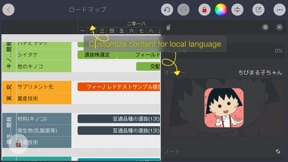
English
App Store: Customer Ratings
Ratings & Reviews
3.0 of 5 (3 Ratings)
App Store: Customer Reviews
No Entry