AboutTermsPrivacyContact
 
Updating
Power Exif-Photo Exif Viewer

Power Exif-Photo Exif Viewer

Released: 2019-06-22
Power Exif-Photo Exif Viewer - QR Code
Version 1.5.2
4+
Download on the App Store
Version 1.5.2
4+
Download on the App Store
Released: 2019-06-22

iPhone Screenshots

Screenshot
Screenshot
Screenshot
Screenshot
Screenshot
Screenshot

iPad Screenshots

Screenshot
Screenshot
Screenshot
Screenshot
Screenshot

Description

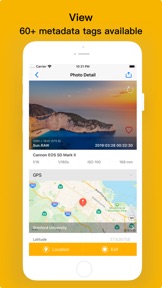
Power Exif is a powerful metadata tool for your photos and videos. You can easily view, edit, and remove exif metadata, including date, time, gps location, camera model, aperture, author and so on.It's very useful for professional photographers to manage the Exif data of their photo&videos.
Features in APP:
View Exif metadata
- View location data
- View more than 60+ metadata tags like ISO, shutter speed, focal length,camera model, lens model, time stamp, aperture, shutter count,file name and a lot more.
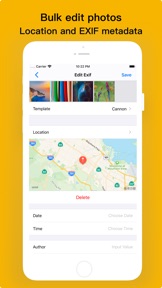
Edit Exif metadata
- Edit GPS location data
- Edit all the exif metadata,such as data, time, author, title, description,comment,keywords, copyright, camera maker, camera model, camera lens maker, camera lens model, aperture, exposure time, software
Remove Exif metadata
- Remove all exif metadate
- Remove GPS location
Bulk edit photo Exif metadata
- Edit or remove Exif metadata of multiple photos at once
- Edit or remove GPS location data of multiple photos at once
Works with
- All of your iOS devices(iPhone, iPad,iPod Touch)
- All photos&videos in your phone camera roll, iCloud photo library and photo stream
- Support Sony, Nikon, Fuji, Canon and other camera photo formats
- Support image formats(JPG,PNG,TIFF,HEIC) and RAW formats(CR2,NEF,DNG)
Others
- Ability to copy photo Exif data to clipboard
- Support Grid view and List view
- Support for deleting the photos&videos directly in the app
- Support for reverting to original image after wrong edit
- Support direct browsing and sharing from the system album
- Ability to share photos&videos with or without Exif metadata
- Support dark mode
- Support template saving and import
What Exif metadata you can view in our app:
FileSize, ObjectName, ImageSize, ISO, FocalLength, ColorModel, Depth, Orientation, DPIHeight, DPIWidth, PixelHeight, PixelWidth, ProfileName, BrightnessValue, CFAPattern, ColorSpace, ComponentsConfiguration, CompressedBitsPerPixel, Contrast, CustomRendered, DateTimeDigitized, DateTimeOriginal, ExifVersion, ExposureTime, ExposureBiasValue, ExposureMode, ExposureProgram, FlashExposureComp, RecommendedExposureIndex, FileSource, Flash, FlashPixVersion, FocalLenIn35mmFilm, FocalLength, Gamma, ISOSpeedRatings, LensSpecification, LightSource, Aperture, ApertureValue, FNumber, MaxApertureValue, MeteringMode, PixelXDimension, PixelYDimension, Saturation, SceneCaptureType, SceneType, SensingMethod, ShutterSpeedValue, SubjectArea, SubsecTimeDigitized, WhiteBalance, SensitivityType, Sharpness, WhiteBalance, FlashCompensation, ImageStabilization, LensID, LensInfo, LensModel, Make, Model, Compression, DateTime, Orientation, PhotometricInterpretation, Software, ResolutionUnit, TileLength, TileWidth, XResolution, YResolution and so on.
If you have any questions or suggestions about our app, please e-mail lilliancream@163.com.We are looking forward to your feedbacks

What's New in Version 1.5.2

1. Photos can be arranged by date for quick and easy searching
2. Performance optimization, faster processing of large numbers of pictures at the same time
3. Optimize GPS information display
4. Japanese translation optimization, especially thanks to the translation provided by enthusiastic users (MIYOSHI TAKESHI)

Seller

Name

li jing

URL

Information

Developer

Categories

Version

1.5.2

Size

11.2 MB

Game Center

No

VPP Device Licensing

Yes

Rating

Rated: 4+

Compatibility

iOS 11.0 or later

Devices

iPhone 5s, iPhone 6, iPhone 6 Plus, iPhone 6s, iPhone 6s Plus, iPhone SE, iPhone 7, iPhone 7 Plus, iPhone 8, iPhone 8 Plus, iPhone X, iPhone XR, iPhone XS, iPhone XS Max, iPhone 11, iPhone 11 Pro, iPhone 11 Pro Max, iPad (5th Generation) Wi-Fi, iPad (5th Generation) Wi-Fi + Cellular, iPad (6th generation) Wi-Fi, iPad (6th generation) Wi-Fi + Cellular, iPad Pro, iPad Pro (Cellular), iPad Pro (9.7-inch), iPad Pro (9.7-inch) (Cellular), iPad Pro 12.9-inch (2nd generation), iPad Pro 12.9-inch (2nd generation) Wi-Fi + Cellular, iPad Pro (10.5-inch), iPad Pro (10.5-inch) Wi-Fi + Cellular, iPad Pro (11-inch), iPad Pro (11-inch) Wi-Fi + Cellular, iPad Pro 12.9-inch (3rd generation), iPad Pro 12.9-inch (3rd generation) Wi-Fi + Cellular, iPad Air, iPad Air (Cellular), iPad Air 2, iPad Air 2 (Cellular), iPad Air (3rd generation), iPad Air (3rd generation) Wi-Fi + Cellular, iPad mini Retina, iPad mini Retina (Cellular), iPad mini 3, iPad mini 3 (Cellular), iPad mini 4, iPad mini 4 (Cellular), iPad mini (5th Generation), iPad mini (5th Generation) Wi-Fi + Cellular, iPad (7th generation) Wi-Fi + Cellular, iPod touch (6th Generation), iPod touch (7th generation)

Languages

English, Chinese, French, German, Italian, Japanese, Korean, Russian, Spanish

App Store: Customer Ratings

Ratings & Reviews

4.5 of 5 (9 Ratings)

App Store: Customer Reviews

2020-02-04

Brilliant

Great app that offers full meta-data editing. I’d really only ask for the developer to add share sheet functionality so that I can edit a single image from within camera roll rather than scrolling through EXIF looking for it, which I find really difficult. Fantastic app. Totally recommended.
Fumi2008
Version 1.5.2
2019-09-11

First Rate App

This app is first rate for processing photos at our various locations.
JOHNTY-NSW
Version 1.4.1
2019-08-26

100%

Brilliant does what it says and more well worth the money you can’t go wrong with this app
ACooper31
Version 1.4.1