AboutTermsPrivacyContact
 
Updating
Duplicate Photos Sweeper

Duplicate Photos Sweeper

Released: 2019-10-02
Copyright © 2019-2025 Wise Tech Labs Private Limited. All rights reserved.
Duplicate Photos Sweeper - QR Code
Version 2.7
4+
Download on the App Store
Version 2.7
4+
Download on the App Store
Released: 2019-10-02
Copyright © 2019-2025 Wise Tech Labs Private Limited. All rights reserved.

iPhone Screenshots

Screenshot
Screenshot
Screenshot
Screenshot
Screenshot
Screenshot
Screenshot

iPad Screenshots

Screenshot
Screenshot
Screenshot
Screenshot
Screenshot
Screenshot
Screenshot

Description

The Problem:
Do you click a lot of Photos of your loved ones with multiple clicks of a similar pose? Do you friends or Family members regularly share Photos with you? This may create multiple unwanted copies of your Photos and clutter your Photos collection with Duplicate and similar Photos.
The Solution:
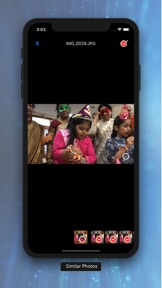
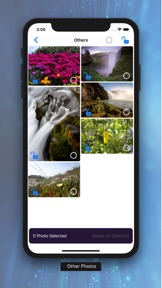
Duplicates Photos Sweeper is a very simple and easy to use application that helps you quickly find and remove duplicate and similar photos from your Mac. Anyone without being tech savvy can use it to search duplicate photos or similar photos on a Mac system and can remove them with ease of a click. Unlike other Duplicate Cleaners, it never stores the 'fingerprints' of your images. You will also be presented with groups of Screenshots, Panoramas, Bursts, Animated Images, Live Photos and other images which you can view, select and deleted the unwanted ones.
Duplicate and Similar photos may occupy bulk storage space on your iPhone and you may not even know about the unnecessary space occupied by them. Memories in form of Photos are priceless but duplicate photos clutters your Photos Collection. Manually locating and removing such duplicate photos from your iPhone may be a tedious job. Duplicate Photos Sweeper is an ultimate Duplicate Photos Finder that helps you to find all duplicate and even similar photos and easily remove them for an organized Photos collection and to regain valuable space.
How does Duplicate Photos Sweeper works?
Follow the below steps to find and remove duplicate and similar photos from your Mac
Step 1: As soon as you start the application, it will start the scan for Duplicate and Similar Photos. It may take some time depending on the number of Photos you have on your Phone.
Step 2: As the application looks for Duplicate and similar Photos, you may scroll down to screenshots and other groups to remove the unwanted pictures.
Step 3: Review the found duplicate and similar photos and trash them from your Phone.
Duplicate Photos Sweeper is different from other duplicate photos cleaners as it compares photos using enhanced visual comparison algorithm just like how a human eye would compare images.
Features of Duplicate Photos Sweeper:
• Find Duplicate Photos and Similar images regardless of their format.
• Supports Exact Match and Similar Match options
• An enhanced visual comparison algorithm is used to compare similarity in images.
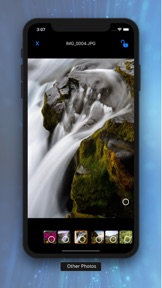
• Preview the difference between photos by sliding multiple photos in a group of photos in scan results.
• Easily delete selected Photos with a click of a button.
• Unlike other Duplicate Cleaners, it never store the 'fingerprints' of your images
• Set various parameters like "Similarity Level" to search for images falling within different similarity range.
Give it a try and we promise that you will be amazed with the search results. Regularly use Duplicate Photos Sweeper every time you click a lot of photos on your Phone.

What's New in Version 2.7

- Limited access to Photos Library supported
- Updated algorithm for finding duplicates
- Compatible with latest iOS 18 or lower.
- Improved search

Seller

Name

Wise Tech Labs Private Limited

Information

Categories

Version

2.7

Size

13.5 MB

Game Center

No

VPP Device Licensing

Yes

Rating

Rated: 4+

Compatibility

iOS 10.0 or later

Devices

iPhone 5s, iPhone 6, iPhone 6 Plus, iPhone 6s, iPhone 6s Plus, iPhone SE, iPhone 7, iPhone 7 Plus, iPhone 8, iPhone 8 Plus, iPhone X, iPhone XR, iPhone XS, iPhone XS Max, iPhone 11, iPhone 11 Pro, iPhone 11 Pro Max, iPhone SE (2nd generation), iPhone 12, iPhone 12 Pro, iPhone 12 Pro Max, iPhone 12 mini, iPhone 13, iPhone 13 Pro, iPhone 13 Pro Max, iPhone 13 mini, iPhone SE (3rd generation), iPhone 14, iPhone 14 Plus, iPhone 14 Pro, iPhone 14 Pro Max, iPhone 15, iPhone 15 Plus, iPhone 15 Pro, iPhone 15 Pro Max, iPhone 16, iPhone 16 Plus, iPhone 16 Pro, iPhone 16 Pro Max, iPhone 16e, iPhone 17, iPhone 17Pro, iPhone 17ProMax, iPhone Air, iPad (5th Generation) Wi-Fi, iPad (5th Generation) Wi-Fi + Cellular, iPad (6th generation) Wi-Fi, iPad (6th generation) Wi-Fi + Cellular, iPad Pro, iPad Pro (Cellular), iPad Pro (9.7-inch), iPad Pro (9.7-inch) (Cellular), iPad Pro 12.9-inch (2nd generation), iPad Pro 12.9-inch (2nd generation) Wi-Fi + Cellular, iPad Pro (10.5-inch), iPad Pro (10.5-inch) Wi-Fi + Cellular, iPad Pro (11-inch), iPad Pro (11-inch) Wi-Fi + Cellular, iPad Pro 12.9-inch (3rd generation), iPad Pro 12.9-inch (3rd generation) Wi-Fi + Cellular, iPad Air, iPad Air (Cellular), iPad Air 2, iPad Air 2 (Cellular), iPad Air (3rd generation), iPad Air (3rd generation) Wi-Fi + Cellular, iPad mini Retina, iPad mini Retina (Cellular), iPad mini 3, iPad mini 3 (Cellular), iPad mini 4, iPad mini 4 (Cellular), iPad mini (5th Generation), iPad mini (5th Generation) Wi-Fi + Cellular, iPad (7th generation) Wi-Fi + Cellular, iPad Pro 11-inch (2nd generation), iPad Pro 11-inch (2nd generation) Wi-Fi + Cellular, iPad Pro 12.9-inch (4th generation), iPad Pro 12.9-inch (4th generation) Wi-Fi + Cellular, iPad Air (4th Generation) (Wi-Fi), iPad Air (4th Generation) (Wi-Fi + Cellular), iPad (8th generation) Wi-Fi, iPad (8th generation) Wi-Fi + Cellular, iPad Pro 11-inch (3rd generation), iPad Pro 11-inch (3rd generation) Wi-Fi + Cellular, iPad Pro 12.9-inch (5th Generation), iPad Pro 12.9-inch (5th Generation) Wi-Fi + Cellular, iPad (9th Generation), iPad (9th Generation) Wi-Fi + Cellular, iPad mini (6th Generation), iPad mini (6th Generation) Wi-Fi + Cellular, iPad Air (5th generation), iPad Air (5th generation) Wi-Fi + Cellular, iPad Pro 11-inch (4th generation), iPad Pro 11-inch (4th generation) Wi-Fi + Cellular, iPad Pro 12.9-inch (6th generation), iPad Pro 12.9-inch (6th generation) Wi-Fi + Cellular, iPad (10th generation), iPad (10th generation) Wi-Fi + Cellular, iPad Air 11-inch (M2) Wi-Fi, iPad Air 13-inch (M2) Wi-Fi, iPad Air 13-inch (M2) Wi-Fi + Cellular, iPad Pro 11-inch (M4) Wi-Fi, iPad Pro 11-inch (M4) Wi-Fi + Cellular, iPad Pro 13-inch (M4) Wi-Fi, iPad Pro 13-inch (M4) Wi-Fi + Cellular, iPad mini (A17 Pro) Wi-Fi, iPad mini (A17 Pro) Wi-Fi + Cellular, iPad (A16) Wi-Fi, iPad (A16) Wi-Fi + Cellular, iPad Air 11-inch (M3) Wi-Fi, iPad Air 11-inch (M3) Wi-Fi + Cellular, iPad Air 13-inch (M3) Wi-Fi, iPad Air 13-inch (M3) Wi-Fi + Cellular, iPod touch (6th Generation), iPod touch (7th generation)

Languages

English

App Store: Customer Ratings

Ratings & Reviews

2.0 of 5 (2 Ratings)

App Store: Customer Reviews

2021-04-03

Duplicate photo sweeper

Constantly crashes.
I see no benefit to this add over the functionality on the google photo app.
Peter Walker
wilstone walker
Version 2.1
2020-07-08

Seems to work well

Works well, but please could the reminder popup be removed? After the first popup, I know that I need to delete the photos from my Recently Deleted album. I don’t need to be reminded every. single. time. I. delete. a. photo. This prompt really impedes the usefulness of this app.
iOS also asks me via popup to confirm each deletion, but I expect you don’t have control over this.
RESPONSE TO DEVELOPER: The popup I’m requesting be removed is generated by the app: “1 Photo moved to Recently Deleted Album in Photos. Do not forget to delete them to gain space.” This only needs to display the first time a user uses the app. We don’t need to be told every time we delete another photo.
FamilialBrush
Version 1.8