AboutTermsPrivacyContact
 
Updating
ON1 Photo Mobile

ON1 Photo Mobile

Released: 2020-06-29
© 2020 ON1 Inc.
ON1 Photo Mobile - QR Code
Version 14.5
4+
Download on the App Store
Version 14.5
4+
Download on the App Store
Released: 2020-06-29
© 2020 ON1 Inc.

iPhone Screenshots

Screenshot
Screenshot
Screenshot
Screenshot
Screenshot
Screenshot
Screenshot

iPad Screenshots

Screenshot
Screenshot
Screenshot
Screenshot
Screenshot
Screenshot
Screenshot

Description

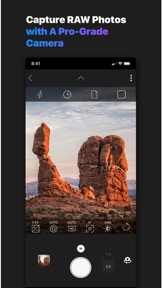
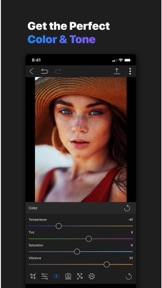
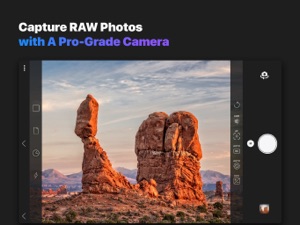
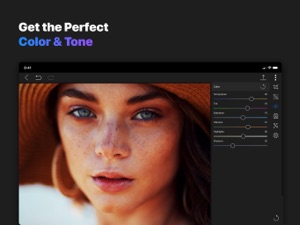
Great photos are everywhere you look, and inspiration can come at any time. With ON1 Mobile you can capture, edit, and organize on the go. The camera captures pro-grade raw format photos with all the manual controls you need. You can edit anywhere too; adjust color and tone using the same raw processing engine as ON1 Photo RAW. With ON1 360, an optional service, when you return home your photos and non-destructive edits are waiting for you inside ON1 Photo RAW.
CAMERA
Powerful camera mode that works like your device's camera app. It’s familiar to use but chock-full of advanced features.
Capture RAW photos on your smartphone with all the tonal range and details you expect from an interchangeable lens camera.
Pro-level manual control over exposure, shutter speed, depth and white balance.
EDIT ANYTIME
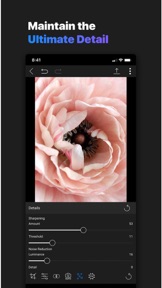
You can process your RAW photos you capture on your device as well as ones you import from an attached interchangeable lens camera, hard drive or memory card. This includes options like Exposure, Contrast, Shadows, Midtones, Highlights, Whites, Blacks, White Balance, Noise and Sharpening.
Crop your photos to zoom-in and recompose.
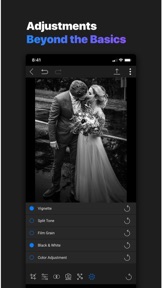
Adjustments beyond the basics of brightness and color. You can convert to black and white, add film grain, darken the edges with a vignette, etc.
With ON1 360, you can even edit photos that live on your other devices, like your desktop computer, even when you are not at home. The edits are non-destructive and are synchronized to all your devices. RAW photos you capture and edit in the ON1 Mobile app on your smartphone are re-editable on any of your computers as well.
You can view and change the metadata from any device as well. This enables you to do your culling (marking your favorites and getting rid of bad frames) from anywhere, like the couch in the living room, the coffee shop or the patio. And of course your metadata changes are synchronized to all your devices.
YOUR PHOTOS EVERYWHERE - ON1 360
With ON1 360, an optional service, you can view photos from any of your devices on all your devices. For example, view photos on your desktop computer on your tablet or smartphone.
You can send full-sized original photos from one device to another. For example, send every new photo you take on your smartphone back to a designated computer. Or manually select which photos to send.
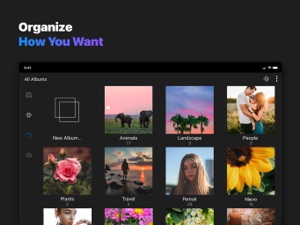
You can browse the way you are used to. The photos are organized by device and then the folders or albums you store your photos in. If you organize by folders, you can browse by folders.
Keep a portfolio of your best work on your phone or tablet to share easily.

Seller

Name

onOne Software

Information

Categories

Version

14.5

Size

47.7 MB

Game Center

No

VPP Device Licensing

Yes

Rating

Rated: 4+

Compatibility

iOS 11.0 or later

Devices

iPhone 5s, iPhone 6, iPhone 6 Plus, iPhone 6s, iPhone 6s Plus, iPhone SE, iPhone 7, iPhone 7 Plus, iPhone 8, iPhone 8 Plus, iPhone X, iPhone XR, iPhone XS, iPhone XS Max, iPhone 11, iPhone 11 Pro, iPhone 11 Pro Max, iPhone SE (2nd generation), iPad (5th Generation) Wi-Fi, iPad (5th Generation) Wi-Fi + Cellular, iPad (6th generation) Wi-Fi, iPad (6th generation) Wi-Fi + Cellular, iPad Pro, iPad Pro (Cellular), iPad Pro (9.7-inch), iPad Pro (9.7-inch) (Cellular), iPad Pro 12.9-inch (2nd generation), iPad Pro 12.9-inch (2nd generation) Wi-Fi + Cellular, iPad Pro (10.5-inch), iPad Pro (10.5-inch) Wi-Fi + Cellular, iPad Pro (11-inch), iPad Pro (11-inch) Wi-Fi + Cellular, iPad Pro 12.9-inch (3rd generation), iPad Pro 12.9-inch (3rd generation) Wi-Fi + Cellular, iPad Air, iPad Air (Cellular), iPad Air 2, iPad Air 2 (Cellular), iPad Air (3rd generation), iPad Air (3rd generation) Wi-Fi + Cellular, iPad mini Retina, iPad mini Retina (Cellular), iPad mini 3, iPad mini 3 (Cellular), iPad mini 4, iPad mini 4 (Cellular), iPad mini (5th Generation), iPad mini (5th Generation) Wi-Fi + Cellular, iPad (7th generation) Wi-Fi, iPad Pro 11-inch (2nd generation), iPad Pro 11-inch (2nd generation) Wi-Fi + Cellular, iPad Pro 12.9-inch (4th generation), iPad Pro 12.9-inch (4th generation) Wi-Fi + Cellular, iPod touch (6th Generation), iPod touch (7th generation)

Languages

English, Chinese, German, Japanese, Polish, Spanish

App Store: Customer Ratings

Ratings & Reviews

2.0 of 5 (4 Ratings)

App Store: Customer Reviews

2020-06-30

Disappointing

- it initially did not recognise my 360 subscription
- the camera part is quite primitive compared to the most camera apps
- no gridlines in the camera
- no level functionality in the camera
- no display of the basic exposure info (shutter speed, ISO, EV compensation) unless one is in the fully manual mode
- the EV compensation value gets reset between the shooting sessions
- some of the JPEGS produced from the edited DNGs and saved to the camera roll have strange artefacts
- the JPEGS produced from the raw files from the 360 cloud and saved to the camera roll don’t have the original date
- there’s no location info in the original files shot by the camera (there’s no entry for the app in the location services in the settings)
As a camera it’s pretty much useless.
As for the editing, the basics are there but there are no user presets, no profiles.
There’s no metadata viewing, the only visible photo info is the file name.
jirid
Version 14.5
2020-06-29

Frequent Crashes

Been waiting a long time for this in a hope it would finally be a Lightroom replacement when used with photo raw. Disappointed with lack of features and really disappointing to see it crash constantly on an iPhone 8 Plus
Thepominlaw
Version 14.5
2020-06-29

360 will revolutionise mobile photography

Having the ability to use my mobile to take in raw and use my favourite raw editor, ON1 Photo RAW 2020, is someone I have been looking forward to for some time. You do need a 360 subscription, and the flexibility of offers far exceeds using alternative cloud solutions. ON1 uses a prosperity version of the raw file to allow editing on different platforms. All very clever and it just works.
Mark Allen Belfast
Version 14.5