Updating


iPhone Screenshots



iPad Screenshots


Description
About:
Your photos take lots of space. You have only two choices: keep it or delete it.
Many times, photos are just informational, so high resolution photos are a waste of space. We need a third choice: keep it in a smaller size.
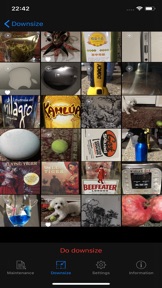
This APP will downsize all the non-favorite photos to a configurable size. The batch processing size is also configurable. You can do all the photos once, or do a couple photos a time. The most recent photos come first.
关于:
您的照片占用大量空间。但您只有两个选择:保留或删除它。
很多时候,照片只是信息性的。所以高分辨率的照片是浪费空间。我们需要第三种选择:保持更小的尺寸。
此APP会将所有非收藏的照片缩小到可配置大小。批处理大小也是可配置的。 你可以一次性处理所有的照片,或每次处理几张照片。最新的照片优先。
Functions:
1. One click to downsize all non-favorite photos
2. Anti-duplication feature (system remember what has been done)
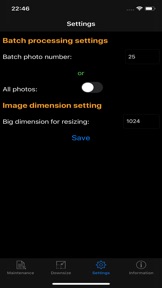
3. Configurable batch processing size (so you can process the old photos in free time)(Pro version only)
4. Configurable resizing image size to meet your requirement (Pro version only)
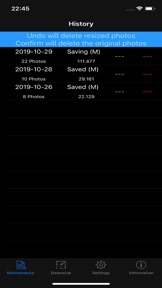
5. Original photos could be delete right after resizing or a later time (Confirm from history)
6. The process is undoable before the originals are deleted
7. History records shows how many photos are downsized and how many space (in Megabytes) will be saved or have been saved, up to one year
8. Pre-resizing features including favorite toggling, single photo view, sharing, deletion, and zooming
功能:
1。单击一下即可缩小所有非收藏夹照片的尺寸
2。防重复功能(系统记住已完成的工作)
3。可配置的批处理大小(以便您可以在空闲时间处理旧照片)(仅限专业版)
4。可配置 缩小图像大小以满足您的要求(仅限专业版本)
5。原始照片可以在调整大小后立即删除或稍后(从历史记录中确认)
6。在删除原始进程之前,该过程是可撤消的
7。历史记录显示缩小的照片数和将保存或已保存的空间数(以兆字节为单位),最多一年
8。调整大小前期功能,包括最喜欢的切换、单张照片视图、分享、删除和缩放";
Usage:
1 Mark all the photos you want to keep in original size as favorite
2.Tapping Do downsize button to do the resizing
3. Select Delete or Cancel for original photos
4. Repeat step 2 and 3.
使用:
1。将要保留原始大小的所有照片标记为收藏
2。点击'缩小'按钮以调整大小
3。选择原始照片的删除或取消
4。重复上面2 和 3
处理所有现有照片后,您不会看到任何需要处理的照片。 系统首先选择最新的照片。
Recommend:
1. Set the batch processing number to a small number to test out this APP
2. Once get familiar with the APP, set the batch processing number to a bigger number (e.g. 50) so that you can use every spare minute to process the existing photos.
3. Once all existing photos are processed, you can set the batch processing number to All.
推荐:
1. 将批处理数量设置为少量以测试此 APP
2. 熟悉 APP 后,将批处理数量设置为较大的数字(例如 50),以便您可以利用零碎时间来处理现有照片。
3. 处理完所有现有照片后,您可以将批处理数量设置为"全部"。
What's New in Version 1.2.1
Fixed bugs
Information
Developer
Categories
Version
1.2.1
Size
1.4 MB
Game Center
No
VPP Device Licensing
Yes
Rating
Rated: 4+
Compatibility
iOS 14.0 or later
Devices
iPhone 5s, iPhone 6, iPhone 6 Plus, iPhone 6s, iPhone 6s Plus, iPhone SE, iPhone 7, iPhone 7 Plus, iPhone 8, iPhone 8 Plus, iPhone X, iPhone XR, iPhone XS, iPhone XS Max, iPhone 11, iPhone 11 Pro, iPhone 11 Pro Max, iPhone SE (2nd generation), iPhone 12, iPhone 12 Pro, iPhone 12 Pro Max, iPhone 12 mini, iPhone 13, iPhone 13 Pro, iPhone 13 Pro Max, iPhone 13 mini, iPhone SE (3rd generation), iPhone 14, iPhone 14 Plus, iPhone 14 Pro, iPhone 14 Pro Max, iPhone 15, iPhone 15 Plus, iPhone 15 Pro, iPhone 15 Pro Max, iPhone 16, iPhone 16Plus, iPhone 16Pro, iPhone 16ProMax, iPhone 16e, iPad (5th Generation) Wi-Fi, iPad (5th Generation) Wi-Fi + Cellular, iPad (6th generation) Wi-Fi, iPad (6th generation) Wi-Fi + Cellular, iPad Pro, iPad Pro (Cellular), iPad Pro (9.7-inch), iPad Pro (9.7-inch) (Cellular), iPad Pro 12.9-inch (2nd generation), iPad Pro 12.9-inch (2nd generation) Wi-Fi + Cellular, iPad Pro (10.5-inch), iPad Pro (10.5-inch) Wi-Fi + Cellular, iPad Pro (11-inch), iPad Pro (11-inch) Wi-Fi + Cellular, iPad Pro 12.9-inch (3rd generation), iPad Pro 12.9-inch (3rd generation) Wi-Fi + Cellular, iPad Air, iPad Air (Cellular), iPad Air 2, iPad Air 2 (Cellular), iPad Air (3rd generation), iPad Air (3rd generation) Wi-Fi + Cellular, iPad mini Retina, iPad mini Retina (Cellular), iPad mini 3, iPad mini 3 (Cellular), iPad mini 4, iPad mini 4 (Cellular), iPad mini (5th Generation), iPad mini (5th Generation) Wi-Fi + Cellular, iPad (7th generation) Wi-Fi + Cellular, iPad Pro 11-inch (2nd generation), iPad Pro 11-inch (2nd generation) Wi-Fi + Cellular, iPad Pro 12.9-inch (4th generation), iPad Pro 12.9-inch (4th generation) Wi-Fi + Cellular, iPad Air (4th Generation) (Wi-Fi), iPad Air (4th Generation) (Wi-Fi + Cellular), iPad (8th generation) Wi-Fi, iPad (8th generation) Wi-Fi + Cellular, iPad Pro 11-inch (3rd generation), iPad Pro 11-inch (3rd generation) Wi-Fi + Cellular, iPad Pro 12.9-inch (5th Generation), iPad Pro 12.9-inch (5th Generation) Wi-Fi + Cellular, iPad (9th Generation), iPad (9th Generation) Wi-Fi + Cellular, iPad mini (6th Generation), iPad mini (6th Generation) Wi-Fi + Cellular, iPad Air (5th generation), iPad Air (5th generation) Wi-Fi + Cellular, iPad Pro 11-inch (4th generation), iPad Pro 11-inch (4th generation) Wi-Fi + Cellular, iPad Pro 12.9-inch (6th generation), iPad Pro 12.9-inch (6th generation) Wi-Fi + Cellular, iPad (10th generation), iPad (10th generation) Wi-Fi + Cellular, iPad Air 11-inch (M2) Wi-Fi, iPad Air 13-inch (M2) Wi-Fi, iPad Air 13-inch (M2) Wi-Fi + Cellular, iPad Pro 11-inch (M4) Wi-Fi, iPad Pro 11-inch (M4) Wi-Fi + Cellular, iPad Pro 13-inch (M4) Wi-Fi, iPad Pro 13-inch (M4) Wi-Fi + Cellular, iPad MiniA17Pro, iPad MiniA17ProCellular, iPod touch (6th Generation), iPod touch (7th generation)
Languages
English, Chinese
App Store: Customer Ratings
Ratings & Reviews
0.0 of 5 (No rating)
App Store: Customer Reviews
No Entry