Updating


iPhone Screenshots

Description
Distraction-free notetaking during screenings. Finally.
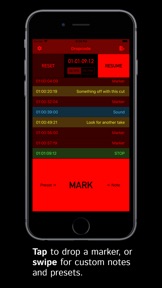
When you're watching down a cut, you should be paying attention to what's on the screen—not your notepad or phone. With Dropcode, you don't even have to look down. Just tap the bottom of the screen to drop a marker at the current timecode.
And for those times when a marker might not be enough, we've got you covered. Swipe right to make a note using one of four customizable presets, or left to write your own note.
When you're done, simply export your markers and throw them on a timeline. Dropcode exports to Avid Media Composer and DaVinci Resolve, with support for other NLEs coming soon. Addressing cut notes has never been simpler.
Never forget what you were thinking during that scene again. Dropcode is an indispensable tool for editors, directors, producers, and executives.
FEATURES:
========
- Add markers without looking at your phone
- Customizable starting timecode
- Frame rate options (24 or 25)
- Customizable note presets
- Keyboard shortcuts for use with a bluetooth keyboard or programmable button
- Export markers by email, iMessage, or Airdrop
- Auto-dim the screen on start for a distraction-free viewing experience
What's New in Version 1.1
- Keyboard shortcuts! Now you can drop markers using a keyboard or programmable bluetooth button:
[s] Start/stop timer
[r] Reset markers
[m] Create basic marker
[n] Create note marker
[p] Create preset marker
- Multiple bug fixes and iOS 14 compatibility updates.
Seller
Name
Stefan Kubicki
Information
Developer
Categories
Version
1.1
Size
9.1 MB
Game Center
No
VPP Device Licensing
Yes
Rating
Rated: 4+
Compatibility
iOS 12.1 or later
Devices
iPhone 5s, iPhone 6, iPhone 6 Plus, iPhone 6s, iPhone 6s Plus, iPhone SE, iPhone 7, iPhone 7 Plus, iPhone 8, iPhone 8 Plus, iPhone X, iPhone XR, iPhone XS, iPhone XS Max, iPhone 11, iPhone 11 Pro, iPhone 11 Pro Max, iPhone SE (2nd generation), iPhone 12, iPhone 12 Pro, iPhone 12 Pro Max, iPhone 12 mini, iPad (5th Generation) Wi-Fi, iPad (5th Generation) Wi-Fi + Cellular, iPad (6th generation) Wi-Fi, iPad (6th generation) Wi-Fi + Cellular, iPad Pro, iPad Pro (Cellular), iPad Pro (9.7-inch), iPad Pro (9.7-inch) (Cellular), iPad Pro 12.9-inch (2nd generation), iPad Pro 12.9-inch (2nd generation) Wi-Fi + Cellular, iPad Pro (10.5-inch), iPad Pro (10.5-inch) Wi-Fi + Cellular, iPad Pro (11-inch), iPad Pro (11-inch) Wi-Fi + Cellular, iPad Pro 12.9-inch (3rd generation), iPad Pro 12.9-inch (3rd generation) Wi-Fi + Cellular, iPad Air, iPad Air (Cellular), iPad Air 2, iPad Air 2 (Cellular), iPad Air (3rd generation), iPad Air (3rd generation) Wi-Fi + Cellular, iPad mini Retina, iPad mini Retina (Cellular), iPad mini 3, iPad mini 3 (Cellular), iPad mini 4, iPad mini 4 (Cellular), iPad mini (5th Generation), iPad mini (5th Generation) Wi-Fi + Cellular, iPad (7th generation) Wi-Fi + Cellular, iPad Pro 11-inch (2nd generation), iPad Pro 11-inch (2nd generation) Wi-Fi + Cellular, iPad Pro 12.9-inch (4th generation), iPad Pro 12.9-inch (4th generation) Wi-Fi + Cellular, iPad Air (4th Generation) (Wi-Fi), iPad Air (4th Generation) (Wi-Fi + Cellular), iPad (8th generation) Wi-Fi, iPad (8th generation) Wi-Fi + Cellular, iPod touch (6th Generation), iPod touch (7th generation)
Languages
English
App Store: Customer Ratings
Ratings & Reviews
0.0 of 5 (No rating)
App Store: Customer Reviews
No Entry