Updating



±0
#35 in Top Paid Apps > Developer Tools
±0
#30 in Top Paid iPad Apps > Developer Tools
iPhone Screenshots


iPad Screenshots


Description
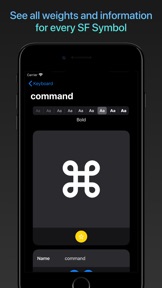
San Fransymbols is the missing app on iOS and iPadOS for viewing all of Apple's SF Symbols. SF Symbols is a cohesive set of 1,500+ glyphs created by Apple for use by developers in iOS, iPadOS, tvOS, watchOS and macOS Catalyst apps.
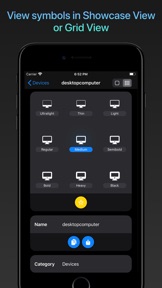
SF Symbols includes nine weights (ultralight, thin, light, regular, medium, semibold, bold, heavy, black) for each icon and automatic scaling. This means it is easier than ever to include glyphs and icons in your apps which not only look great, but adhere to important accessibility features like Dynamic Type.
San Fransymbols is created to make it easier than ever for you to search for, compare and choose the right symbol from SF Symbols for every situation, with features such as:
+++ SWIFTUI AND UIKIT CODE +++
Automatically generate SwiftUI and UIKit code for every symbol and weight. Drag and drop support means you can drop the code right into other apps (such as Swift Playgrounds) on iPad.
+++ SEE WHICH SYMBOLS ARE RESTRICTED +++
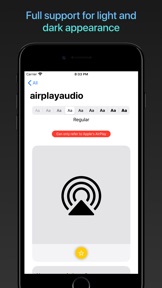
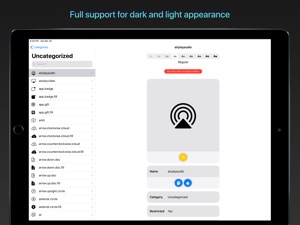
Some symbols may only be used to refer to certain Apple services. San Fransymbols shows a red banner for these, so you can be certain you are using each symbol correctly.
+++ COMPARE WEIGHTS ON THE FLY +++
Compare every weight of each symbol by simply tapping on the desired weight. Will it look better in semibold or heavy? San Fransymbols makes it easier than ever to decide.
+++ FAVORITE SYMBOLS +++
Tap the yellow star icon under any symbol to add it to your favorites. Perfect for keeping track of a list of symbols you want to incorporate into a project.
+++ SUPPORT FOR KEYBOARD SHORTCUTS AND CURSOR ON iPADOS +++
Full support for keyboard shortcuts and pointer interactions on iPadOS. Change symbol weight with the keyboard, right-click to set favorite symbols, easily navigate buttons with pointer interactions, and more.
+++ FREE, WITHOUT ADVERTS +++
The app is free and does not contain adverts. If you find it useful, it would be much appreciated if you dropped a tip in the Tip Jar!
What's New in Version 1.2
+ Choose between Showcase View or Grid View for each symbol
+ Adds keyboard shortcuts on iPadOS:
- Cmd-1 : Showcase View
- Cmd-2 : Grid View
- Cmd-Shift-- : Decrease symbol weight
- Cmd-Shift-+ : Increase symbol weight
- Cmd-W : Close modal
- Cmd-D: Toggle favorite
+ Adds context menus on iPadOS for:
- Copying symbol information and code
- Adding and removing symbols from favorites in the master list
+ Improvements to layout at some larger Dynamic Type settings
+ Minor tweaks to iPadOS pointer interactions
+ Some minor UI adjustments
Information
Developer
Categories
Version
1.2
Size
3.1 MB
Game Center
No
VPP Device Licensing
Yes
Rating
Rated: 4+
Compatibility
iOS 13.4 or later
Devices
iPhone 5s, iPhone 6, iPhone 6 Plus, iPhone 6s, iPhone 6s Plus, iPhone SE, iPhone 7, iPhone 7 Plus, iPhone 8, iPhone 8 Plus, iPhone X, iPhone XR, iPhone XS, iPhone XS Max, iPhone 11, iPhone 11 Pro, iPhone 11 Pro Max, iPhone SE (2nd generation), iPad (5th Generation) Wi-Fi, iPad (5th Generation) Wi-Fi + Cellular, iPad (6th generation) Wi-Fi, iPad (6th generation) Wi-Fi + Cellular, iPad Pro, iPad Pro (Cellular), iPad Pro (9.7-inch), iPad Pro (9.7-inch) (Cellular), iPad Pro 12.9-inch (2nd generation), iPad Pro 12.9-inch (2nd generation) Wi-Fi + Cellular, iPad Pro (10.5-inch), iPad Pro (10.5-inch) Wi-Fi + Cellular, iPad Pro (11-inch), iPad Pro (11-inch) Wi-Fi + Cellular, iPad Pro 12.9-inch (3rd generation), iPad Pro 12.9-inch (3rd generation) Wi-Fi + Cellular, iPad Air, iPad Air (Cellular), iPad Air 2, iPad Air 2 (Cellular), iPad Air (3rd generation), iPad Air (3rd generation) Wi-Fi + Cellular, iPad mini Retina, iPad mini Retina (Cellular), iPad mini 3, iPad mini 3 (Cellular), iPad mini 4, iPad mini 4 (Cellular), iPad mini (5th Generation), iPad mini (5th Generation) Wi-Fi + Cellular, iPad (7th generation) Wi-Fi, iPad Pro 11-inch (2nd generation), iPad Pro 11-inch (2nd generation) Wi-Fi + Cellular, iPad Pro 12.9-inch (4th generation), iPad Pro 12.9-inch (4th generation) Wi-Fi + Cellular, iPod touch (6th Generation), iPod touch (7th generation), Apple Watch Series 4
Languages
English
App Store: Customer Ratings
Ratings & Reviews
5.0 of 5 (2 Ratings)
App Store: Customer Reviews
No Entry