AboutTermsPrivacyContact
 
Updating
Track My Asthma

Track My Asthma

Released: 2020-11-19
© 2022 Will Dale
Track My Asthma - QR Code
Version 2.3.1
4+
Download on the App Store
Version 2.3.1
4+
Download on the App Store
Released: 2020-11-19
© 2022 Will Dale

iPhone Screenshots

Screenshot
Screenshot
Screenshot
Screenshot
Screenshot
Screenshot
Screenshot
Screenshot
Screenshot
Screenshot

iPad Screenshots

Screenshot
Screenshot
Screenshot
Screenshot
Screenshot
Screenshot
Screenshot
Screenshot
Screenshot

Description

Track My Asthma is an easy way to track your Asthma. You can use it as a personal Asthma diary or use it to track multiple peoples Asthma.
Control panel
The control panel gives you a centralised point from which you get easy access to all the functions of Track My Asthma.
Doses Taken
Track My Asthma makes it super easy to track your medication usage. Every time you take a dose of your medication, add it to the Doses Taken page to get a complete diary of medication usage. The colour coding makes it simple to see if doses are being missed. You can also filter by medication to see just a list of those doses. Your health data is yours so you can export it to CSV at any time.
Peakflow
Much like in Doses Taken, the peak flow diary is simple to use. When you take a measurement, add it to the tracker to get a full record of your peak flow measurements. Optionally, you can mark how you were feeling at the time to help you keep track of symptoms. You can choose to add your peak flow data to Apple Health. As with the Doses Taken, you can export your peak flow data to CSV at any time.
Add Reminders
Set reminders in the app to send you notifications when it is time to take medications, do a peak flow reading or book an appointment to see the Doctor or Asthma Nurse. Set the reminders to repeat Daily, Weekly Monthly or just a one-off.
Medications
In the Medications page, add all the medications you want to track. Add data like its name, the number of doses per day, type of medicine (Inhaler or Tablet), notes about it. If it's your rescue medication, you can choose to add it to Apple Health's Inhaler Usage section.
Charts
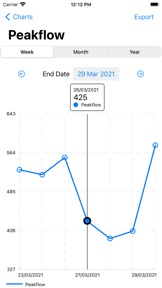
The Charts page allows you to view your progress over time easily and intuitively. For each of the medicines that you are tracking, you can view the doses you have taken. The peak flow chart will help you see changes over time. If need you can export the underlying chart data as CSV.
Features:
Track usage of multiple medications.
Track your peak flow.
Export your data for use in other apps.
Set reminders.
View charts of your progress.
Track multiple people on one device.
Add measurement to Apple Health.
Light and Dark Mode.
All backed up in iCloud.

What's New in Version 2.3.1

Some bug fixes for iOS 14 devices

Information

Developer

Categories

Version

2.3.1

Size

4.3 MB

Game Center

No

VPP Device Licensing

Yes

Rating

Rated: 4+

Compatibility

iOS 14.0 or later

Devices

iPhone 5s, iPhone 6, iPhone 6 Plus, iPhone 6s, iPhone 6s Plus, iPhone SE, iPhone 7, iPhone 7 Plus, iPhone 8, iPhone 8 Plus, iPhone X, iPhone XR, iPhone XS, iPhone XS Max, iPhone 11, iPhone 11 Pro, iPhone 11 Pro Max, iPhone SE (2nd generation), iPhone 12, iPhone 12 Pro, iPhone 12 Pro Max, iPhone 12 mini, iPhone 13, iPhone 13 Pro, iPhone 13 Pro Max, iPhone 13 mini, iPhone SE (3rd generation), iPhone 14, iPhone 14 Plus, iPhone 14 Pro, iPhone 14 Pro Max, iPad (5th Generation) Wi-Fi, iPad (5th Generation) Wi-Fi + Cellular, iPad (6th generation) Wi-Fi, iPad (6th generation) Wi-Fi + Cellular, iPad Pro, iPad Pro (Cellular), iPad Pro (9.7-inch), iPad Pro (9.7-inch) (Cellular), iPad Pro 12.9-inch (2nd generation), iPad Pro 12.9-inch (2nd generation) Wi-Fi + Cellular, iPad Pro (10.5-inch), iPad Pro (10.5-inch) Wi-Fi + Cellular, iPad Pro (11-inch), iPad Pro (11-inch) Wi-Fi + Cellular, iPad Pro 12.9-inch (3rd generation), iPad Pro 12.9-inch (3rd generation) Wi-Fi + Cellular, iPad Air, iPad Air (Cellular), iPad Air 2, iPad Air 2 (Cellular), iPad Air (3rd generation), iPad Air (3rd generation) Wi-Fi + Cellular, iPad mini Retina, iPad mini Retina (Cellular), iPad mini 3, iPad mini 3 (Cellular), iPad mini 4, iPad mini 4 (Cellular), iPad mini (5th Generation), iPad mini (5th Generation) Wi-Fi + Cellular, iPad (7th generation) Wi-Fi + Cellular, iPad Pro 11-inch (2nd generation), iPad Pro 11-inch (2nd generation) Wi-Fi + Cellular, iPad Pro 12.9-inch (4th generation), iPad Pro 12.9-inch (4th generation) Wi-Fi + Cellular, iPad Air (4th Generation) (Wi-Fi), iPad Air (4th Generation) (Wi-Fi + Cellular), iPad (8th generation) Wi-Fi, iPad (8th generation) Wi-Fi + Cellular, iPad Pro 11-inch (3rd generation), iPad Pro 11-inch (3rd generation) Wi-Fi + Cellular, iPad Pro 12.9-inch (5th Generation), iPad Pro 12.9-inch (5th Generation) Wi-Fi + Cellular, iPad (9th Generation), iPad (9th Generation) Wi-Fi + Cellular, iPad mini (6th Generation), iPad mini (6th Generation) Wi-Fi + Cellular, iPad Air (5th generation), iPad Air (5th generation) Wi-Fi + Cellular, iPad Pro 11-inch (4th generation), iPad Pro 11-inch (4th generation) Wi-Fi + Cellular, iPad Pro 12.9-inch (6th generation), iPad Pro 12.9-inch (6th generation) Wi-Fi + Cellular, iPad (10th generation), iPad (10th generation) Wi-Fi + Cellular, iPod touch (6th Generation), iPod touch (7th generation)

Languages

English

App Store: Customer Ratings

Ratings & Reviews

4.5 of 5 (4 Ratings)

App Store: Customer Reviews

2023-05-17

Problems

Trying to add that I’ve taken my inhaler, save button not working.
On calendar there’s a bar with Bob but can’t delete it - not sure who Bob is????
Thought this app would be a great help in sharing results with my practice nurse but not really impressed.
Joyciejane
Version 2.3.0
2023-05-09

Great app

This app is great at reminding me to track both my peak flow and my doses.
3 small points
1. The slider to input peak flow is clunky! Why not use an input box?
2. On the Doses page we get TODAY, YESTERDAY and PREVIOUS. It would be easier when looking back for those to read the date then where the date is we see the time without needing to open each input. As the charts only shows how many doses per day, being able to see at a glance wider times I’m taking extra doses would help. Is it mainly the morning? Etc
3. (As a retired maths teacher this grates). The charts have weird numbering. I’m assuming it takes an average and start below the min etc but the lines are often at 363, 373 etc! My peak flow only reads in tens. I would much prefer a graph where the lines are in tens.
Apart from these small gripes the app provides me with everything I need bar 1 addition. A daily notes section. Why have I needed to use my inhaler more? ie because I’ve been for a long walk, or pollen count high etc.
This app is almost perfect. 😀 Definitely better than others I’ve looked at.
!Mrs M !
Version 2.2.0
2022-02-22

Brilliant app

This is a great little app. I’ve been using it for a couple of months now and it’s very reliable and easy to use. It has handy features for recording your peak flow and the medications you take. The charts are helpful, eg I can take a screenshot of my peak flow chart if I need evidence to send to my GP. There are only two little changes I’d make. The first is to the peak flow slider - it’s a bit fiddly so it would be good if it was possible to type in numbers as well. The second and more important development would be to add a countdown on the medications to help track how many doses I’ve used on my inhalers. This would help me work out when I need to order my repeat prescriptions. I can do this by downloading the data and counting them but it would be easier if the app simply tracked this for me. Thanks.
Gingerjo100
Version 2.1.1