AboutTermsPrivacyContact
 
Updating
wishoTouch Japanese dictionary

wishoTouch Japanese dictionary

Released: 2009-05-15
© sazanami software
wishoTouch Japanese dictionary - QR Code
Version 4.8.1
17+
Download on the App Store
Version 4.8.1
17+
Download on the App Store
Released: 2009-05-15
© sazanami software

iPhone Screenshots

Screenshot
Screenshot
Screenshot
Screenshot
Screenshot
Screenshot
Screenshot
Screenshot
Screenshot

iPad Screenshots

Screenshot
Screenshot
Screenshot
Screenshot
Screenshot
Screenshot
Screenshot
Screenshot
Screenshot

Description

Save time looking up Japanese with wishoTouch. This universal app turns your iPhone/iPad into a powerful, easy-to-use dictionary that packs some unique features.
wishoTouch comes with its own full-screen kanji handwriting pad. You need to know the stroke order, but results are sorted in such a way that most of the time you don't need to draw the whole character. You can also find kanji by radical, number of strokes, meaning etc., rotate the device to quickly thumb through related characters, and watch interactive stroke-order animations for 6,355 kanji.
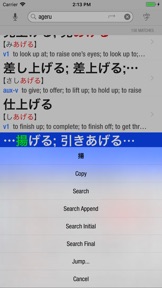
And that's not all. Tight integration with a word dictionary lets you seamlessly jump between a kanji and its compounds. This integration makes use of multitouch gestures: touching a kanji shows its details, while touch-holding gives you other options.
Hunting for Japanese words and kanji has never been simpler or more enjoyable!
NOTE: Basic knowledge of hiragana and kanji stroke order is recommended.
FEATURES include:
- Incremental search in English and Japanese
- Autocorrect in English and romaji
- Bookmark, annotate and share entries
- Split View/Slide Over Multitasking Mode (iPad)
- Jump to other apps and web dictionaries
- Share Extension to look up from other apps
- Share Extension to add cards to Anki
- Speech recognition in English and Japanese
- Night mode (dark mode)
- Apple Watch app
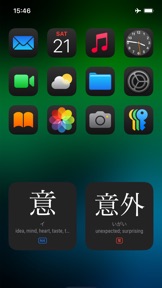
- Home Screen Widgets
- Lock Screen Widgets
OPTIONAL ADD-ONS include:
- Kanji OCR (Optical Character Recognition)
- Watch Handwriting
- Example Sentences
- JLPT Flashcards
(Add-ons are one-time purchase, NOT subscription)
This app uses the JMDICT, KANJIDIC2 and RADKFILE Japanese dictionary files. These files are property of the Electronic Dictionary Research and Development Group at Monash University and are used in conformance with the Group’s licence.
KanjiVG is © Ulrich Apel and used under the CC Attribution Share-Alike license.

What's New in Version 4.8.1

- Fixes widget issue
- Various other fixes

Seller

Name

sazanami software

Information

Categories

Version

4.8.1

Size

377.6 MB

Game Center

Yes

VPP Device Licensing

Yes

Rating

Rated 17+ for the following:
Unrestricted Web Access
Infrequent/Mild Profanity or Crude Humour

Compatibility

iOS 16.0 or later

Devices

iPhone 5s, iPhone 6, iPhone 6 Plus, iPhone 6s, iPhone 6s Plus, iPhone SE, iPhone 7, iPhone 7 Plus, iPhone 8, iPhone 8 Plus, iPhone X, iPhone XR, iPhone XS, iPhone XS Max, iPhone 11, iPhone 11 Pro, iPhone 11 Pro Max, iPhone SE (2nd generation), iPhone 12, iPhone 12 Pro, iPhone 12 Pro Max, iPhone 12 mini, iPhone 13, iPhone 13 Pro, iPhone 13 Pro Max, iPhone 13 mini, iPhone SE (3rd generation), iPhone 14, iPhone 14 Plus, iPhone 14 Pro, iPhone 14 Pro Max, iPhone 15, iPhone 15 Plus, iPhone 15 Pro, iPhone 15 Pro Max, iPhone 16, iPhone 16 Plus, iPhone 16 Pro, iPhone 16 Pro Max, iPhone 16e, iPhone 17, iPhone 17 Pro, iPhone 17 Pro Max, iPhone Air, iPhone 17e, iPad (5th Generation) Wi-Fi, iPad (5th Generation) Wi-Fi + Cellular, iPad (6th generation) Wi-Fi, iPad (6th generation) Wi-Fi + Cellular, iPad Pro, iPad Pro (Cellular), iPad Pro (9.7-inch), iPad Pro (9.7-inch) (Cellular), iPad Pro 12.9-inch (2nd generation), iPad Pro 12.9-inch (2nd generation) Wi-Fi + Cellular, iPad Pro (10.5-inch), iPad Pro (10.5-inch) Wi-Fi + Cellular, iPad Pro (11-inch), iPad Pro (11-inch) Wi-Fi + Cellular, iPad Pro 12.9-inch (3rd generation), iPad Pro 12.9-inch (3rd generation) Wi-Fi + Cellular, iPad Air, iPad Air (Cellular), iPad Air 2, iPad Air 2 (Cellular), iPad Air (3rd generation), iPad Air (3rd generation) Wi-Fi + Cellular, iPad mini Retina, iPad mini Retina (Cellular), iPad mini 3, iPad mini 3 (Cellular), iPad mini 4, iPad mini 4 (Cellular), iPad mini (5th Generation), iPad mini (5th Generation) Wi-Fi + Cellular, iPad (7th generation) Wi-Fi + Cellular, iPad Pro 11-inch (2nd generation), iPad Pro 11-inch (2nd generation) Wi-Fi + Cellular, iPad Pro 12.9-inch (4th generation), iPad Pro 12.9-inch (4th generation) Wi-Fi + Cellular, iPad Air (4th Generation) (Wi-Fi), iPad Air (4th Generation) (Wi-Fi + Cellular), iPad (8th generation) Wi-Fi, iPad (8th generation) Wi-Fi + Cellular, iPad Pro 11-inch (3rd generation), iPad Pro 11-inch (3rd generation) Wi-Fi + Cellular, iPad Pro 12.9-inch (5th Generation), iPad Pro 12.9-inch (5th Generation) Wi-Fi + Cellular, iPad (9th Generation), iPad (9th Generation) Wi-Fi + Cellular, iPad mini (6th Generation), iPad mini (6th Generation) Wi-Fi + Cellular, iPad Air (5th generation), iPad Air (5th generation) Wi-Fi + Cellular, iPad Pro 11-inch (4th generation), iPad Pro 11-inch (4th generation) Wi-Fi + Cellular, iPad Pro 12.9-inch (6th generation), iPad Pro 12.9-inch (6th generation) Wi-Fi + Cellular, iPad (10th generation), iPad (10th generation) Wi-Fi + Cellular, iPad Air 11-inch (M2) Wi-Fi, iPad Air 13-inch (M2) Wi-Fi, iPad Air 13-inch (M2) Wi-Fi + Cellular, iPad Pro 11-inch (M4) Wi-Fi, iPad Pro 11-inch (M4) Wi-Fi + Cellular, iPad Pro 13-inch (M4) Wi-Fi, iPad Pro 13-inch (M4) Wi-Fi + Cellular, iPad mini (A17 Pro) Wi-Fi, iPad mini (A17 Pro) Wi-Fi + Cellular, iPad (A16) Wi-Fi, iPad (A16) Wi-Fi + Cellular, iPad Air 11-inch (M3) Wi-Fi, iPad Air 11-inch (M3) Wi-Fi + Cellular, iPad Air 13-inch (M3) Wi-Fi, iPad Air 13-inch (M3) Wi-Fi + Cellular, iPad Pro 11-inch (M5) Wi-Fi, iPad Pro 11-inch (M5) Wi-Fi + Cellular, iPad Pro 13-inch (M5) Wi-Fi, iPad Pro 13-inch (M5) Wi-Fi + Cellular, iPad Air11M4, iPad Air11M4Cellular, iPad Air13M4, iPad Air13M4Cellular, iPod touch (6th Generation), iPod touch (7th generation), Apple Watch Series 4

Languages

English, Japanese

App Store: Customer Ratings

Ratings & Reviews

5.0 of 5 (4 Ratings)

App Store: Customer Reviews

2017-12-15

2017 updates

The app looks very nice and modern, especially with the dark theme. Overall very nicely presented and professionally made. Now it would be fantastic if there was a SRS flashcard add-on.
Michaels1980
Version 4.0
2014-11-09

An excellent Kanji dictionary for learners of all levels

I’ve been using this app for a long time now and the latest release has improved an already great app enormously.
The user interface has been simplified at the same time as extending the functionality and they have gone a great job of making the iPhone and iPad interfaces feel consistent while still making use of the resolution available on each platform.
It’s easy to search for Kanji by multiple radicals and also using handwriting recognition, although it’s strict about the stroke order rather than effectively doing OCR of the final result, even though it has an OCR module for recognising individual characters using the camera. It has lots of compounds and examples as well as including things like verb conjugations. That makes it a great tool for Japanese learners of all levels.
I bought it such a long time ago that I’ve forgotten the cost of the app, but I remember it not being cheap, especially if you add in the in app purchases of the extra modules, but given the use I’ve had out of it over that time, it’s been well worth it. Highly recommended.
Gavin Lucas
Version 3.0
2013-04-13

Excellent Japanese Kanji App + Dictionary

Considering the price of this app, this is an extremely good Kanji App, with dictionary and even pronunciation aid functionality. The Kanji recognition software by writing on the screen however, is reliant on the user's knowledge of stroke order, making it more restrictive to users who are at least have some basic knowledge of Kanji - especially in comparison to other apps with Kanji writing input recognition that can recognise Kanji irrespective of stroke order. But overall, great value for money. Highly recommended!
M97531
Version 2.4.1
2013-01-27

Convenient dictionary and word reference.

This is a great accessory to any study course in Japanese. Its relatively easy to look up meanings in Romaji or English and to see the equivalent hiragana/katakana and kanji symbols. Finding meanings by writing kanji onscreen is an acquired skill and you need to get the correct stroke order in order for Wisho to recognise the character you are entering.
Buraian2013
Version 2.4
2013-01-04

Essential

If you live in Japan and are not Japanese, this will make your life better.
A difficult choice
Version 2.4
2011-09-17

How I wish I had this at university!

Excellent kanji dictionary: simply handwrite the character on the screen to look it up (it even shows you the stroke order in an animation), or you can search for specific words or phrases by typing them into the search bar in English or Romaji. This wonderful tool even has audio in both English and Japanese. If you're after a kanji & English-Japanese-English dictionary, look no further.
AVBill
Version 2.1.1
2011-03-13

Best kanji handwriting dictionary

This is the best kanji handwriting dictionary available on iOS. Bear in mind that the built-in iOS handwriting recognition for Chinese (touted as a "feature" by some of the other dictionary programmes) is no good for Japanese: too many of the characters are different. You need a programme like WishoTouch or ShinKanji if you want to turn your iDevice into a Wordtank style electronic dictionary.
Like all the other kanji dictionaries on iOS however, WishoTouch is very much stroke order dependent, which can be frustrating at times. If you've ever used the kanji recognition on Windows, Nintendo DS, or any of the Vision Objects programmes, this comes a poor second.
On the plus side however, it allows you to look up compounds, unlike its competitors. This is actually a crucial feature. It allows you to use WishoTouch to look up whole words; other Apps only let you look up characters. If you are reading Japanese and need kanji lookup, this is basically your only choice. The other apps are ok for people studying one kanji at a time, but are no use for compounds.
There is a facility to easily send characters to other dictionaries you have installed on your device such as EB Pocket. With iOS 4 multitasking this works a treat. At present though you can't send a compound, only a single character (so if you want to send a compound from Wishotouch to another dictionary you need to do it manually, using copy and paste).
I recommend the combination of this plus EB Pocket; the closest my iPod has got to being a wordtank replacement.
Please make this into a universal app!
Yojimbo2000
Version 1.9
2010-12-02

Expensive / Kanji lookup is stroke order dependent.

The main reason for buying this should be the kanji lookup by stroke input. Brilliant idea, but the elephant in the room is that LOOKUP IS STROKE ORDER DEPENDENT :( This almost totally defeats the object, unless you are looking for the simplest of kanji it's not easy to guess the stroke order. If you know the stroke order of a complex kanji you probably know what it means already. Developers need to hurry up and sort this out!
Another downside, this app is EXPENSIVE. Then there's the 'extras' that don't come included. I never tried the kanji OCR module so I can't comment. However, selling 'example sentences' as an add-on module is a rip-off. A Japanese dictionary is all but useless without practical word use examples. If you're after an excellent dictionary with tons of examples, verb conjugations, stroke order animations and compound kanji lookup then buy the one simply called 'Japanese' it's much better.
isshokenmei
Version 1.9
2010-04-13

Easy to use!

I've tried a few kanji apps, and this is the best I've tried yet. It rapidly narrows down the options as you type. I would give it 5 stars, but it's a bit pricey.
Bazza_d