AboutTermsPrivacyContact
 
Updating
TuneLab Piano Tuner

TuneLab Piano Tuner

Released: 2009-12-03
TuneLab Piano Tuner - QR Code
Version 4.4
4+
Download on the App Store
Version 4.4
4+
Download on the App Store
Released: 2009-12-03

iPhone Screenshots

Screenshot
Screenshot
Screenshot
Screenshot

iPad Screenshots

Screenshot
Screenshot

Description

Do not buy this app unless you are a professional piano technician. This is a professional tool that produces a custom piano tuning for any piano. It is part of our popular TuneLab line of piano tuning programs for Smartphones, tablet computers, and laptops which piano technicians have been using sine 2001.
Notable features:
* Capable of an accuracy to 0.02 cents.
* Measures and uses inharmonicity of the piano to construct a custom tuning.
* Provides an over-pull mode for more accurate pitch-raises.
* Can store hundreds of tuning files for individual pianos.
* Tuning files can be stored locally and in the Cloud on Dropbox.
* Provides many historical temperaments for period music.
* Switches notes automatically when you play the next note.
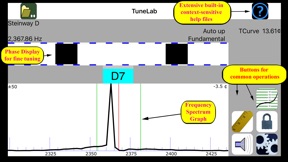
* Provides a strobe-like Phase Display for fine-tuning.
* Provides a versatile frequency spectrum display.
TuneLab lets you customize a tuning by sampling the inharmonicity for a few notes of the particular piano. You can choose the kind of tuning stretch you want, based on octaves, 12ths, double-octaves, or other intervals. Good defaults are in place if you are not sure which settings you prefer. Then you start tuning.
After a custom tuning has been created from inharmonicity measurements you can store this tuning by name. The next time you need to tune that piano, or one very much like it, you simply load that same tuning file and start tuning. There is essentially no limit to the number of tuning files that you can store. TuneLab comes with some sample tuning files and an "Average" tuning file so you can start tuning right away without bothering to measure inharmonicity.
TuneLab covers the normal piano range from A0 to C8 (88 notes). The automatic note-switching feature makes it possible to enjoy hands-free operation. There is also easy one-touch manual note switching.
TuneLab has two different displays that are visible at the same time. One is the Phase Display. This is a band where black squares move left or right. The object in tuning is to make the squares stop moving. The other is a Spectrum Display. This is a graph that shows a peak in the audio frequency spectrum for every pitch present in the sound. The object here is to tune so as to place the peak in the graph at a central red line. The spectrum display makes it possible to do rough tuning without mutes, since each string of a unison produces its own peak in the graph. Having both the Phase Display and the Spectrum Display visible at the same time gives you a more complete picture of the tuning than any single spinner-type or needle-type display.

What's New in Version 4.4

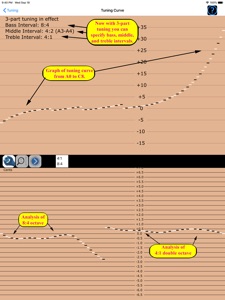
* A new tuning curve generation method called "3-part tuning" provides the means to specify the kind of interval that should be beatless at three separate places in the scale: bass, treble, and middle.
* "Auto-all" note switching mode will now switch automatically from any note to any other note.

Seller

Name

Real-Time Specialties, inc.

Information

Categories

Version

4.4

Size

29.6 MB

Game Center

No

VPP Device Licensing

Yes

Rating

Rated: 4+

Compatibility

iOS 9.0 or later

Devices

iPhone 4S, iPhone 5, iPhone 5c, iPhone 5s, iPhone 6, iPhone 6 Plus, iPhone 6s, iPhone 6s Plus, iPhone SE, iPhone 7, iPhone 7 Plus, iPhone 8, iPhone 8 Plus, iPhone X, iPhone XR, iPhone XS, iPhone XS Max, iPhone 11, iPhone 11 Pro, iPhone 11 Pro Max, iPad 2 (Wi-Fi), iPad 2 (3G), iPad (3rd Generation) (Wi-Fi), iPad (3rd Generation) (4G), iPad (4th Generation) (Wi-Fi), iPad (4th Generation) (4G), iPad (5th Generation) Wi-Fi, iPad (5th Generation) Wi-Fi + Cellular, iPad (6th generation) Wi-Fi, iPad (6th generation) Wi-Fi + Cellular, iPad Pro, iPad Pro (Cellular), iPad Pro (9.7-inch), iPad Pro (9.7-inch) (Cellular), iPad Pro 12.9-inch (2nd generation), iPad Pro 12.9-inch (2nd generation) Wi-Fi + Cellular, iPad Pro (10.5-inch), iPad Pro (10.5-inch) Wi-Fi + Cellular, iPad Pro (11-inch), iPad Pro (11-inch) Wi-Fi + Cellular, iPad Pro 12.9-inch (3rd generation), iPad Pro 12.9-inch (3rd generation) Wi-Fi + Cellular, iPad Air, iPad Air (Cellular), iPad Air 2, iPad Air 2 (Cellular), iPad Air (3rd generation), iPad Air (3rd generation) Wi-Fi + Cellular, iPad mini (Wi-Fi), iPad mini (4G), iPad mini Retina, iPad mini Retina (Cellular), iPad mini 3, iPad mini 3 (Cellular), iPad mini 4, iPad mini 4 (Cellular), iPad mini (5th Generation), iPad mini (5th Generation) Wi-Fi + Cellular, iPad (7th generation) Wi-Fi + Cellular, iPod touch (5th generation), iPod touch (6th Generation), iPod touch (7th generation), Apple Watch Series 4, Apple Watch Series 5

Languages

English

App Store: Customer Ratings

Ratings & Reviews

5.0 of 5 (1 Rating)

App Store: Customer Reviews

2010-09-06

In tune every time

What a fab apps and a fraction of the price of other similar products on the Market (ones with spinning wheels). Tune lab pro is for professional tuners like myself who are Back to back with work. It takes the stress out of the day by helping you tune perfectly every time. Learn more about tuning than you could ever dream of. I have to give this apps top marks. Happy tuning but mined your battery life on the I phone ....you'll need your charger.
jaszy p