Updating
CamerAlert
Released: 2010-02-15
© 2017 PocketGPSWorld.com Ltd - All Rights Reserved Worldwide


iPhone Screenshots
iPad Screenshots
Description
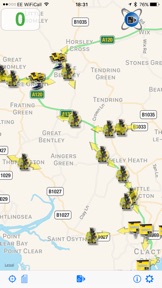
CamerAlert is a self-contained Speed and Red Light Camera warning system using data from the renowned PocketGPSWorld.com Speed Camera Database. Whilst you drive, it provides audible and visual warnings as you approach speed camera locations as well as giving your average speed during SPECs cameras. CamerAlert uses directional information to reduce false alerts, you are only warned of cameras that are relevant to your direction of travel.
Featured in The Sunday Times Top 500 Apps Worldwide
SUPPORT: We ALWAYS reply to support requests. If you've logged a support ticket and you have not received a reply within 24hrs MAX then please check your junkmail or spam filters.
TIP FOR BETTER NOTIFICATIONS: In the main iPhone settings go to Notifications. From the list select CamerAlert & then choose the 'Alert' notification type. This will keep a blue pop up on screen until you have passed the camera. The default is the 'Banner' type which vanishes after 2 seconds.
MIRRORED DISPLAY: If your display is mirrored, then you have the "Mirror Display" option enabled in settings. This is explained in the user-guide - please take a moment to read it before posting a negative review
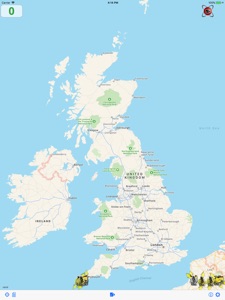
CamerAlert has two distinct modes: Map and List. In Map mode you are shown a map with the cameras located on it. In List mode you are shown a list of all the cameras in your vicinity. You can see the camera type, distance & direction. CamerAlert supports multitasking so you can run it in combination with your preference of Navigation App.
COMPATIBILITY: CamerAlert requires iOS 9.0 minimum and supports iPhone 3G, 4 & 4S and all iPad 3G models. It will not function on non-3G iPad or iPod Touch unless you use an Apple approved GPS receiver accessory. Map mode requires a data connection. iPod Touch users or those wishing to avoid mobile internet use (or whilst roaming) can run the app in list mode which uses no data.
IMPORTANT: CamerAlert, when first installed, has a demo Speed Camera Database. To ensure you have the latest camera data we include a free trial subscription, after which you will need to subscribe for updates. You do not need to register for the free trial.
In-App subscriptions will be charged to your iTunes account after you confirm the purchase, they do not auto-renew at the end of the purchased period. In-App subscriptions require registration to allow you to restore and use your subscription on all of your devices.
In-App subscriptions are £3.99 for one month, £8.99 for 3 months or £19.99 for 12 months. The database is updated on a weekly basis.
If you are not an existing subscriber you can subscribe via Apple's In-App Purchase service to ensure continued access to updates. In-App subscriptions can be only be used on iOS devices linked to the Apple ID used to make the original In-App purchase.
PocketGPSWorld.com Ltd subscribers can use their annual membership for camera updates by linking within the app.
Another feature, unique to this app, is that the latest data can be downloaded over the air at any time (mobile internet or WiFi required) to ensure you have the most up-to-date speed camera information available at all times.
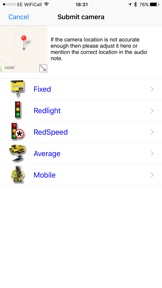
If you see a camera that is not in the database then you can report it using CamerAlert. This feature can also be used to change information about a camera already in the database i.e. changing speed or direction information.
Disclaimer: The use of a speed camera warning device may not be legal in all countries and territories. Continued use of GPS can dramatically decrease battery life. External power is advised.
Privacy and Terms
For privacy and terms please visit http://www.cameralert.com/privacy-policy/
What's New in Version 2.0.7
Updated settings to allow the 'Ignore Direction' option to be set/reset correctly.
Seller
Name
PocketGPSWorld.com Ltd
Information
Developer
Categories
Version
2.0.7
Size
8.1 MB
Game Center
No
VPP Device Licensing
Yes
Rating
Rated: 4+
Compatibility
iOS 9.0 or later
Devices
iPhone 11 Pro Max, iPad Air 2 (Cellular), iPad mini Retina (Cellular), iPad Pro (11-inch), iPad (5th Generation) Wi-Fi, iPad (6th generation) Wi-Fi, iPod touch (6th Generation), iPad Pro (11-inch) Wi-Fi + Cellular, iPad (6th generation) Wi-Fi + Cellular, iPad Pro 12.9-inch (3rd generation), iPad (5th Generation) Wi-Fi + Cellular, iPad mini (5th Generation) Wi-Fi + Cellular, iPad mini (5th Generation), iPad Pro, iPad mini 3, iPad mini 4 (Cellular), iPad mini 4, iPhone 11, iPod touch (7th generation), iPad mini 3 (Cellular), iPad Air, iPad Air 2, iPad Pro 12.9-inch (2nd generation), iPad Pro (Cellular), iPad Pro (9.7-inch) (Cellular), iPad Pro (10.5-inch) Wi-Fi + Cellular, iPad Pro (9.7-inch), iPad mini Retina, iPad Air (Cellular), iPad Air (3rd generation) Wi-Fi + Cellular, iPhone 6 Plus, iPad Air (3rd generation), iPad Pro (10.5-inch), iPad Pro 12.9-inch (2nd generation) Wi-Fi + Cellular, iPhone 6, iPhone XR, iPhone XS, iPhone 6s, iPhone SE, iPhone 7 Plus, iPhone 6s Plus, iPhone 5s, iPhone X, iPhone 8, iPhone XS Max, iPhone 8 Plus, iPhone 7, iPhone 5, iPad (7th generation) Wi-Fi, iPhone 5c, iPad (7th generation) Wi-Fi + Cellular, iPad Air3, iPad Air3Cellular, iPad Mini5, iPad Mini5Cellular, iPhone 11 Pro, iPad Pro 12.9-inch (3rd generation) Wi-Fi + Cellular
Languages
English
App Store: Customer Ratings
Ratings & Reviews
3.0 of 5 (37 Ratings)
App Store: Customer Reviews
No Entry