Updating


+8
#11 in Top Paid Apps > Business
-1
#35 in Top Paid iPad Apps > Business
iPhone Screenshots
iPad Screenshots


Description
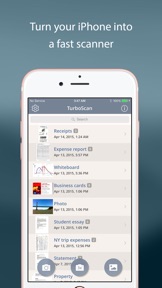
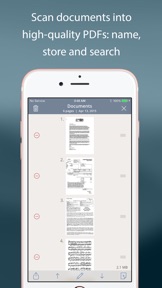
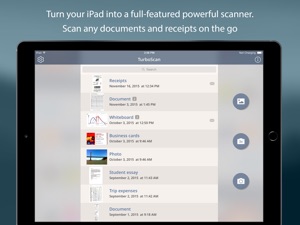
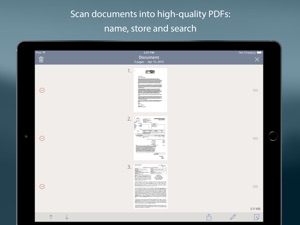
TurboScan turns your iPhone into a full-featured and powerful scanner for documents, receipts, books, photos, whiteboards, and other text. Using just your iPhone or iPad, you can quickly scan your multipage documents in high quality PDFs or JPEGs, name, store and send them anywhere.
• "I was going to buy a Quick Scanner so I could go paperless, but this app has just saved me hundreds of dollars" (TurboScan user)
• Featured in The NY Times, CNN Money and The Telegraph.
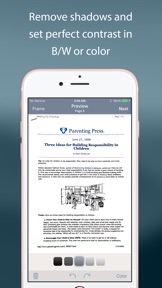
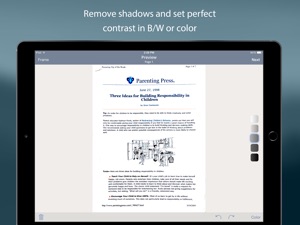
TurboScan uses advanced fast algorithms to accurately detect document edges, straighten them (correct perspective), eliminate shadows and set a perfect contrast for text - black on white. Color and photo modes are also available.
TurboScan boasts a powerful yet easy to use interface. Get instant one-tap brightness, rotation and color controls all on one screen!
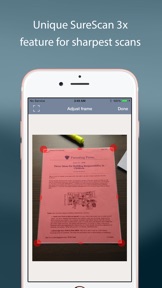
TurboScan also offers SureScan, our proprietary scanning mode for sharper scans (especially useful in low-light conditions.) SureScan automatically takes three pictures of the same document, giving you guaranteed perfect result every time.
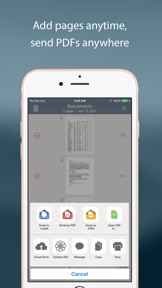
TurboScan's handy "Email to myself" feature lets you routinely send documents to a predefined address with one tap, or even upload them to online storage sites like Evernote.
All processing happens on your iPhone, and the confidentiality of your data is never compromised (no Internet connection needed.)
TURBOSCAN FEATURES:
• Automatic document edge detection and perspective correction
• SureScan 3x mode for sharpest scans
• Touch ID & passcode lock
• Document naming, storage inside the app and smart search
• Add and reorder pages at any time
• Arrange multiple receipts or business cards on a PDF page for printing, etc.
• “Email to myself” feature for quick routine emails
• Email or message documents as PDF, JPEG, or PNG, or save to Photos
• Upload, auto-upload and backup to iCloud Drive
• Open PDFs or JPEGs in other apps like Dropbox or Google Drive to send to clouds
• Copy & paste scans to other scans or Clipboard, and merge
• AirDrop function (press Open PDF In...)
• Printing via AirPrint or printing apps
• Compact attachments with adjustable size
• Ultra-fast processing (under 4 seconds per page)
TIPS ON SCANNING
• Make sure your document is flat and well lit.
• For best edge detection, include some margin around your document while shooting.
• Use flash in low light conditions, but avoid glare with glossy documents.
We're constantly improving TurboScan, and we value our customers' opinions and feedback. Please email us at support@turboscanapp.com. Thank you!
What's New in Version 2.9.8
• Define default "From" email account in Settings
• Fixed a bug with calling TurboScan from other apps like XpenseTracker
• Other improvements and fixes
Information
Developer
Categories
Version
2.9.8
Size
25.3 MB
Game Center
No
VPP Device Licensing
Yes
Rating
Rated: 4+
Compatibility
iOS 8.0 or later
Devices
iPhone 11 Pro Max, iPad Air 2 (Cellular), iPad mini Retina (Cellular), iPad Pro (11-inch), iPad (5th Generation) Wi-Fi, iPad (6th generation) Wi-Fi, iPod touch (6th Generation), iPad Pro (11-inch) Wi-Fi + Cellular, iPad (6th generation) Wi-Fi + Cellular, iPad Pro 12.9-inch (3rd generation), iPad (5th Generation) Wi-Fi + Cellular, iPad mini (5th Generation) Wi-Fi + Cellular, iPad mini (5th Generation), iPad Pro, iPad mini 3, iPad mini 4 (Cellular), iPad mini 4, iPhone 11, iPod touch (7th generation), iPad mini 3 (Cellular), iPad Air, iPad Air 2, iPad Pro 12.9-inch (2nd generation), iPad Pro (Cellular), iPad Pro (9.7-inch) (Cellular), iPad Pro (10.5-inch) Wi-Fi + Cellular, iPad Pro (9.7-inch), iPad mini Retina, iPad Air (Cellular), iPad Air (3rd generation) Wi-Fi + Cellular, iPhone 6 Plus, iPad Air (3rd generation), iPad Pro (10.5-inch), iPad Pro 12.9-inch (2nd generation) Wi-Fi + Cellular, iPhone 6, iPhone XR, iPhone XS, iPhone 6s, iPhone SE, iPhone 7 Plus, iPhone 6s Plus, iPhone 5s, iPhone X, iPhone 8, iPhone XS Max, iPhone 8 Plus, iPhone 7, iPhone 5, iPad (7th generation) Wi-Fi, iPhone 5c, iPad (7th generation) Wi-Fi + Cellular, iPad Air3, iPad Air3Cellular, iPad Mini5, iPad Mini5Cellular, iPhone 11 Pro, iPad Pro 12.9-inch (3rd generation) Wi-Fi + Cellular, Watch4
Languages
English, Chinese, French, German, Italian, Japanese, Portuguese, Russian, Spanish
App Store: Customer Ratings
Ratings & Reviews
5.0 of 5 (343 Ratings)
App Store: Customer Reviews
No Entry