AboutTermsPrivacyContact
 
Updating
Machinist Journeyman

Machinist Journeyman

Released: 2010-02-04
© Jim Rowe
Machinist Journeyman - QR Code
Version 17.2
4+
Download on the App Store
Version 17.2
4+
Download on the App Store
Released: 2010-02-04
© Jim Rowe

iPhone Screenshots

Screenshot
Screenshot
Screenshot
Screenshot
Screenshot

Description

Machinist Journeyman was just updated with new features to give you the best app possible. You will be amazed by the amount of "I Use it Everyday" content in this app.
Featured in several Trade Publications, this app is surfacing quickly as the obvious choice for assisting in dozens of everyday Machine Shop Calculations.
*METRIC VERSION NOW IN APP STORE*
Search for "Machinist METRIC Journeyman"
Striving for a User-Friendly Experience, the Journeyman brings you the desired calculations for Chip Thinning Milling Calculations, Circular Interpolation Feed Adjustments, Tapping Feeds, Trig Functions, Sine Bar, Metric & Inch Conversions, Tap Drill Sizes, Desired Spot Drill & C'Drill Diameter by Depth and much more.
The "Machinist Journeyman" includes::
"Picker" Style Decimal-Drill Chart
"Picker" Style Centerdrill Info
MILLING SECTION IPM FEEDS:
*RPM & IPM
*SFM & FPT
*Radial Chip Thinning
*Ballnose Chip Thinning
*45 Degree Lead Angle Chip Thinning
*Tap Speed & Feed
*Threadmill G-Code Program Generator
*Toroidal Milling
MILLING SECTION IPR FEEDS:
*RPM & IPR
*SFM & FPT
*Radial Chip Thinning
*Ballnose Chip Thinning
*45 Degree Lead Angle Chip Thinning
*Tap Speed & Feed
MILLING MISC:
*RPM
*SFM
*Internal Circular Interpolation Feed Adjustments
*External Circular Interpolation Feed Adjustments
TURNING SECTION:
*RPM
*SFM
*Helix Angle and Proper Anvil Selection for Laydown Threading Systems
*Thread Reference Point
*Length to Diameter Ratio
*Smallest Effective Dia for desired SFM based upon Max RPM
*G97 to G96 Constant SFM Calculations
*Surface Finish Calculation
DRILLING SECTION:
*Drill Point Length
*Spot Drill Depth for Desired Diameter
*Center Drill Depth for Desired Diameter
*Center Drill Dimension Information
*Tap Drill Sizes for: NPT, NPS, BSPT & BSPP
*Tap Drill Sizes Calculations for:
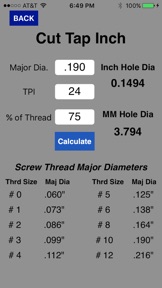
* Cut Tap Inch
* Cut Tap Metric
*Form Tap Inch
*Form Tap Metric
Allows you to calculate Special Thread Specifications, not choosing ONLY from a pre-determined list
MATH:
*NEW* CNC Bolt Circle Calculator, 72 Holes, 3 O'Clock is Zero Degrees and goes Counter ClockWise in Rotation.
Bolt Circle Calculator
*Right Triangle Trig Section
*Sine Bar Height
*Dimensions for + and - Tolerances
*Dimensions for + and + Tolerances
*Dimensions for - and - Tolerances
(Thanks Dave for the Idea)
CONVERSION SECTION:
*IN / MM
*HP / KW
*LB/ KG
*Temperature
*Torque
*Square Across Corners
*Hex Across Corners
*Length to Diameter Ratio
*MM Pitch to Threads per Inch
ESTIMATING CALCULATIONS:
*Qty. of Inserts
*Per Part Tool Cost
*Lathe Cut Time
*Mill Cut Time
*Manual Mill Feeds
*Production Hours Needed for Job
*Feet of Material Needed
SALESMAN CALCULATIONS:
*Profit Margin
*Sell / Cost / Profit
*Off List Discount
REFERENCES:
*NEW* Inch Size Screw Thread Info up to 1-1/4" diameter
*GD&T Symbol Chart
*Rockwell C to Brinell Hardness
INFORMATION:
*Highlighting articles that the Developer has had published which explains certain machining processes.
Future updates will include Video Training Sessions.
Focusing on a User-Friendly Layout, the Journeyman will continue to grow as more areas are developed and will be released as FREE Updates.
Besides just producing the numbers you desire, the Journeyman illustrates certain theories while trying to educate users not familiar with these concepts. This training concept will be continued as the app grows.
Visit www.smartcalculations.com to see more.
NOTE:
We suggest to periodically turn your device off and let it clear any stranded memory. The app will load every time after doing this small step.

What's New in Version 17.2

This app has been updated by Apple to display the Apple Watch app icon.
Added Centerdrill Diameter feature

Seller

Name

James Rowe

URL

Information

Categories

Version

17.2

Size

4.6 MB

Game Center

No

VPP Device Licensing

Yes

Rating

Rated: 4+

Compatibility

iOS 10.0 or later

Devices

iPhone 5, iPhone 5c, iPhone 5s, iPhone 6, iPhone 6 Plus, iPhone 6s, iPhone 6s Plus, iPhone SE, iPhone 7, iPhone 7 Plus, iPhone 8, iPhone 8 Plus, iPhone X, iPhone XR, iPhone XS, iPhone XS Max, iPhone 11, iPhone 11 Pro, iPhone 11 Pro Max, iPhone SE (2nd generation), iPhone 12, iPhone 12 Pro, iPhone 12 Pro Max, iPhone 12 mini, iPhone 13, iPhone 13 Pro, iPhone 13 Pro Max, iPhone 13 mini, iPhone SE (3rd generation), iPhone 14, iPhone 14 Plus, iPhone 14 Pro, iPhone 14 Pro Max, iPad (4th Generation) (Wi-Fi), iPad (4th Generation) (4G), iPad (5th Generation) Wi-Fi, iPad (5th Generation) Wi-Fi + Cellular, iPad (6th generation) Wi-Fi, iPad (6th generation) Wi-Fi + Cellular, iPad Pro, iPad Pro (Cellular), iPad Pro (9.7-inch), iPad Pro (9.7-inch) (Cellular), iPad Pro 12.9-inch (2nd generation), iPad Pro 12.9-inch (2nd generation) Wi-Fi + Cellular, iPad Pro (10.5-inch), iPad Pro (10.5-inch) Wi-Fi + Cellular, iPad Pro (11-inch), iPad Pro (11-inch) Wi-Fi + Cellular, iPad Pro 12.9-inch (3rd generation), iPad Pro 12.9-inch (3rd generation) Wi-Fi + Cellular, iPad Air, iPad Air (Cellular), iPad Air 2, iPad Air 2 (Cellular), iPad Air (3rd generation), iPad Air (3rd generation) Wi-Fi + Cellular, iPad mini Retina, iPad mini Retina (Cellular), iPad mini 3, iPad mini 3 (Cellular), iPad mini 4, iPad mini 4 (Cellular), iPad mini (5th Generation), iPad mini (5th Generation) Wi-Fi + Cellular, iPad (7th generation) Wi-Fi + Cellular, iPad Pro 11-inch (2nd generation), iPad Pro 11-inch (2nd generation) Wi-Fi + Cellular, iPad Pro 12.9-inch (4th generation), iPad Pro 12.9-inch (4th generation) Wi-Fi + Cellular, iPad Air (4th Generation) (Wi-Fi), iPad Air (4th Generation) (Wi-Fi + Cellular), iPad (8th generation) Wi-Fi, iPad (8th generation) Wi-Fi + Cellular, iPad Pro 11-inch (3rd generation), iPad Pro 11-inch (3rd generation) Wi-Fi + Cellular, iPad Pro 12.9-inch (5th Generation), iPad Pro 12.9-inch (5th Generation) Wi-Fi + Cellular, iPad (9th Generation), iPad (9th Generation) Wi-Fi + Cellular, iPad mini (6th Generation), iPad mini (6th Generation) Wi-Fi + Cellular, iPad Air (5th generation), iPad Air (5th generation) Wi-Fi + Cellular, iPad Pro 11-inch (4th generation), iPad Pro 11-inch (4th generation) Wi-Fi + Cellular, iPad Pro 12.9-inch (6th generation), iPad Pro 12.9-inch (6th generation) Wi-Fi + Cellular, iPad (10th generation), iPad (10th generation) Wi-Fi + Cellular, iPod touch (6th Generation), iPod touch (7th generation)

Languages

English

App Store: Customer Ratings

Ratings & Reviews

2.0 of 5 (1 Rating)

App Store: Customer Reviews

2010-02-25

No metric

I agree with the above review, £5.99 for a machinist app with very little metric support is pretty shocking. How about a G/M code reference page as well. Add these things + lower the price = 5 stars
Cnc uk
2010-02-12

Ok but more options needed

Paid good money for this for the sheer convenience of being able to do basic threading and speed/feed calculations from my pocket and in principle this app would be perfect but there's no option to switch the formulas to metric. Given how easy it would be for the developers to do it really should be in there as a global or per page option. I don't want to know about threads per inch any more than I want to know how big my NC programs are in feet of tape. Please update then 5 stars!!
Slipstool