AboutTermsPrivacyContact
 
Updating
WiFi Camera - Remote iPhones

WiFi Camera - Remote iPhones

Released: 2012-08-13
© Daniel Amitay
WiFi Camera - Remote iPhones - QR Code
Version 2.4
4+
Download on the App Store
Version 2.4
4+
Download on the App Store
Released: 2012-08-13
© Daniel Amitay

iPhone Screenshots

Screenshot
Screenshot
Screenshot
Screenshot

iPad Screenshots

Screenshot
Screenshot
Screenshot
Screenshot

Description

WiFi Camera makes a great remote-photography tool! Set up one device to take a group photo, and use the other as a remote!
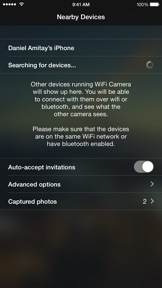
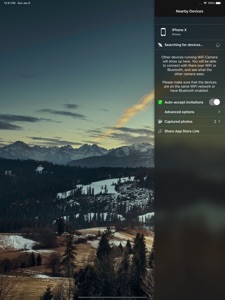
WiFi Camera will allow you to connect two iOS devices wirelessly. You will be able to receive and transmit the camera view with the other device, in addition to sending photo capture requests, which will take a full-resolution photo on the receiving device, transfer it to the requesting device, and save the photo on both devices.
Simply download WiFi Camera, install and run it on two devices or more, and it works like a charm! NOTE: You need to install and run WiFi Camera on two devices, one of which should have a camera.
- Works on all iPhones, iPads, iPod Touches! (iOS 7.0+)
- Fast image streaming
- WiFi or Bluetooth connection
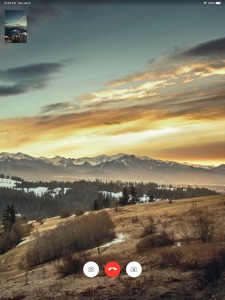
- Picture-in-picture view of what is being transmitted
- Beautiful, intuitive interface
- One-touch connect & disconnect
- Interface rotates with the device
- Facetime-like interface
Connection Issues?
It is possible that your wireless network does not support the Bonjour Networking protocol that WiFi Camera utilizes. You should make sure that both devices are successfully connected to the same wireless network and that there is successful connectivity. If this does not work, it is recommended that bluetooth be turned on for both devices.

What's New in Version 2.4

Crash fix on iOS 12 devices

Seller

Information

Developer

Categories

Version

2.4

Size

2.8 MB

Game Center

No

VPP Device Licensing

Yes

Rating

Rated: 4+

Compatibility

iOS 7.0 or later

Devices

iPad (4th Generation) (4G), iPhone 11 Pro Max, iPad Air 2 (Cellular), iPad mini Retina (Cellular), iPad Pro (11-inch), iPad (5th Generation) Wi-Fi, iPad (6th generation) Wi-Fi, iPod touch (6th Generation), iPad Pro (11-inch) Wi-Fi + Cellular, iPad (6th generation) Wi-Fi + Cellular, iPad Pro 12.9-inch (3rd generation), iPad (5th Generation) Wi-Fi + Cellular, iPad mini (5th Generation) Wi-Fi + Cellular, iPad mini (5th Generation), iPad Pro, iPad mini 3, iPad mini 4 (Cellular), iPad mini 4, iPhone 11, iPod touch (7th generation), iPad mini 3 (Cellular), iPad Air, iPad Air 2, iPad Pro 12.9-inch (2nd generation), iPad Pro (Cellular), iPad Pro (9.7-inch) (Cellular), iPad Pro (10.5-inch) Wi-Fi + Cellular, iPad Pro (9.7-inch), iPad mini Retina, iPad Air (Cellular), iPad Air (3rd generation) Wi-Fi + Cellular, iPhone 6 Plus, iPad Air (3rd generation), iPad Pro (10.5-inch), iPad Pro 12.9-inch (2nd generation) Wi-Fi + Cellular, iPhone 6, iPhone XR, iPhone XS, iPhone 6s, iPhone SE, iPhone 7 Plus, iPhone 6s Plus, iPhone 5s, iPhone X, iPhone 8, iPhone XS Max, iPhone 8 Plus, iPhone 7, iPhone 5, iPad (7th generation) Wi-Fi, iPhone 5c, iPad (7th generation) Wi-Fi + Cellular, iPad Air3, iPad Air3Cellular, iPad Mini5, iPad Mini5Cellular, iPhone 11 Pro, iPad Pro 12.9-inch (3rd generation) Wi-Fi + Cellular

Languages

English

App Store: Customer Ratings

Ratings & Reviews

0.0 of 5 (No rating)

App Store: Customer Reviews

2018-10-02

Stopped working with ios12 update, shame,

Stopped working with ios12 update
steve prd
Version 2.2
2017-03-18

Can't get it to work

Can see devices, it says connecting but then kicks back to original screen. Waste of money, went back to using Presence app.
Camajk
Version 2.2
2016-11-04

Don't buy it

Waste of time and money
Dad 10101
Version 2.2
2016-09-12

Doesn't really work

Both devices show up and both say connecting with invitations auto accepted. But it never connects just flashes back to the main screen both devices on latest iOS. I reckon the ports are set to something nonstandard over hotspot. DEV PLEASE TRY PORT 80 option to minimise problems.
Profees
Version 2.2
2016-04-12

Could do with a record option

As the title says really
That's the only thing that lets it down as there are times I see the baby or kids doing stuff when I am not there which I wish was recorded 😊
Balian 23
Version 2.2
2016-03-27

Babycam!

Works perfect as a babycam. Used an unwanted iPhone, hung it on the wall, and I can now flick on my iPad to see perfect footage of little 'un asleep. 79p well spent.
Nafemeister
Version 2.2
2015-05-19

Reversing camera!

Mount your iPhone to trailer with suction mount, connect with this app to ipad and you have a free reversing camera. Mount iPhone above tow ball and no longer will you hit the bumper when hitching up... Cool! Cheaper than a dedicated kit, just remember to take camera off back of car before heading off down the motorway
Self employed,
Version 2.1
2013-12-29

Waste of money

I tried this app by using my iPad, iPad mini and iPhone in various configurations. All I managed to achieve, in between the constant disconnecting and reconnecting, was to take a couple of images that came out completely black. Absolutely useless. The preview screen looks like a first generation digital camera. I can only hope that when it does work it produces better images than the preview.
If others have more success with this then I am happy for you, but as far as I am concerned this app is now deleted from all of my devices and is regarded as an educational purchase - it taught me a lesson.
Polar Explorer
Version 1.2
2013-03-24

Good app

Connected straight away good pictures nice and clear
5 stars for me
Mec man
Version 1.2
2013-02-12

It works - sort of

Connected iPhone and iPad together no problem, however streaming video quality is awful.
Johndoe142
Version 1.2
2013-01-03

Picture quality lets it down badly

A great idea and a great app apart from the one major thing you'd want to do with it - ie take pictures. Simple to use but the picture quality is like webcams of the 80s
Ade_J
Version 1.2
2012-11-17

Poor picture quality

Quality is very very poor, like a 10 year old webcam.
Joe.Bro
Version 1.2
2012-10-30

Ok ish

Picture quality isn't that great
And it keeps disconnecting from iPad to iPhone everytime I a photo
Please sort this out and then this app would get a five star
ashfu
Version 1.2
2012-10-26

Useless, rarely works

Managed to take a few pictures, but then the connection is lost and you have to restart and grant permission again.
w0lfiesmith
Version 1.2
2012-10-23

Crap app

Doesn't work
Bigwilly&thetwins
Version 1.2
2012-10-15

Great app!

This is a really fantastic app. It can be used as a photo self timer as suggested but its better as a spy camera. Put one device in a room and you can spy on what's going on in the room and take pictures as evidence. It needs one thing a way of automatically connecting so you don't have to click accept each time you turn on the app.
Jack?????
Version 1.2