AboutTermsPrivacyContact
 
Updating
SSTV Slow Scan TV

SSTV Slow Scan TV

Released: 2010-08-27
© 2010-2017 Black Cat Systems
SSTV Slow Scan TV - QR Code
Version 2.0
4+
Download on the App Store
Version 2.0
4+
Download on the App Store
Released: 2010-08-27
© 2010-2017 Black Cat Systems

iPhone Screenshots

Screenshot

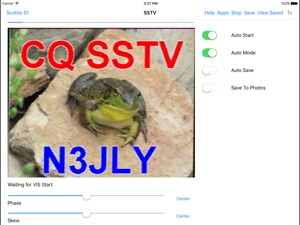
iPad Screenshots

Screenshot

Description

Want to display or send SSTV transmissions, without using a bulky computer? SSTV Pad lets you decode and display Ham (Amateur) Radio SSTV (Slow Scan TV) transmissions. Just connect your device to an HF radio (or even set it next to the radio's speaker), tune in an SSTV frequency, and watch the pictures. SSTV Pad decodes all of the popular SSTV modes, including Robot, Scottie, Martin, and more. Some modes are receive only.
Decoding of SSTV transmissions begins automatically as soon as the start of image audio signals are detected, and the image format is automatically selected. Manual control is also available for use when receiving conditions are poor. Timing signals (phase and skew) can be adjusted to compensate for mismatches with the sending station.
Received images can be saved - including automatically as they are received. You can leave the app running unattended, and come back to view all the received images. You can review saved images, as well as send them via email, and use iTunes file sharing to transfer them to your computer. You can even share them on your Facebook page, or tweet them to your followers, directly from the app! (iOS 6 and later)
You can also transmit images, taken from your saved photos or taken with your device's camera. Text, such as your callsign, can be added to the sent image.
Buy your copy right now, and start decoding and displaying SSTV transmissions in minutes. Just set your iPhone or iPad next to the radio speaker, and watch the pictures come rolling in.
Note: If you cannot see the transmit button, go to the Accessibility settings for your device and turn Button Shapes OFF. It makes the buttons too large so you cannot see them all.
Also, It is very important to have a well tuned signal of good quality, and make sure you get the audio from your radio to your device without adding additional distortion, or auto start and mode detect will not work optimally. Please see this page for tips on using the app and connecting your radio: http://www.blackcatsystems.com/ipad/iPad_SSTV_Pad_FAQ.html
You can also use Bluetooth audio devices to feed audio into your device. Please be sure to use a good quality Bluetooth device, that does not distort the audio.
Modes supported for reception (not all modes can be transmitted):
B&W 8 sec
B&W 12 sec
B&W 24 sec
B&W 36 sec
Martin M1
Martin M1
Martin M2
Martin M3
Martin M4
MP73"
MP115
MP140
MP175
MR73
MR90
MR115
MR140
MR175
PD 50
PD 90
PD 120
PD 160
PD 180
PD 240
PD 290
Robot 12C
Robot 24C
Robot 36C
Robot 72C
SC-1 32 sec
SC-1 16 sec
SC-1 8 sec
SC-2-60
SC-2-120
SC-2-180
Scottie S1
Scottie S2
Scottie S3
Scottie S4
Scottie DX

What's New in Version 2.0

Can now add multi line text to transmitted images.
Updates for iOS 10.2

Information

Categories

Version

2.0

Size

1.6 MB

Game Center

No

VPP Device Licensing

Yes

Rating

Rated: 4+

Compatibility

iOS 6.0 or later

Devices

iPhone 3GS, iPhone 4, iPhone 4S, iPhone 5, iPhone 5c, iPhone 5s, iPhone 6, iPhone 6 Plus, iPhone 6s, iPhone 6s Plus, iPhone SE, iPhone 7, iPhone 7 Plus, iPhone 8, iPhone 8 Plus, iPhone X, iPhone XR, iPhone XS, iPhone XS Max, iPhone 11, iPhone 11 Pro, iPhone 11 Pro Max, iPad 2 (Wi-Fi), iPad 2 (3G), iPad (3rd Generation) (Wi-Fi), iPad (3rd Generation) (4G), iPad (4th Generation) (Wi-Fi), iPad (4th Generation) (4G), iPad (5th Generation) Wi-Fi, iPad (5th Generation) Wi-Fi + Cellular, iPad (6th generation) Wi-Fi, iPad (6th generation) Wi-Fi + Cellular, iPad Pro, iPad Pro (Cellular), iPad Pro (9.7-inch), iPad Pro (9.7-inch) (Cellular), iPad Pro 12.9-inch (2nd generation), iPad Pro 12.9-inch (2nd generation) Wi-Fi + Cellular, iPad Pro (10.5-inch), iPad Pro (10.5-inch) Wi-Fi + Cellular, iPad Pro (11-inch), iPad Pro (11-inch) Wi-Fi + Cellular, iPad Pro 12.9-inch (3rd generation), iPad Pro 12.9-inch (3rd generation) Wi-Fi + Cellular, iPad Air, iPad Air (Cellular), iPad Air 2, iPad Air 2 (Cellular), iPad Air (3rd generation), iPad Air (3rd generation) Wi-Fi + Cellular, iPad mini (Wi-Fi), iPad mini (4G), iPad mini Retina, iPad mini Retina (Cellular), iPad mini 3, iPad mini 3 (Cellular), iPad mini 4, iPad mini 4 (Cellular), iPad mini (5th Generation), iPad mini (5th Generation) Wi-Fi + Cellular, iPad (7th generation) Wi-Fi + Cellular, iPod touch (4th generation), iPod touch (5th generation), iPod touch (6th Generation), iPod touch (7th generation)

Languages

English

App Store: Customer Ratings

Ratings & Reviews

4.5 of 5 (5 Ratings)

App Store: Customer Reviews

2019-12-29

Very good

ISS sending SSTV for a few days just using my hand held scanner and the phone mic got a bit of a picture but lost signal
gpcarl
Version 2.0
2017-01-13

Excellent !

Thank you again for the Update this January of 2017
73's
Maheezik
Version 2.0
2016-08-21

Works ok but fails more often

I find that this app usually fails to recognise the mode being used which is a real shame as when it does work it's great.
Mayedd
Version 1.9
2015-04-12

Sstv

Very hard to sync image. By the time you get near an image, the transmission has finished. 3/5
G4BTI
Version 1.7.1
2014-12-18

Does not save images

Not sure what has gone wrong, it won't save images :-(
When I tell it to save image it shows the file name but I can't find it anywhere. Not in the app and not in the camera roll.
Preseli
Version 1.6.1
2013-02-06

Great App!

Thanks for the hard work, 73
M6NKA
Version 1.3
2013-02-02

Great

Excellent idea for the ipad which works amazingly well. Has enough control to be simple enough for anyone to give it a go. Good work guys!
OpinionatedSteve
Version 1.3
2013-01-15

Basic but does the job

The latest update has included the ability to send images too. I don't know why this was not included from day one. Now I can test it between my ipad and iPhone.
As someone else mentioned the controls are too sensitive. You slide the slider to straighten the image but you cannot lift your finger off the control without it going w only again.
It seems to handle every SSTV format going
Marcel the Monkey
Version 1.3
2012-11-11

Great SSTV RX

This SSTV decoding app works very well, it is easier to use in the iPad rather than to iPhone as it is is easier to use the skew control. It would be useful if the developer could add auto skew correction. Also is there plans to add transmit ability? The app works fine just place the microphone near the radio speaker.
BigBobby123
Version 1.2.1