AboutTermsPrivacyContact
 
Updating
Money Manager Pro (PC Editing)

Money Manager Pro (PC Editing)

Released: 2010-10-06
© RealByte Inc.
Money Manager Pro (PC Editing) - QR Code
Version 3.2.10
4+
Download on the App Store
Version 3.2.10
4+
Download on the App Store
Released: 2010-10-06
© RealByte Inc.

iPhone Screenshots

Screenshot
Screenshot
Screenshot
Screenshot

Description

We provide two version for iOS (Money Manager Next, Money Manager Pro).
Next version (Blue Icon) is the later version which offers, even more, functionalities than Pro version (Brown Icon).
That is why we recommend using Next version.
Pro version is also good.
“Money Manager” is an optimized application for personal asset management.
※ PC editing function
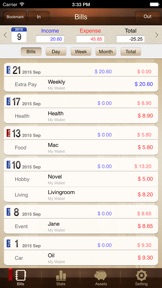
You can view ‘“Money Manager” application by Wi-Fi or 3G. You can see the data sorted by date, category and asset group on the screen of your PC. In addition, you can see fluctuations of your asset indicated by graphs on your PC.
※ Applying double entry bookkeeping
It facilitates efficient asset management. It does not just record your money coming in and out of your account but deposits your money into your account as soon as your income is input and draws money from your account as soon as your expenditure is input.
※ Budget management function
You can manage your budget. It shows your budget and expenditure by a graph so you can see the amount of your expenditure against your budget quickly.
※ Card / Debit Card management function
Entering a settlement date, you can see payment amount and outstanding payment at asset tab. You can arrange the automatic debit by simply connecting your debit card with your account.
※ Passcode
You can check passcode in multitasking state so you can safely manage your account book.
※ Transfer, direct debit and recurrence function
Transfer between assets is possible, which makes your asset management more efficient. In addition, you can manage you salary, insurance, term deposit and loan more easily by setting automatic transfer and recurrence.
※ Instant statistics
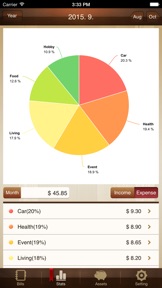
Based on the data entered, you can instantly see your expenditure by category and changes between each month. And you can see change of your assets and income/expenditure indicated by a graph as well.
※ Bookmark function
You can easily input your frequent expenditures all at once by bookmarking them.
※ Backup / Restore
You can make and view backup files in Excel file and backup / restore is possible.
※ Choice of currency – you can freely choose your currency.
※ Other functions
- Change of starting date
- Calculator function (Amount > upper right button)
- Sub Category ON-OFF function

What's New in Version 3.2.10

Minor Bug Fixed.

Information

Developer

Categories

Version

3.2.10

Size

31.7 MB

Game Center

No

VPP Device Licensing

Yes

Rating

Rated: 4+

Compatibility

iOS 8.0 or later

Devices

iPhone 11 Pro Max, iPad Air 2 (Cellular), iPad mini Retina (Cellular), iPad Pro (11-inch), iPad (5th Generation) Wi-Fi, iPad (6th generation) Wi-Fi, iPod touch (6th Generation), iPad Pro (11-inch) Wi-Fi + Cellular, iPad (6th generation) Wi-Fi + Cellular, iPad Pro 12.9-inch (3rd generation), iPad (5th Generation) Wi-Fi + Cellular, iPad mini (5th Generation) Wi-Fi + Cellular, iPad mini (5th Generation), iPad Pro, iPad mini 3, iPad mini 4 (Cellular), iPad mini 4, iPhone 11, iPod touch (7th generation), iPad mini 3 (Cellular), iPad Air, iPad Air 2, iPad Pro 12.9-inch (2nd generation), iPad Pro (Cellular), iPad Pro (9.7-inch) (Cellular), iPad Pro (10.5-inch) Wi-Fi + Cellular, iPad Pro (9.7-inch), iPad mini Retina, iPad Air (Cellular), iPad Air (3rd generation) Wi-Fi + Cellular, iPhone 6 Plus, iPad Air (3rd generation), iPad Pro (10.5-inch), iPad Pro 12.9-inch (2nd generation) Wi-Fi + Cellular, iPhone 6, iPhone XR, iPhone XS, iPhone 6s, iPhone SE, iPhone 7 Plus, iPhone 6s Plus, iPhone 5s, iPhone X, iPhone 8, iPhone XS Max, iPhone 8 Plus, iPhone 7, iPhone 5, iPad (7th generation) Wi-Fi, iPhone 5c, iPad (7th generation) Wi-Fi + Cellular, iPad Air3, iPad Air3Cellular, iPad Mini5, iPad Mini5Cellular, iPhone 11 Pro, iPad Pro 12.9-inch (3rd generation) Wi-Fi + Cellular, Watch4

Languages

English, Chinese, French, German, Japanese, Korean, Portuguese, Russian, Spanish

App Store: Customer Ratings

Ratings & Reviews

0.0 of 5 (No rating)

App Store: Customer Reviews

2012-08-08

Needs some tweaking

Lovely app - ideal for what you need it for. Only thing I would say is the pie chart which splits your income definitely needs more colours! Very annoying when 5 categories have the same colour... Hope this can be looked at!
Dave700700
Version 2.5.1
2011-10-27

Great

Great app use it all the time to keep track of spending. Balances and watching my savings grow through stats.
Flyingwombat007
Version 2.4.3
2011-08-01

Needs work

Needs work. Decimal and coma wrong way round can't set up recurring transfer thats as far as I got not using
udave7
Version 2.3.1
2011-07-04

Great app

Just needs a bit of tweaking. Like being able to view daily & weekly income/outgoings, not just monthly. Other than that it's really useful
Alphamega93
Version 2.3.0