AboutTermsPrivacyContact
 
Updating
ClockZ Pro

ClockZ Pro

Released: 2011-02-01
© 2011-2018 Meruem, Inc.
ClockZ Pro - QR Code
Version 7.6.1
4+
Download on the App Store
Version 7.6.1
4+
Download on the App Store
Released: 2011-02-01
© 2011-2018 Meruem, Inc.

iPhone Screenshots

Screenshot
Screenshot
Screenshot
Screenshot
Screenshot

iPad Screenshots

Screenshot
Screenshot
Screenshot

Description

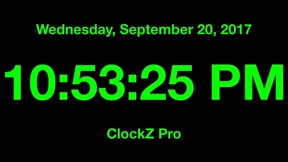
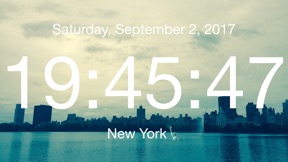
ClockZ Pro is a clock app that displays the current time. Highly customized with 3D map and photo wallpaper changing the color and size of the clock font, additionally widget display is also possible. Music alarm, timer, stopwatch were added in the latest version.
What's difference from ClockZ:
• Custom text can be displayed under the clock
• No Ads
• Apple Watch app
• Apple TV app
Features:
• Basic features of 18 types of backgrounds, text colors, fonts
• Automatically unlock (Automatically does not sleep when launching the app)
• Seconds, Dates and Weeks
• Music Alarm
• Your Photo and 3D Map for backgrounds (Paid)
• Timer
• Stopwatch
• Battery display
• Theme (Paid)
• Text size (Pinch gesture or double tap)
• Brightness
• Sharing feature
• AR Clock (Migrate to new app)
Design
• Clock for large and simple
• Diversity
• Optimized for Night Stand
Supports:
• iPhone / iPad and Latest device, Latest iOS (You can use multiple devices with single purchase)
• Device Rotate (Portrait / Landscape)
• Quick Action (3D touch)
• 15 languages
• Widget (Latest Search Result + Launch App)
• iMessage (Current time display)
• Apple TV (Current time display)
• Apple Watch (Remote control for text colors)
--------------------------------
Frequently Asked Questions
Q. About AM/PM or 24-Hour Time
A. You can change from the Setting app < General < Date & Time < 24-Hour Time.
Q. About Alarm
A. Make sure that notification is enabled from the launch app < Plus button < Settings. Please also check the volume and set time.
Q. About Time lag
A. ClockZ is synchronized with the time of the your device. Please check the time setting of the your device.

What's New in Version 7.6.1

This app has been updated by Apple to display the Apple Watch app icon.
• Fixed music alarm crash for iOS 11.3

Seller

Name

Makoto Katsumata

URL

Information

Developer

Categories

Version

7.6.1

Size

42.8 MB

Game Center

No

VPP Device Licensing

Yes

Rating

Rated: 4+

Compatibility

iOS 9.0 or later

Devices

iPhone 4S, iPhone 5, iPhone 5c, iPhone 5s, iPhone 6, iPhone 6 Plus, iPhone 6s, iPhone 6s Plus, iPhone SE, iPhone 7, iPhone 7 Plus, iPhone 8, iPhone 8 Plus, iPhone X, iPhone XR, iPhone XS, iPhone XS Max, iPhone 11, iPhone 11 Pro, iPhone 11 Pro Max, iPhone SE (2nd generation), iPhone 12, iPhone 12 Pro, iPhone 12 Pro Max, iPhone 12 mini, iPhone 13, iPhone 13 Pro, iPhone 13 Pro Max, iPhone 13 mini, iPad 2 (Wi-Fi), iPad 2 (3G), iPad (3rd Generation) (Wi-Fi), iPad (3rd Generation) (4G), iPad (4th Generation) (Wi-Fi), iPad (4th Generation) (4G), iPad (5th Generation) Wi-Fi, iPad (5th Generation) Wi-Fi + Cellular, iPad (6th generation) Wi-Fi, iPad (6th generation) Wi-Fi + Cellular, iPad Pro, iPad Pro (Cellular), iPad Pro (9.7-inch), iPad Pro (9.7-inch) (Cellular), iPad Pro 12.9-inch (2nd generation), iPad Pro 12.9-inch (2nd generation) Wi-Fi + Cellular, iPad Pro (10.5-inch), iPad Pro (10.5-inch) Wi-Fi + Cellular, iPad Pro (11-inch), iPad Pro (11-inch) Wi-Fi + Cellular, iPad Pro 12.9-inch (3rd generation), iPad Pro 12.9-inch (3rd generation) Wi-Fi + Cellular, iPad Air, iPad Air (Cellular), iPad Air 2, iPad Air 2 (Cellular), iPad Air (3rd generation), iPad Air (3rd generation) Wi-Fi + Cellular, iPad mini (Wi-Fi), iPad mini (4G), iPad mini Retina, iPad mini Retina (Cellular), iPad mini 3, iPad mini 3 (Cellular), iPad mini 4, iPad mini 4 (Cellular), iPad mini (5th Generation), iPad mini (5th Generation) Wi-Fi + Cellular, iPad (7th generation) Wi-Fi + Cellular, iPad Pro 11-inch (2nd generation), iPad Pro 11-inch (2nd generation) Wi-Fi + Cellular, iPad Pro 12.9-inch (4th generation), iPad Pro 12.9-inch (4th generation) Wi-Fi + Cellular, iPad Air (4th Generation) (Wi-Fi), iPad Air (4th Generation) (Wi-Fi + Cellular), iPad (8th generation) Wi-Fi, iPad (8th generation) Wi-Fi + Cellular, iPad Pro 11-inch (3rd generation), iPad Pro 11-inch (3rd generation) Wi-Fi + Cellular, iPad Pro 12.9-inch (5th Generation), iPad Pro 12.9-inch (5th Generation) Wi-Fi + Cellular, iPad (9th Generation), iPad (9th Generation) Wi-Fi + Cellular, iPad mini (6th Generation), iPad mini (6th Generation) Wi-Fi + Cellular, iPod touch (5th generation), iPod touch (6th Generation), iPod touch (7th generation), Apple Watch Series 4
Languages

English, Chinese, Dutch, French, German, Indonesian, Italian, Japanese, Korean, Russian, Spanish, Thai, Turkish, Vietnamese

App Store: Customer Ratings

Ratings & Reviews

4.5 of 5 (11 Ratings)

App Store: Customer Reviews

2017-01-25

Not bad - room for improvement

Not a bad app but with a lot of improvements needed. I notice that when you turn your phone into a horizontal position the date moves into the time section. Also would be nice to be able to alter the brightness through a swipe action (up/down) on the main screen instead of having to go into the settings. Other than that not bad app
Timmit150
Version 6.0.1
2017-01-04

Clock

Love it love it what more can you say just love it every sense I down loaded this app it has never let me down I like it because when ever I look for the time at night it there big and bold keep up the good work👍👍👍
Youaskmeto
Version 6.0.0
2015-06-13

Digital clock

Nice, simple and readable app, especially when somebody ask you at work "what's the time?" You can show it from long distance or as reminder time is up to go to work (not pro-longed breaks).
apogeum
Version 4.0.1
2011-04-23

The clock app

I really like this app because it's so simple and functional. I enjoy using this as a time and date stand. This app is also good because it very customisable with all the colours, fonts etc. If there were to be improvements then it would be an addition of an alarm function or something extra. Overall this is a brilliant app and I would highly recommend this app to my friends. Good job.
AALimited
Version 1.2
2011-04-07

Oh dear

Only displays in landscape and the settings reset to default when you close and restart the app.
Janner007
Version 1.1