AboutTermsPrivacyContact
 
Updating
Snap Camera! - Write notes on your pictures the easy way.

Snap Camera! - Write notes on your pictures the easy way.

Released: 2011-03-18
© 2011, CodeCrop Software
Snap Camera! - Write notes on your pictures the easy way. - QR Code
Version 2.02
4+
Download on the App Store
Version 2.02
4+
Download on the App Store
Released: 2011-03-18
© 2011, CodeCrop Software

iPhone Screenshots

Screenshot
Screenshot
Screenshot
Screenshot
Screenshot

Description

"Snap! is a photo annotation app that looks simple yet useful." - TUAW.com
"... the app does what it says! If you’ve ever come across a need to annotate photos, or think you could use something like this, then grab Snap!" - Christine Chan, appadvice.com
"I like using Snap! because it is one of those apps that does a task efficiently and cleanly, and does it well. The simplicity of use is fantastic and once you start using it, you’ll find that you can’t help but annotate before you fire pics off to FaceBook or Twitter." - AppleBitch.com
"Brilliant tool! - This thing is seriously good - it has a simple interface but there is lots of power. ... Easy to use for casual use, but actually powerful enough for research and professional work!" - loblolly NZ user
Check out a video of Snap in action at http://snap.codecrop.com/
Snap is the easiest way to add notes to your photos! Just snap a photo, write as many notes as you want, move them around with your finger and it'll be saved with the notes overlaid on it.
And sharing on Facebook, Twitter, Evernote or email is just a touch away.
Other apps can do this but only Snap has a beautiful and intuitive interface that makes using it easy and fun.
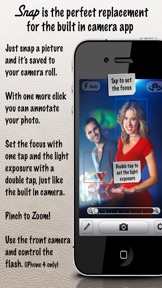
Snap is so fast and easy to use that it can be used as a replacement for the iPhone built-in camera app and be used in a number of situations:
- You're shopping for a new couch and taking a lot of pictures of your choices but later on you don't remember all the prices? Just write the prices on your picture. You can also write the dimensions, name of the store, name of the salesperson, anything!
- Just moved to a new house and need to remember the size of your rooms so you can shop around? Just take a picture and write down all you want.
- Want to remember how this great wine you're drinking tastes like and how much it costs? Snap a picture of the bottle and write it all down!
- Want to document your kid's homework? Take a picture and write the date, grade, description and keep them forever!
- Traveling? Write the names of all the places you've been so you don't forget when showing them to your friends.
- Want to have some fun? Take pictures from your friends and family and add captions, subtitles and labels. Kids love to play with Snap's intuitive interface.
Other great features include:
* Color: Now you can change the text and box color as well as the font and size of the text.
* AirPrint: Print your annotated photos from your iPhone.
* Photo Library: You can write on ANY image of your iPhone's photo library, not only on the pictures you take with the app.
* Auto save: Don't worry about saving your pictures. Snap saves everything in the background so you can keep snapping and taking notes.
* Geotag: Your location is saved on your image file, just like on the iPhone built-in camera app (iOS 4.1 or greater only).
* Touch to focus: Touch on your screen to set the focus anywhere (iPhone 4, 3GS in iOS 4.0 or greater).
* Touch for exposure: Touch twice anywhere to set the light exposure (iPhone 4, 3GS in iOS 4.0 or greater).
* Flash: Control the flash on your iPhone 4 just like on the built-in camera app.
* Front Camera: With the iPhone 4, take pictures with the front camera just like on the built-in camera app.
* Picture quality: Choose from high quality or low quality pictures.
* Pinch and zoom: Add notes to specific areas with a different font size.
* Orientation: Portrait and landscape orientation when adding notes.
* Go to http://support.codecrop.com to see all the planned features we have and to make suggestions of your own.
* Please, don't use the review for questions or complaints, as we can't answer using iTunes but we'll answer every email you send to support@codecrop.com.

What's New in Version 2.02

This app has been updated by Apple to display the Apple Watch app icon.
- Fixing a crash with the Fonts Keyboard

Seller

Name

Gustavo Ambrozio

Information

Categories

Version

2.02

Size

9.7 MB

Game Center

No

VPP Device Licensing

Yes

Rating

Rated: 4+

Compatibility

iOS 6.0 or later

Devices

iPhone 3GS, iPhone 4, iPhone 4S, iPhone 5, iPhone 5c, iPhone 5s, iPhone 6, iPhone 6 Plus, iPhone 6s, iPhone 6s Plus, iPhone SE, iPhone 7, iPhone 7 Plus, iPhone 8, iPhone 8 Plus, iPhone X, iPhone XR, iPhone XS, iPhone XS Max, iPhone 11, iPhone 11 Pro, iPhone 11 Pro Max, iPhone SE (2nd generation), iPhone 12, iPhone 12 Pro, iPhone 12 Pro Max, iPhone 12 mini, iPhone 13, iPhone 13 Pro, iPhone 13 Pro Max, iPhone 13 mini, iPhone SE (3rd generation), iPhone 14, iPhone 14 Plus, iPhone 14 Pro, iPhone 14 Pro Max, iPhone 15, iPhone 15 Plus, iPhone 15 Pro, iPhone 15 Pro Max, iPad 2 (Wi-Fi), iPad 2 (3G), iPad (3rd Generation) (Wi-Fi), iPad (3rd Generation) (4G), iPad (4th Generation) (Wi-Fi), iPad (4th Generation) (4G), iPad (5th Generation) Wi-Fi, iPad (5th Generation) Wi-Fi + Cellular, iPad (6th generation) Wi-Fi, iPad (6th generation) Wi-Fi + Cellular, iPad Pro, iPad Pro (Cellular), iPad Pro (9.7-inch), iPad Pro (9.7-inch) (Cellular), iPad Pro 12.9-inch (2nd generation), iPad Pro 12.9-inch (2nd generation) Wi-Fi + Cellular, iPad Pro (10.5-inch), iPad Pro (10.5-inch) Wi-Fi + Cellular, iPad Pro (11-inch), iPad Pro (11-inch) Wi-Fi + Cellular, iPad Pro 12.9-inch (3rd generation), iPad Pro 12.9-inch (3rd generation) Wi-Fi + Cellular, iPad Air, iPad Air (Cellular), iPad Air 2, iPad Air 2 (Cellular), iPad Air (3rd generation), iPad Air (3rd generation) Wi-Fi + Cellular, iPad mini (Wi-Fi), iPad mini (4G), iPad mini Retina, iPad mini Retina (Cellular), iPad mini 3, iPad mini 3 (Cellular), iPad mini 4, iPad mini 4 (Cellular), iPad mini (5th Generation), iPad mini (5th Generation) Wi-Fi + Cellular, iPad (7th generation) Wi-Fi + Cellular, iPad Pro 11-inch (2nd generation), iPad Pro 11-inch (2nd generation) Wi-Fi + Cellular, iPad Pro 12.9-inch (4th generation), iPad Pro 12.9-inch (4th generation) Wi-Fi + Cellular, iPad Air (4th Generation) (Wi-Fi), iPad Air (4th Generation) (Wi-Fi + Cellular), iPad (8th generation) Wi-Fi, iPad (8th generation) Wi-Fi + Cellular, iPad Pro 11-inch (3rd generation), iPad Pro 11-inch (3rd generation) Wi-Fi + Cellular, iPad Pro 12.9-inch (5th Generation), iPad Pro 12.9-inch (5th Generation) Wi-Fi + Cellular, iPad (9th Generation), iPad (9th Generation) Wi-Fi + Cellular, iPad mini (6th Generation), iPad mini (6th Generation) Wi-Fi + Cellular, iPad Air (5th generation), iPad Air (5th generation) Wi-Fi + Cellular, iPad Pro 11-inch (4th generation), iPad Pro 11-inch (4th generation) Wi-Fi + Cellular, iPad Pro 12.9-inch (6th generation), iPad Pro 12.9-inch (6th generation) Wi-Fi + Cellular, iPad (10th generation), iPad (10th generation) Wi-Fi + Cellular, iPod touch (4th generation), iPod touch (5th generation), iPod touch (6th Generation), iPod touch (7th generation)

Languages

English

App Store: Customer Ratings

Ratings & Reviews

5.0 of 5 (1 Rating)

App Store: Customer Reviews

2013-11-19

Doesn't work

This doesn't work. Please refund my money.
Asdfhjklpzy
Version 1.51
2012-12-01

Snap Camera

Definitely one of the best and most useful applications I have purchased and so easy to use.
Christine Shefford
Version 1.51
2012-08-25

SNAP.

Brings photos alive.No problem.
Quitediva
Version 1.51
2012-04-07

Does not work on 3GS! Please refund!

Does not work on 3GS! Please refund!
山峰
Version 1.51
2011-06-21

Works well

Works well on iPhone 4 & iPad 2.
Only problem is that top controls are sometimes partially hidden.
Carl K.....
Version 1.30
2011-06-02

Snap!o

"Brill app I thought oh not Another cam app?? But this one is soo simple to use and very effective!' does what it says on the tin,get its well worth .59p
norman downing
Version 1.20