AboutTermsPrivacyContact
 
Updating
Lens•Lab

Lens•Lab

Released: 2011-04-19
© 2011-2018 Jeff Menter
Lens•Lab - QR Code
Version 1.3.2
4+
Download on the App Store
Version 1.3.2
4+
Download on the App Store
Released: 2011-04-19
© 2011-2018 Jeff Menter

iPhone Screenshots

Screenshot
Screenshot
Screenshot

iPad Screenshots

Screenshot
Screenshot

Description

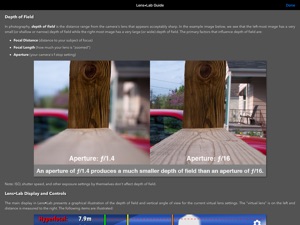
Lens•Lab is a virtual lens simulation tool for photographers of all skill levels. It graphically illustrates how depth of field and field of view relate to your SLR camera and lenses.
Professionals will like how quick and easy it is to get depth of field calculations.
Semi-pro photographers will enjoy configuring "what-if?" scenarios for various lenses.
Photography beginners will find it to be a great learning tool by exploring the interplay of aperture, focal length, and focal distance in real time.
Lens•Lab is more than a great depth of field calculator, it's a lens simulator that can help you explore, see, and intuitively understand how depth of field works with your camera and lenses.
Lens•Lab Features:
Advanced visual depiction of depth of field with real-time controls:
• The background scales from 10 centimeters to 100 meters interactively
• Out-of-focus areas are represented as blurred in real-time
• Distance labels, angle of view, and other information updates as you touch
Easily control aperture, focal length, and focal distance with sliders or touch:
• Aperture (from ƒ/0.95 to ƒ/64 in continuous increments)
• Focal Length (configurable from 1mm to "very large number")
• Focal Distance (from 10cm to 100m)
Information overlays are independently configurable:
• Hyperfocal Distance
• Far Depth of Field
• Focal Distance
• Near Depth of Field
• Total Depth of Field
• Vertical Angle of View
• Distance Scale
• Simulated Blur
Sensor size is configurable for:
• Full Frame (35mm)
• APS-H (1.3x crop factor)
• DX (1.5x crop factor)
• APS-C (1.6x crop factor)
• Four Thirds (2.0x crop factor)
Additionally, there are controls for distance units (metric or imperial) and display of Full Frame Equivalent focal length (for cameras with sensors smaller than full frame.)
Included is a usage guide that explains all features of the application as well as depth of field in photography.
Lens•Lab works with all iPhone, iPod Touch, and iPad models running iOS 8 or newer.

What's New in Version 1.3.2

This app has been updated by Apple to display the Apple Watch app icon.
• Fix for crash on plus devices

Seller

Name

Jeff Menter

URL

Information

Developer

Categories

Version

1.3.2

Size

1.6 MB

Game Center

No

VPP Device Licensing

Yes

Rating

Rated: 4+

Compatibility

iOS 9.0 or later

Devices

iPhone 4S, iPhone 5, iPhone 5c, iPhone 5s, iPhone 6, iPhone 6 Plus, iPhone 6s, iPhone 6s Plus, iPhone SE, iPhone 7, iPhone 7 Plus, iPhone 8, iPhone 8 Plus, iPhone X, iPhone XR, iPhone XS, iPhone XS Max, iPhone 11, iPhone 11 Pro, iPhone 11 Pro Max, iPhone SE (2nd generation), iPhone 12, iPhone 12 Pro, iPhone 12 Pro Max, iPhone 12 mini, iPhone 13, iPhone 13 Pro, iPhone 13 Pro Max, iPhone 13 mini, iPhone SE (3rd generation), iPhone 14, iPhone 14 Plus, iPhone 14 Pro, iPhone 14 Pro Max, iPad 2 (Wi-Fi), iPad 2 (3G), iPad (3rd Generation) (Wi-Fi), iPad (3rd Generation) (4G), iPad (4th Generation) (Wi-Fi), iPad (4th Generation) (4G), iPad (5th Generation) Wi-Fi, iPad (5th Generation) Wi-Fi + Cellular, iPad (6th generation) Wi-Fi, iPad (6th generation) Wi-Fi + Cellular, iPad Pro, iPad Pro (Cellular), iPad Pro (9.7-inch), iPad Pro (9.7-inch) (Cellular), iPad Pro 12.9-inch (2nd generation), iPad Pro 12.9-inch (2nd generation) Wi-Fi + Cellular, iPad Pro (10.5-inch), iPad Pro (10.5-inch) Wi-Fi + Cellular, iPad Pro (11-inch), iPad Pro (11-inch) Wi-Fi + Cellular, iPad Pro 12.9-inch (3rd generation), iPad Pro 12.9-inch (3rd generation) Wi-Fi + Cellular, iPad Air, iPad Air (Cellular), iPad Air 2, iPad Air 2 (Cellular), iPad Air (3rd generation), iPad Air (3rd generation) Wi-Fi + Cellular, iPad mini (Wi-Fi), iPad mini (4G), iPad mini Retina, iPad mini Retina (Cellular), iPad mini 3, iPad mini 3 (Cellular), iPad mini 4, iPad mini 4 (Cellular), iPad mini (5th Generation), iPad mini (5th Generation) Wi-Fi + Cellular, iPad (7th generation) Wi-Fi + Cellular, iPad Pro 11-inch (2nd generation), iPad Pro 11-inch (2nd generation) Wi-Fi + Cellular, iPad Pro 12.9-inch (4th generation), iPad Pro 12.9-inch (4th generation) Wi-Fi + Cellular, iPad Air (4th Generation) (Wi-Fi), iPad Air (4th Generation) (Wi-Fi + Cellular), iPad (8th generation) Wi-Fi, iPad (8th generation) Wi-Fi + Cellular, iPad Pro 11-inch (3rd generation), iPad Pro 11-inch (3rd generation) Wi-Fi + Cellular, iPad Pro 12.9-inch (5th Generation), iPad Pro 12.9-inch (5th Generation) Wi-Fi + Cellular, iPad (9th Generation), iPad (9th Generation) Wi-Fi + Cellular, iPad mini (6th Generation), iPad mini (6th Generation) Wi-Fi + Cellular, iPad Air (5th generation), iPad Air (5th generation) Wi-Fi + Cellular, iPad Pro 11-inch (4th generation), iPad Pro 11-inch (4th generation) Wi-Fi + Cellular, iPad Pro 12.9-inch (6th generation), iPad Pro 12.9-inch (6th generation) Wi-Fi + Cellular, iPad (10th generation), iPad (10th generation) Wi-Fi + Cellular, iPod touch (5th generation), iPod touch (6th Generation), iPod touch (7th generation)

Languages

English

App Store: Customer Ratings

Ratings & Reviews

2.0 of 5 (1 Rating)

App Store: Customer Reviews

2018-04-09

Good but for inaccuracies

Depth of field of a lens is determined by focal length, aperture and distance to subject. It is not however dependant upon sensor size. This app changes the depth of field when you select a different size sensor, which is incorrect. The only difference the sensor size has is to the field of view. Fix this please and this could be a great app.
Robertoliv73
Version 1.3.2
2012-01-26

fab

Very simple, nice to use and, though i haven't checked, the numbers that it gives you seem to be right.
All good.
Slater8r
Version 1.0