AboutTermsPrivacyContact
 
Updating
Glovius - 3D CAD File Viewer

Glovius - 3D CAD File Viewer

Released: 2011-05-09
© 2018 Geometric Americas Inc.
Glovius - 3D CAD File Viewer - QR Code
Version 6.6.1
4+
Download on the App Store
Version 6.6.1
4+
Download on the App Store
Released: 2011-05-09
© 2018 Geometric Americas Inc.

iPhone Screenshots

Screenshot
Screenshot
Screenshot
Screenshot
Screenshot
Screenshot
Screenshot
Screenshot
Screenshot
Screenshot

iPad Screenshots

Screenshot
Screenshot
Screenshot
Screenshot
Screenshot
Screenshot
Screenshot
Screenshot
Screenshot
Screenshot

Description

Glovius for iOS provides a simple and easy way to view, showcase, and collaborate on 3D CAD parts and assemblies on your iPhone and iPad. View 3D parts and assemblies from popular CAD formats. Analyze CAD components, run reports, and collaborate with your team. Glovius for iPhone and iPad is a perfect companion app for Glovius Cloud and Glovius for Windows.
View 3D CAD files on the go
• View 3D CAD files saved in your Dropbox or Glovius Cloud
• Upload parts from your iPhone or iPad
• Upload files on cloud.glovius.com
• One click Push to Cloud from Glovius for Windows
• Open large parts and assemblies in seconds
• Downloaded files are available for offline viewing
3D File Formats Supported
• CATIA (CATPart, CATProduct, CGR), NX (PRT), Creo and Pro/ENGINEER (PRT and ASM)
• SolidWorks (SLDPRT, SLDASM), Inventor (IPT, IAM), Solid Edge (PRT, ASM)
• STP, STEP, IGS, IGES, JT, STL, SketchUp, 3DS, and more.
View 3D Geometry, Attributes, Assembly Product Structure and PMI Information
• Zoom, pan, roll, rotate 3D models; double tap to reset
• Animate through standard views
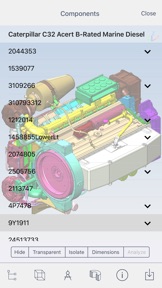
• View assembly product structure and hide/show/isolate components
• View PMI, GDnT and attributes information
Analyze CAD Components
• Tap a component to view bounding box, attributes, make it transparent/solid
• Take point to point measurements
• Cut dynamic sections across standard XY, YZ, XZ planes
Run Reports, right from your iPhone or iPad
• Download Bill of Materials (BoM) report for Assemblies
• Download 3D PDF Report
• Download in high quality STL, 3DS, and OBJ formats
Collaborate with your Team
• Get and share feedback with the Activity Feed
• Save, Share, and email snapshots
• Add text comments, freehand markups on image snapshots
• Get notified when files are added, updated, or commented by others
Supporting Work from Home
• All Glovius apps are free till 31st May 2020.
Feedback and Suggestions
For feedback and suggestions, email us at support@glovius.com. Your feedback is important to us!
Glovius Cloud Subscription Details
Subscribe to Glovius Cloud Plan to continue using Glovius. Payment will be charged to your iTunes Account, and will automatically renew each year within 24 hours of your subscription ending. Cancel any time by turning off auto-renewal in your iTunes Account Settings.
Subscription Pricing
• USA - 18.99 USD per month + Taxes, if applicable
• USA - 98.99 USD per year + Taxes, if applicable
• All other countries priced in USD equivalent.
Apple Subscription Terms
– Payment will be charged to iTunes Account at confirmation of purchase.
– Subscription automatically renews unless auto-renew is turned off at least 24-hours before the end of the current period.
– Account will be charged for renewal within 24-hours prior to the end of the current period, and identify the cost of the renewal.
– Subscriptions may be managed by the user and auto-renewal may be turned off by going to the user's Account Settings after purchase.
– Any unused portion of a free trial period, if offered, will be forfeited when the user purchases a subscription to that publication, where applicable.
Terms & Conditions
https://www.hcltech.com/privacy-statement

What's New in Version 6.6.1

Welcome to Glovius for iOS v6.6.1!
- Supporting Work from Home
- All Glovius apps are free till 30th June 2020
- Bug fixes
Stay safe and healthy.
If you like Glovius, please leave a review! It helps. For support and feedback, write us at support@glovius.com

Seller

Name

Geometric Americas Inc

Information

Developer

Categories

Version

6.6.1

Size

52.6 MB

Game Center

No

VPP Device Licensing

Yes

Rating

Rated: 4+

Compatibility

iOS 10.0 or later

Devices

iPhone 5, iPhone 5c, iPhone 5s, iPhone 6, iPhone 6 Plus, iPhone 6s, iPhone 6s Plus, iPhone SE, iPhone 7, iPhone 7 Plus, iPhone 8, iPhone 8 Plus, iPhone X, iPhone XR, iPhone XS, iPhone XS Max, iPhone 11, iPhone 11 Pro, iPhone 11 Pro Max, iPhone SE (2nd generation), iPhone 12, iPhone 12 Pro, iPhone 12 Pro Max, iPhone 12 mini, iPhone 13, iPhone 13 Pro, iPhone 13 Pro Max, iPhone 13 mini, iPad (4th Generation) (Wi-Fi), iPad (4th Generation) (4G), iPad (5th Generation) Wi-Fi, iPad (5th Generation) Wi-Fi + Cellular, iPad (6th generation) Wi-Fi, iPad (6th generation) Wi-Fi + Cellular, iPad Pro, iPad Pro (Cellular), iPad Pro (9.7-inch), iPad Pro (9.7-inch) (Cellular), iPad Pro 12.9-inch (2nd generation), iPad Pro 12.9-inch (2nd generation) Wi-Fi + Cellular, iPad Pro (10.5-inch), iPad Pro (10.5-inch) Wi-Fi + Cellular, iPad Pro (11-inch), iPad Pro (11-inch) Wi-Fi + Cellular, iPad Pro 12.9-inch (3rd generation), iPad Pro 12.9-inch (3rd generation) Wi-Fi + Cellular, iPad Air, iPad Air (Cellular), iPad Air 2, iPad Air 2 (Cellular), iPad Air (3rd generation), iPad Air (3rd generation) Wi-Fi + Cellular, iPad mini Retina, iPad mini Retina (Cellular), iPad mini 3, iPad mini 3 (Cellular), iPad mini 4, iPad mini 4 (Cellular), iPad mini (5th Generation), iPad mini (5th Generation) Wi-Fi + Cellular, iPad (7th generation) Wi-Fi + Cellular, iPad Pro 11-inch (2nd generation), iPad Pro 11-inch (2nd generation) Wi-Fi + Cellular, iPad Pro 12.9-inch (4th generation), iPad Pro 12.9-inch (4th generation) Wi-Fi + Cellular, iPad Air (4th Generation) (Wi-Fi), iPad Air (4th Generation) (Wi-Fi + Cellular), iPad (8th generation) Wi-Fi, iPad (8th generation) Wi-Fi + Cellular, iPad Pro 11-inch (3rd generation), iPad Pro 11-inch (3rd generation) Wi-Fi + Cellular, iPad Pro 12.9-inch (5th Generation), iPad Pro 12.9-inch (5th Generation) Wi-Fi + Cellular, iPad (9th Generation), iPad (9th Generation) Wi-Fi + Cellular, iPad mini (6th Generation), iPad mini (6th Generation) Wi-Fi + Cellular, iPod touch (6th Generation), iPod touch (7th generation), Apple Watch Series 4, Apple Watch Series 5, Apple Watch Series 6 (GPS), Apple Watch Series 6 (GPS + Cellular), Apple Watch Series SE (GPS), Apple Watch Series SE (GPS + Cellular), Apple Watch Series 7 (GPS), Apple Watch Series 7 (GPS + Cellular)

Languages

English

App Store: Customer Ratings

Ratings & Reviews

1.0 of 5 (2 Ratings)

App Store: Customer Reviews

2019-02-18

Be honest

Uninstalled immediately, disingenuous not to put the costs up front, be honest
dhhjkkkgg
Version 5.4
2013-06-06

Don't buy

What an absolute con - a paid app.... which you can only actually use by subscribing further, an absolute joke!! I can only describe as fraud.... DO NOT BUY
DT100999
Version 3.2
2012-05-10

Surprisingly good

Want to view you 3d model on your iPad - well I did, I wanted to view both my Inventor models and my sketchup designs.
But despite the wealth of Autodesk apps on here viewing an Inventor model for some reason just not available - they ought to look at doing something like the Rhino app. Same is true for Sketchup.
Anyway, this works by converting your file using Babel3d's online conversion system and downloads it to you iPad. It works really well. From the samples I've done the sketchup models worked really well, the inventor ones Ok - all colours were lost it all the model detail was intact.
You can spin your model, zoom etc and there's a built in sectioning viewing tool, just like edrawings, and you can save views as pictures in your photos as well as emailing them.
A (free) Babel acount is required for the conversion process and they give you credit for about 9 model conversions. Thereafter it's 99cents per model.
Gypsypoppit
Version 2.2.3
2011-08-22

Very good tool

I'm a 3d designer on Catia V5 and this as a visual tool to show to customers is well worth the 6.99. Rotation is good, you can also pan & zoom using your two fingers. Unfortunately you can't add other files to make an assembly, nor can you centre rotation to a certain feature, but this isn't a major concern. Uploading files is amazingly easy via their website. Hopefully it'll be improved on the next revisions.
Cragglebaby
Version 2.1