AboutTermsPrivacyContact
 
Updating
Linky for Twitter and Mastodon

Linky for Twitter and Mastodon

Released: 2011-05-22
© 2019 Pragmatic Code
Linky for Twitter and Mastodon - QR Code
Version 6.2.2
4+
Download on the App Store
Version 6.2.2
4+
Download on the App Store
Released: 2011-05-22
© 2019 Pragmatic Code

iPhone Screenshots

Screenshot
Screenshot
Screenshot
Screenshot
Screenshot
Screenshot

iPad Screenshots

Screenshot
Screenshot
Screenshot
Screenshot
Screenshot

Description

Linky lets you easily share webpage links, images and text extracts to Twitter and Mastodon from your iPhone and iPad.
Write your post, choose which preferred social networks and Linky will do the rest! You can connect Linky to Twitter and Mastodon.
Linky's very own iOS Share Extension allows you to post messages without ever leaving third-party applications.
Want to share a webpage Link? Linky can insert both the url and the title of the webpage as required. Linky will suggest images related to shared links and can attach them to your messages. It can also shorten links, giving you access to further link analytics.
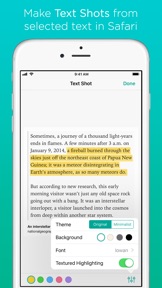
How about selected text in Safari? Linky's Web Clipper extracts selected text and carries it over to the composer sheet, ready for you to edit. You can also make a text shot from the text selection for sharing as a beautiful image.
What about a great photo? Share images easily from Photos app and third-party applications. You can also preview the shared image in fullscreen before sending it.
Share any text too! Bring up the extension, the text is copied in the message, edit if required and share. It's that simple.
Use Markup to annotate, crop and edit images inline. Write or draw on the attachment, or add arrows and lenses, or obscure sensitive information.
"Linky 5.0 removes friction from sharing links, quotes, and images. I appreciate the intelligent use of Open Graph and Twitter Cards to save even more time, and I'm a fan of the deeper controls Linky brings when compared to the default share sheet of Twitter. I can't recommend Linky enough." - MacStories
"Linky turbocharges sharing links and images to Twitter from Safari or other apps supporting iOS extensions." 4/5 - Macworld
Prizes :
• MacStories Must-Have iOS Apps, 2018 Edition
• MacStories Must-Have iOS Apps, 2017 Edition
• MacStories Must-Have iOS Apps, 2016 Edition
• MacStories Must-Have iOS Apps, 2015 Edition
• MacStories Must-Have iOS Apps, 2014 Edition
Features:
• Supports Twitter and Mastodon.
• Post messages simultaneously on multiple accounts.
• iOS Share Extension is integrated directly into Safari and many other third-party apps, allowing to directly share text, images and web page links.
• Add multiple images to your messages (animated gif images are supported).
• Image preview in fullscreen.
• Suggestion of images related to shared links.
• Share selected text in Safari as a text shot image.
• Markup: annotate, crop and edit images inline. Available tools: Sketch, arrows, lenses, text blocks, pixelate, crop & rotate.
• Links, hashtags and mentions are color-highlighted when composing.
• Usernames are auto-completed when typing the @ symbol.
• Links can be shortened when the message is sent using bit.ly, CloudApp, Droplr, Goo.gl, and yourls.org (all link-shorteners require an account).
• Clipboard URL: If a URL is copied to the clipboard from another application, Linky will ask whether you want to use it.
• URL Scheme to launch Linky from other apps using the x-callback-url specification (in-app documentation and examples).
• VoiceOver accessibility for the visually impaired.
• Universal App (iPhone, iPad, iPad Pro).
• Designed for iOS 12 and the Retina HD Display.
• Supports iOS multitasking (Slide Over and Split View on the iPad).
• 3D Touch Peek and Pop in the message composer: peek at toolbar buttons (Link, Title, Text Clip) to get a quick preview and pop to insert in the message.
• Haptic feedbacks.
• Optimized for latest iPhone: XS, XS Max.
• Supports both portrait and landscape orientations on the iPhone and the iPad.

What's New in Version 6.2.2

Fixed a crash that could occur when launching the message composer.

Seller

Information

Categories

Version

6.2.2

Size

18.6 MB

Game Center

No

VPP Device Licensing

Yes

Rating

Rated: 4+

Compatibility

iOS 11.0 or later

Devices

iPhone 5s, iPhone 6, iPhone 6 Plus, iPhone 6s, iPhone 6s Plus, iPhone SE, iPhone 7, iPhone 7 Plus, iPhone 8, iPhone 8 Plus, iPhone X, iPhone XR, iPhone XS, iPhone XS Max, iPhone 11, iPhone 11 Pro, iPhone 11 Pro Max, iPad (5th Generation) Wi-Fi, iPad (5th Generation) Wi-Fi + Cellular, iPad (6th generation) Wi-Fi, iPad (6th generation) Wi-Fi + Cellular, iPad Pro, iPad Pro (Cellular), iPad Pro (9.7-inch), iPad Pro (9.7-inch) (Cellular), iPad Pro 12.9-inch (2nd generation), iPad Pro 12.9-inch (2nd generation) Wi-Fi + Cellular, iPad Pro (10.5-inch), iPad Pro (10.5-inch) Wi-Fi + Cellular, iPad Pro (11-inch), iPad Pro (11-inch) Wi-Fi + Cellular, iPad Pro 12.9-inch (3rd generation), iPad Pro 12.9-inch (3rd generation) Wi-Fi + Cellular, iPad Air, iPad Air (Cellular), iPad Air 2, iPad Air 2 (Cellular), iPad Air (3rd generation), iPad Air (3rd generation) Wi-Fi + Cellular, iPad mini Retina, iPad mini Retina (Cellular), iPad mini 3, iPad mini 3 (Cellular), iPad mini 4, iPad mini 4 (Cellular), iPad mini (5th Generation), iPad mini (5th Generation) Wi-Fi + Cellular, iPad (7th generation) Wi-Fi + Cellular, iPod touch (6th Generation), iPod touch (7th generation)

Languages

English, French

App Store: Customer Ratings

Ratings & Reviews

5.0 of 5 (3 Ratings)

App Store: Customer Reviews

2017-07-11

**WARNING** Screenshot your accounts!

Just a warning to others who might have a lot of accounts added to the app. This latest update REMOVES them all straight after updating. You're not just re-linking them, you have to re-add them from scratch and then re-order them again. Not bad if you only have a few accounts, but if you have a lot it's worth screen-shotting them before updating so you know which you are re-adding and in what order. That's if your pedantic like me anyways and had it set up just like you wanted.
**Actual App Review**
If there is an app that is amazeballs it's this one.
Fantastic addition to the sharing functionality of the iPhone. The ability to add a picture and link to a share at the same time, and share to multiple social media accounts simultaneously is fantastic.
Muti-Facebook account support would make it even more awesome.
Oli Wal
Version 3.0.3
2016-05-14

Excellent Utility Application

This application is really great. It also gets better and better over time. Very well done developers.
manmouna
Version 5.3
2016-01-02

Good, but limited

Only supports login to Twitter/Facebook via the iOS settings, so if you don't use those you can't use the app.
Hatticus
Version 5.2.1
2014-10-05

Great app for fast social posting

It's is a really handy app to publish content from websites quickly to Twitter and Facebook, including pages. Ignore the "doesn't work" review it does work, there was a problem with the App Store, not the dev's fault!
amjbarnesy
Version 4.0.1
2014-02-24

Great App!!

Use this app everyday and it's just brilliant! Save me so much time posting URL's to twitter! Had a slight issue using Linky with iOS Chrome but the developer sorted it out in a couple of hours! Great support!!
Murmike
Version 5.9