AboutTermsPrivacyContact
 
Updating
Moku Hanga

Moku Hanga

Released: 2012-04-04
© JixiPix Software
Moku Hanga - QR Code
Version 1.39
4+
Download on the App Store
Version 1.39
4+
Download on the App Store
Released: 2012-04-04
© JixiPix Software

iPhone Screenshots

Screenshot
Screenshot
Screenshot
Screenshot
Screenshot

iPad Screenshots

Screenshot
Screenshot
Screenshot
Screenshot
Screenshot

Description

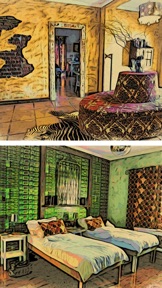
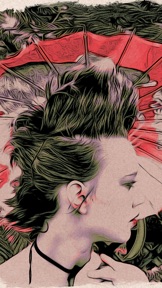
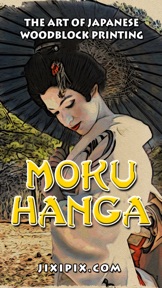
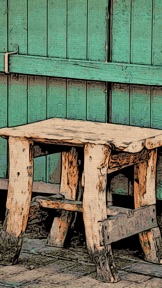
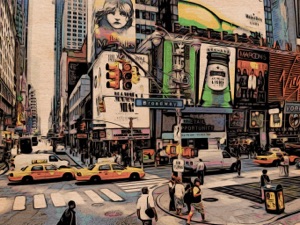
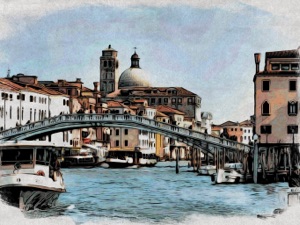
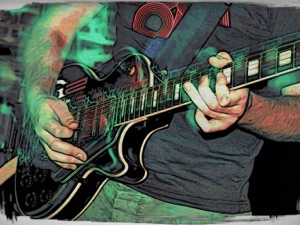
You've discovered the fascinating art of Moku Hanga, the Japanese method of wood-block printing. Breathtaking landscapes, beautiful women, and busy cityscapes can be transformed into this exotic art known for flowing hand-chiseled outlines and brushed on color.
The Moku Hanga app, Moku the Japanese word for “wood” while hanga is known as “print”, allows you to create an artistic wood-block print from any picture or snapshot — no need for time consuming carving — the artists from JixiPix do all the work for you! With the power to fully customize your Moku Hanga, you can create a masterpiece artistic enough be part of printmaking history!
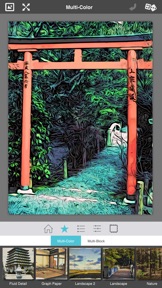
The outlines in Moku Hanga are extremely eye catching, replicating a hand chiseled relief-art. Using sliders found on the adjust tab you can control the smoothness, width and strength of the chiseled outline to fit your composition.
Presets are also available to give your project a quick start. Choose from a range of bold chisled outlines, and bright to subtle color combinations. If the preset colors chosen for your work are not to your liking, there is the option to alter your palette colors. Once the desired color is achieved complete your artwork with an artistic edge or paper. In printmaking the final image does rely on the choice of paper; whether it is kozo fibers or rice paper — this will add an artistic quaility to your print and complete your Moku Hanga.
Moku Hanga Features:
• Automatically create a work of art with the look of hand chiseled outlines and brushed on color, fully adjustable with simple sliders.
• Adjust the outline width, strength and how smooth or fluid your chiseled outline appears.
• Control the color in your artwork with saturation, strength and image color sliders.
• Choose between two printing styles: "Multi-Color" or "Multi-Block".
• The Multi-Color style uses all the original colors in your photo. By adjusting the "Image Color" slider you can reduce or add colors to your artwork giving it a variety of printed-styles, from a full-color block process to spot-color ones.
•The Multi-Block style uses 5 blocks of color pulled from your original image then divides the colors across your artwork giving the look of carving a separate woodblock for every color. The cool thing about this style is the ability to "Randomize Colors" throughout your artwork and the ability to replace any or all of these colors, using the full-spectrum color picker. You can achieve simple to exaggerated color results using this process.
• Works with Hi-Res images and saves Hi-Res for top-quality results
• Gets you started fast with a variety of presets
• Creates personal-favorite custom presets using the "Save Preset" menu
• Has the addictive JixiPix Randomizer – so much fun!
• Superior customer support and updates – we're committed to your long-term satisfaction

What's New in Version 1.39

iOS 12 Optimizations

Seller

Name

JixiPix, LLC

Information

Categories

Version

1.39

Size

20.9 MB

Game Center

No

VPP Device Licensing

Yes

Rating

Rated: 4+

Compatibility

iOS 11.0 or later

Devices

iPad Pro (11-inch), iPad (5th Generation) Wi-Fi, iPad (6th generation) Wi-Fi, iPod touch (6th Generation), iPad Pro (11-inch) Wi-Fi + Cellular, iPad (6th generation) Wi-Fi + Cellular, iPad Pro 12.9-inch (3rd generation), iPad (5th Generation) Wi-Fi + Cellular, iPad mini (5th Generation) Wi-Fi + Cellular, iPad mini (5th Generation), iPad Pro, iPad mini 3, iPad mini 4 (Cellular), iPad mini 4, iPad Pro (Cellular), iPad Pro (9.7-inch) (Cellular), iPad Pro (10.5-inch) Wi-Fi + Cellular, iPad Pro (9.7-inch), iPad Air (3rd generation) Wi-Fi + Cellular, iPhone 6 Plus, iPad Air (3rd generation), iPad Pro (10.5-inch), iPad Pro 12.9-inch (2nd generation) Wi-Fi + Cellular, iPhone 6, iPhone XR, iPhone XS, iPhone 6s, iPhone SE, iPhone 7 Plus, iPhone 6s Plus, iPhone 5s, iPhone X, iPhone 8, iPhone XS Max, iPhone 8 Plus, iPhone 7, iPhone 5, iPad (7th generation) Wi-Fi, iPhone 5c, iPad (7th generation) Wi-Fi + Cellular, iPad Air3, iPad Air3Cellular, iPad Mini5, iPad Mini5Cellular, iPad Pro 12.9-inch (3rd generation) Wi-Fi + Cellular

Languages

App Store: Customer Ratings

Ratings & Reviews

5.0 of 5 (7 Ratings)

App Store: Customer Reviews

2016-12-19

Unique

Interesting and unique effect. I'll certainly use this.
Eye of the Heart
Version 1.28
2016-04-15

Quite good

This is quite good. To be fair, I have seen this kind of image processing in other drawing apps. It's a kind of charcoal drawing effect where you can alter pencil thickness and colours. It's not rocket science, but it works pretty well. There is a good range of filters and you have good control over the output.
AN0rt
Version 1.28
2015-04-09

Magic

Once again these developers score 10 out of 10. A wonderful app with plenty of control and lovely results so easily achieved.
Big Huggie
Version 1.25
2014-05-09

Stunning

My absolute favourite photo app. The results are almost always beautiful and often surprising. I thought twice about reviewing it positively, actually, as I'd quite like to be the only person who knows about it! Too late now. Get it!
TVCruelty
Version 1.21
2014-03-06

The effects aren't bad

The UI is terrible though, like all their apps. It's quite slow saving full res pics and removes all metadata. Also, displaying all the big messages while it is doing something is quite annoying, a small indicator would be sufficient.
jirid
Version 1.21
2013-11-02

Brilliant fun!

Absolutely loving this app - so much you can do with it! Hours of fun transforming pics :-D
Pledge20
Version 1.21
2013-10-31

Moku Hanga

This is a great app,best of its kind.
Hearteeee
Version 1.21
2013-10-30

Stunning

Truly amazing app - loads of effects which are all customisable and it creates beautiful works of art. Thinking of using the images to make calendars cards etc...
Lettyspaghetti
Version 1.21
2013-08-05

Stunning!!!

Beautiful & original. Gorgeous results every time.
catnipqueen
Version 1.11
2013-02-20

Great app

Great results - a top ten app. Recommend.
Nickfromupnorth
Version 1.11
2013-02-17

Moku Hanga

Quite simply love this app. Different.
Scallopman
Version 1.11
2012-12-29

Great - unique effects

Easy to use, range of interesting and original effects, renders quickly, takes a little while to save because the resolution is good. No bugs so far either and I've used it for ages. (iPad3, iPhone 3 and 5)
Artista Oil and Haiku are also worth getting if you like this. (By the same developer) there were HD versions for iPad.
(Also look at 'Paint Mee' and 'Glaze' for high res painting effects)
sand625
Version 1.0
2012-11-26

Wow brilliant

What an amazing app I have created some amazing looking pictures from some very boring photos love this and all the apps from this supplier !! Keep them coming
Jojas2000
Version 1.0
2012-06-10

Original

Second app I have from this developer. Can only repeat myself for this one too: original idea, good variety of options and it can be adjusted individually. Pictures saved in good resolution, too.
Love it!
RustyDaveB
Version 1.0
2012-05-10

Top notch!

I was hoping that this app would be good - it's better than I expected.
It takes a little while to save but I've no problem with that as the resolution is good.
I look forward to future updates.
Cheers.
Gflute
Version 1.0
2012-04-08

Great... But!

I took some time getting the effect I wanted, and was really pleased with it. However...
I have quite a few Jixi apps, most give me what I want, others are on the verge of deletion. This one seems to be best, except that it will not save!
I left my phone awake for two whole hours and it still shown the wheel of death.
Please fix this otherwise brilliant app very soon. I need the picture sorting out for my daughters room for her birthday, next month!
Sigh of England
Version 1.0
2012-04-06

Lovely!

This app is easy to use, highly customisable and gives great results. Saving the images takes some time but rendering is very fast. Highly recommended.
Whippeteer
Version 1.0