AboutTermsPrivacyContact
 
Updating
Cross Stitch Maker: Draw Realistic Embroidery!

Cross Stitch Maker: Draw Realistic Embroidery!

Released: 2012-08-07
© 2012 Megafauna Software
Cross Stitch Maker: Draw Realistic Embroidery! - QR Code
Version 2.0
4+
Download on the App Store
Version 2.0
4+
Download on the App Store
Released: 2012-08-07
© 2012 Megafauna Software

iPhone Screenshots

Screenshot
Screenshot
Screenshot
Screenshot
Screenshot

iPad Screenshots

Screenshot
Screenshot
Screenshot
Screenshot
Screenshot

Description

Relax with the original pixel art!
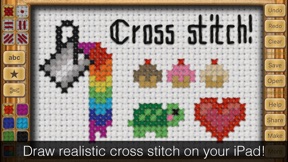
Cross Stitch Maker lets you draw realistic cross stitch on your iPhone or iPad! Create beautiful projects easily by typing a message and using the built-in library of borders and clipart. Or take some time to create your own drawing using the 100+ thread colors and six stitch types.
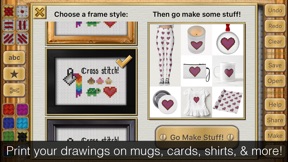
You won't believe how realistic your finished picture is! It looks just like a real framed cross stitch hanging on a wall. You can even print your design on mugs, shirts, stamps, cards, and more! The "Share" tool lets you easily send your creation to friends. A great way to send Birthday, Mother's Day, and other holiday greetings. Your friends might even think it's a real cross stitch!
Project Ideas:
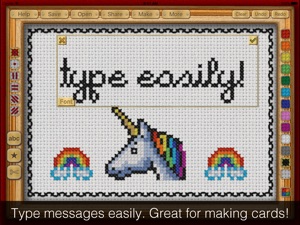
• Make a custom card! Type a message, then add a border and a picture from the clipart menu. Email it or have a real card printed by clicking "Make"
• Make pixel art inspired by your favorite video game.
• Give your tweet or Facebook update extra punch by saying it in cross stitch. Built in Twitter and Facebook sharing makes this easy.
• Say something mischievous ... Drawn in the sweet innocence of embroidery, this can be hilarious!
• Use the app to plan a real cross stitch project. Your design looks so real in the app, you will know exactly how it will turn out.
• Design birth announcements, party invitations, place cards, and other fun stuff!
• Print your creations on real world items such as mugs, t-shirts, greeting cards and more!
Features:
• Photorealistic results
• 100+ thread colors
• 6 stitch types
• 7 fonts
• 10 frame options
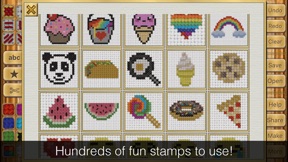
• 250+ clipart borders and pictures
• Built-in Facebook, Twitter, and email sharing

What's New in Version 2.0

What's new in this update? Wow, a lot!
- Bigger drawing area on long phones
- New french knot stitch type!
- 81 new cute & colorful clipart images! This was the the most fun part of making this update :)
- Brighter fabric & stitch colors
- Three new frames to choose from
- More colors available from the side bar on iPad
- Easier to get the keyboard out of the way when you need to position your text. Just hit "Done."
- New "no fabric" option for sharing your image. Looks nice when printed on white Zazzle items.
- More Zazzle products to print on! Check out the new "Make" button for more info.
- Bug fixes
Thanks so much to everyone who sent feedback. I make the app by myself so hearing your feedback is super, super helpful. I hope you enjoy the update as much as I enjoyed making it! ~Sarah

Seller

Name

Sarah Pierce

URL

Information

Developer

Categories

Version

2.0

Size

84.1 MB

Game Center

No

VPP Device Licensing

Yes

Rating

Rated: 4+

Compatibility

iOS 8.0 or later

Devices

iPhone 4S, iPhone 5, iPhone 5c, iPhone 5s, iPhone 6, iPhone 6 Plus, iPhone 6s, iPhone 6s Plus, iPhone SE, iPhone 7, iPhone 7 Plus, iPhone 8, iPhone 8 Plus, iPhone X, iPhone XR, iPhone XS, iPhone XS Max, iPhone 11, iPhone 11 Pro, iPhone 11 Pro Max, iPad 2 (Wi-Fi), iPad 2 (3G), iPad (3rd Generation) (Wi-Fi), iPad (3rd Generation) (4G), iPad (4th Generation) (Wi-Fi), iPad (4th Generation) (4G), iPad (5th Generation) Wi-Fi, iPad (5th Generation) Wi-Fi + Cellular, iPad (6th generation) Wi-Fi, iPad (6th generation) Wi-Fi + Cellular, iPad Pro, iPad Pro (Cellular), iPad Pro (9.7-inch), iPad Pro (9.7-inch) (Cellular), iPad Pro 12.9-inch (2nd generation), iPad Pro 12.9-inch (2nd generation) Wi-Fi + Cellular, iPad Pro (10.5-inch), iPad Pro (10.5-inch) Wi-Fi + Cellular, iPad Pro (11-inch), iPad Pro (11-inch) Wi-Fi + Cellular, iPad Pro 12.9-inch (3rd generation), iPad Pro 12.9-inch (3rd generation) Wi-Fi + Cellular, iPad Air, iPad Air (Cellular), iPad Air 2, iPad Air 2 (Cellular), iPad Air (3rd generation), iPad Air (3rd generation) Wi-Fi + Cellular, iPad mini (Wi-Fi), iPad mini (4G), iPad mini Retina, iPad mini Retina (Cellular), iPad mini 3, iPad mini 3 (Cellular), iPad mini 4, iPad mini 4 (Cellular), iPad mini (5th Generation), iPad mini (5th Generation) Wi-Fi + Cellular, iPad (7th generation) Wi-Fi + Cellular, iPod touch (5th generation), iPod touch (6th Generation), iPod touch (7th generation)

Languages

English

App Store: Customer Ratings

Ratings & Reviews

4.0 of 5 (8 Ratings)

App Store: Customer Reviews

2017-12-04

Absolutely fantastic app

In all my years of x stitch, I have never felt as happy as I do now!! This is an ingenious idea. So many times I have done some personal designs but so slow on pencilling graph pages.
This takes away all the laborious time and makes it exciting because it is already there for you, not just with the colours but designs also if you’re a beginner.
Thankyou so much for this absolutely fantastic app. It has certainly made my x stitch days easier.....and more exciting. Thank you Sarah Pierce
Cazzer1966
Version 1.0
2017-08-02

Not great

I wanted to be able to make a chart. This was terrible. No counters or grid. Size is so small I struggle to see. Wasted 1.99
Vixen32
Version 2.0
2017-04-25

The app does what I want it to!

Downloaded this because I wanted to do some writing and I was struggling manually. This app is great but it could really benefit from a stitch counter up the side and across the top. Also the ability to work on a larger canvas and zoom functionality :)
BexF
Version 2.0
2016-12-02

So disappointing

So limited. Very few fonts. Little instruction. Very small number of clip arts. BASIC
Carllette
Version 1.0
2016-10-30

Not worth it

Not that great. You're stuck with a small horizontal frame and cannot change it. I was hoping for something with various sizes both horizontal and vertical. Not worth the money.
LittleMissBecca194
Version 1.0
2016-08-27

Excellent utility!

My wife is an avid cross-stitcher and frequently asks me to design text or motifs. I used to do this on graph paper, hell if you make a mistake - not any more! This is easy to use and you get an excellent idea of what it will look like when included in a finished cross stitch. Yes it would be nice if there were more/larger canvas sizes, another backstitch font maybe, but overall this is excellent and you can't beat the value for money!
PhilW222
Version 1.0
2015-04-09

Fantastic

So simple to use, not complicated like other cross stitch apps. Absolutely brilliant
Chippy +nibs
Version 1.0
2015-03-09

Excellent

At first I thought this was a very basic little app, which wasn't much use. How wrong I was. Since I started to design an A-Z of Christmas, in rectangles 27x19, it has been invaluable. It's very easy to use and is far more flexible than you might at first think. The colour palette is adequate and allows you to have a good idea of the finished design. Buy it! You'll be glad you did.
Nelly29157
Version 1.0
2015-02-27

sort it

Can't get it up can I?!!
porkswordfish
Version 1.0
2014-05-29

Excellent value for money

Get range of stamps and easy to use. Only downfall is unable to zoom out or select size.
Hazomcneo
Version 1.0
2013-09-04

Nice little app

Good app - but would like to see these updates; bigger canvas, more fonts (smaller ones would be great) and portrait mode!
ScarlettDark
Version 1.0
2013-06-16

Good

I was surprised ! Easy to use, great for small projects. Would love more templates though.
Not given 5 stars because its only works in landscape mode, would love to use it in portrait, color palate is small, plus I'd like a bigger 'canvas', bigger projects have to be designed in segments and saved.
Over all worth the money though, I'm having great fun!
Fred12go
Version 1.0
2013-06-11

Almost perfect

I really liked the quality of the app, it is very easy to use. I purchased this app as I intended to use it to design cross stitch patterns before making the real thing. However, it is not possible to change the size of the canvas, this is a shame because it limits you to quite a small size. I assumed there would be a feature that enabled you to change the size of the canvas and I don't think that will be difficult to add. If it wasn't for this reason this would score 5 stars.
Ambro1989
Version 1.0
2013-03-16

Great!

Lovely little app and so easy to use. Super little motifs really get the ideas flowing. Looking forward to turning some designs into the real thing.
Davehensh
Version 1.0
2013-03-15

Easy

Easy to use, and I have made some great gifts using it.
Luke Pearson
Version 1.0
2013-02-16

Fantastic!

I love this app - it is simple to use and produces great results. Perfect for cross stitch fans, including beginners. The only limit is your imagination.
nats_d
Version 1.0
2012-12-06

Unbelievable and not in a good way

Made a couple of designs, apart from the fact I paid £1:49 for it! It keeps CRASHING! Can't even go on it now! UNBELIEVABLE! Truly unacceptable. FIX IT.
Appy shopper 98
Version 1.0
2012-11-19

My new favourite app

I've been waiting for ages for an app like this, and now I have it, I'm addicted...
knitted dookers
Version 1.0
2012-08-21

Best Cross Stitch App Ever

This app is excellent, not only can you design your own cross stitch but it has pre set stamps where you can add pictures, borders etc and you can then email or share with your friends and print. Lovely as a personalised gift.
Emma Bijoux
Version 1.0