Updating


iPhone Screenshots


iPad Screenshots


Description
GedFamilies enables a GEDCOM file to be easily transferred to your iPhone, iPod Touch, or iPad, enabling it to be viewed and edited wherever you are. GedFamilies supports the following functionality:
- GEDCOM 5.5.1 plus support for many custom tags
- ASCII, ANSI, ANSEL, UTF-8 character sets
- Multiple family files
- New family files can be created from scratch
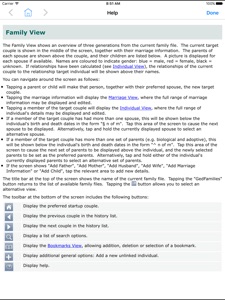
- Family View, Pedigree View, Descendant View and Timeline
- Index, searchable by Given Name, Surname or ID
- Relationships
- Events and facts
- Sources
- Locations and Addresses, with geolocation via Maps
- Alternate Names
- Pictures, including the ability to add pictures from camera or photo album
- Documents
- Audio files
- Portrait and Landscape mode on all views
- Full screen support on the iPad
GedFamilies uses a highly efficient database implementation, allowing very large family files to be supported.
GedFamilies requires access to a Wi-Fi network or use of iTunes via a USB connection in order to transfer family files between your device and your PC. USB transfer uses iTunes File Sharing which requires your device to be running iOS 3.2 or above.
GedFamilies requires a companion program running on the PC to transfer family files to and from the iPhone, iPod Touch or iPad. This program, GedFamilies Sync, can be downloaded free of charge from www.telgen.co.uk/gedfamilies.
A sample family file is included.
Support and exchange of information with other users is available via the user forum at www.telgen.co.uk/gedfamilies/forum.
What's New in Version 2.2.0
Support iOS 10
Seller
Name
TelGen Limited
Information
Developer
Categories
Version
2.2.0
Size
32.1 MB
Game Center
No
VPP Device Licensing
Yes
Rating
Rated: 4+
Compatibility
iOS 7.1 or later
Devices
iPhone 4, iPhone 4S, iPhone 5, iPhone 5c, iPhone 5s, iPhone 6, iPhone 6 Plus, iPhone 6s, iPhone 6s Plus, iPhone SE, iPhone 7, iPhone 7 Plus, iPhone 8, iPhone 8 Plus, iPhone X, iPhone XR, iPhone XS, iPhone XS Max, iPhone 11, iPhone 11 Pro, iPhone 11 Pro Max, iPad 2 (Wi-Fi), iPad 2 (3G), iPad (3rd Generation) (Wi-Fi), iPad (3rd Generation) (4G), iPad (4th Generation) (Wi-Fi), iPad (4th Generation) (4G), iPad (5th Generation) Wi-Fi, iPad (5th Generation) Wi-Fi + Cellular, iPad (6th generation) Wi-Fi, iPad (6th generation) Wi-Fi + Cellular, iPad Pro, iPad Pro (Cellular), iPad Pro (9.7-inch), iPad Pro (9.7-inch) (Cellular), iPad Pro 12.9-inch (2nd generation), iPad Pro 12.9-inch (2nd generation) Wi-Fi + Cellular, iPad Pro (10.5-inch), iPad Pro (10.5-inch) Wi-Fi + Cellular, iPad Pro (11-inch), iPad Pro (11-inch) Wi-Fi + Cellular, iPad Pro 12.9-inch (3rd generation), iPad Pro 12.9-inch (3rd generation) Wi-Fi + Cellular, iPad Air, iPad Air (Cellular), iPad Air 2, iPad Air 2 (Cellular), iPad Air (3rd generation), iPad Air (3rd generation) Wi-Fi + Cellular, iPad mini (Wi-Fi), iPad mini (4G), iPad mini Retina, iPad mini Retina (Cellular), iPad mini 3, iPad mini 3 (Cellular), iPad mini 4, iPad mini 4 (Cellular), iPad mini (5th Generation), iPad mini (5th Generation) Wi-Fi + Cellular, iPad (7th generation) Wi-Fi, iPad ProFourthGen, iPad ProFourthGenCellular, iPad ProSecondGen, iPad ProSecondGenCellular, iPod touch (5th generation), iPod touch (6th Generation), iPod touch (7th generation), Apple Watch Series 4, Apple Watch Series 5
Languages
English, Danish, Dutch, German, Italian, Norwegian Bokmål, Swedish
App Store: Customer Ratings
Ratings & Reviews
5.0 of 5 (1 Rating)
App Store: Customer Reviews
No Entry