AboutTermsPrivacyContact
 
Updating
Money Manager : Budget&Expense

Money Manager : Budget&Expense

Released: 2012-11-05
© 2017 Realbyte Inc.
Money Manager : Budget&Expense - QR Code
Version 2.3.13
4+
Download on the App Store
Version 2.3.13
4+
Download on the App Store
Released: 2012-11-05
© 2017 Realbyte Inc.

iPhone Screenshots

Screenshot
Screenshot
Screenshot
Screenshot
Screenshot
Screenshot
Screenshot
Screenshot

iPad Screenshots

Screenshot
Screenshot
Screenshot
Screenshot
Screenshot
Screenshot
Screenshot

Description

“Money Manager Next” is an optimized application for personal account management.
Household account management is complicated. But we make it simple by simplifying the things that are complex. The default settings will get you started, and once you get used to it, you can alter the settings according to your needs with the highly flexible and customizable functions available.
- Super easy and simple to enter data anytime, anywhere.
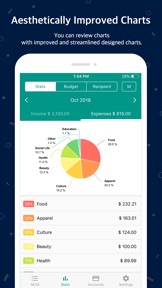
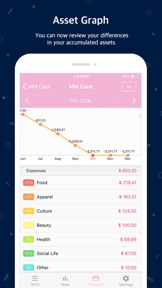
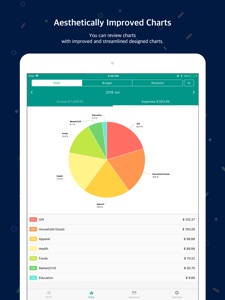
- View your spending tendencies graphically.
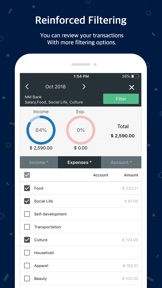
- View statistics by simply entering the data.
- Search and calculator functions.
- Set up sub-categories and main categories as necessary.
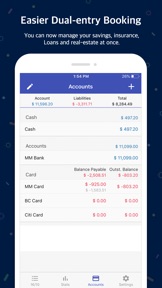
- Manage all your accounts at once.
- Use multiple currencies.
- Check weekly, monthly, and annual statistics.
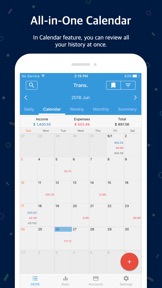
- Use calendar view.
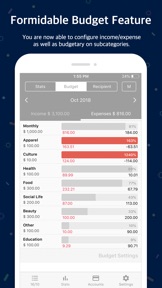
- Use budget planning features to plan weekly, monthly, and annual budgets.
- Change the start date of the month.
※ Applying double entry bookkeeping
It facilitates efficient account management. Automally double entry bookkeeping.
※ PC manager function
You can view ‘“Money Manager” application using Wi-Fi. You can edit and sort the data by date, category or account group on the screen of your PC. In addition, you can see fluctuations of your accounts indicated on graphs on your PC.
※ Budget management function
You can manage your budget. It shows your budget and expenditures on a graph so you can compare the amount of your expenditures against your budget quickly.
※ Credit Card / Debit Card management function
When entering a future payment date, you can see the payment amount and outstanding balance on the accounts page. You can connect your debit card to your accounts so that expenses are automatically recorded under a specific account.
※ Passcode
You can speficy a desired time lapse before the app requests a passcode.
※ Automatic money transfer and frequency functions
You can set up automatic money transfers between your accounts and configure the frequency of those transfers.
※ Sort expenses by recipient
You can sort your expenses by recipient and view this information graphically.
※ Payment Profiles
You can easily enter frequent expenditures by creating payment profiles.
※ Backup / Restore
You can backup and restore your data via email, iTunes and iCloud.
※ Multiple currency support – you can have individual entries in multiple currencies, and configure each account to calculate the total balance in your desired currency.
In Full Version.
Manage from PC is available.
There is no Ads.
There is no limit the accounts.
(In lite version, 10 accounts is available.)

What's New in Version 2.3.13

Minor Bug Fixed.

Seller

Information

Developer

Categories

Version

2.3.13

Size

62.9 MB

Game Center

No

VPP Device Licensing

Yes

Rating

Rated: 4+

Compatibility

iOS 9.0 or later

Devices

iPhone 11 Pro Max, iPad Air 2 (Cellular), iPad mini Retina (Cellular), iPad Pro (11-inch), iPad (5th Generation) Wi-Fi, iPad (6th generation) Wi-Fi, iPod touch (6th Generation), iPad Pro (11-inch) Wi-Fi + Cellular, iPad (6th generation) Wi-Fi + Cellular, iPad Pro 12.9-inch (3rd generation), iPad (5th Generation) Wi-Fi + Cellular, iPad mini (5th Generation) Wi-Fi + Cellular, iPad mini (5th Generation), iPad Pro, iPad mini 3, iPad mini 4 (Cellular), iPad mini 4, iPhone 11, iPod touch (7th generation), iPad mini 3 (Cellular), iPad Air, iPad Air 2, iPad Pro 12.9-inch (2nd generation), iPad Pro (Cellular), iPad Pro (9.7-inch) (Cellular), iPad Pro (10.5-inch) Wi-Fi + Cellular, iPad Pro (9.7-inch), iPad mini Retina, iPad Air (Cellular), iPad Air (3rd generation) Wi-Fi + Cellular, iPhone 6 Plus, iPad Air (3rd generation), iPad Pro (10.5-inch), iPad Pro 12.9-inch (2nd generation) Wi-Fi + Cellular, iPhone 6, iPhone XR, iPhone XS, iPhone 6s, iPhone SE, iPhone 7 Plus, iPhone 6s Plus, iPhone 5s, iPhone X, iPhone 8, iPhone XS Max, iPhone 8 Plus, iPhone 7, iPhone 5, iPad (7th generation) Wi-Fi, iPhone 5c, iPad (7th generation) Wi-Fi + Cellular, iPad Air3, iPad Air3Cellular, iPad Mini5, iPad Mini5Cellular, iPhone 11 Pro, iPad Pro 12.9-inch (3rd generation) Wi-Fi + Cellular, Watch4

Languages

English, Bengali, Chinese, French, German, Indonesian, Italian, Japanese, Korean, Polish, Portuguese, Romanian, Russian, Spanish, Turkish, Ukrainian, Vietnamese

App Store: Customer Ratings

Ratings & Reviews

3.5 of 5 (3 Ratings)

App Store: Customer Reviews

2019-03-02

Really good app for managing personal money

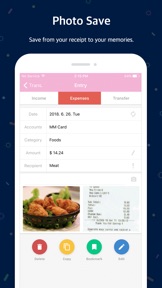
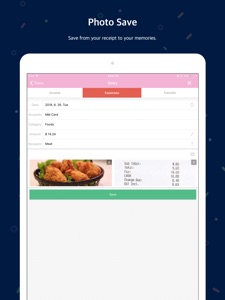
Enjoying using this app. Very easy to log one’s spending, love the stats chart, and that I can save receipts. The only reason I didn’t give 5 stars is that I’d like the ability to add a not or comments, & that sometimes the sub categories go round in circles. Other than that, it’s fab! Thanks for developing this app.
StayingKonnectd
Version 2.3.7
2019-01-14

Well done!

A very considered app, shows a lot of thought went into making it what it is. I have been using it now for a about month and have found it to be very useful. Some of the useful things you can do with this:
1) create budget categories and subcategories and track spending against budget over a time period you choose.
You define your categories and subcategories and specify all the ways you cover costs- from different accounts/cards or cash payment.
2) gives you the flexibility to move funds between ‘pots’ which would be hand for those who do zero balance budgeting.
3) different ways of tracking spending: e.g. charts, calendar.
4) adding new expenses is super easy and can be done through the widget, which also shows what you’ve spent today and what you did yesterday.
5) upload and store receipts
Well done!
Mail junky
Version 2.3.4
2018-12-15

Good

App
AKM Bari
Version 2.3.1
2018-12-03

Does the job

Stored on a Cloud, I access it across several iPads and iPhone. Best accounts app I’ve found so far.
WmRRH
Version 2.2.7
2018-09-01

Good but..

Good and simple but I can’t find a way to sync my iPhone and iPad app together.
Tony lo miglio
Version 2.1.10
2017-02-02

Simple and accurate

Tried many money managers and this is by far the best for the job. Displays balance, able to forecast bills with the calendar and gives and accurate amount remaining for remaining time.
WOLFXCII
Version 1.8.4