AboutTermsPrivacyContact
 
Updating
UploadCam. Your Company Camera

UploadCam. Your Company Camera

Released: 2013-04-03
© Bitwise Software SL
UploadCam. Your Company Camera - QR Code
Version 6.3
4+
Download on the App Store
Version 6.3
4+
Download on the App Store
Released: 2013-04-03
© Bitwise Software SL

iPhone Screenshots

Screenshot
Screenshot
Screenshot
Screenshot
Screenshot
Screenshot
Screenshot

iPad Screenshots

Screenshot
Screenshot
Screenshot
Screenshot
Screenshot

Description

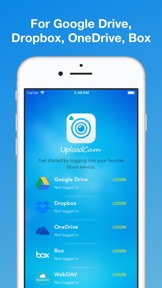
With UploadCam the photos and videos that you take are automatically stored and organized on your Google Drive, Dropbox, OneDrive or Box account. This means that you can access them anywhere, organize them quickly and share them easily!
Features:
► Use your existing Google Drive, Dropbox, Box or OneDrive Account - no need to create yet another service account!
► NEW: Draw on top of the images you take!
► NEW: Annotate photos by adding a custom description, date/time, location and other parameters. They will appear as an overlay in your photos
► Save space on your device by uploading your photos and videos to the cloud instead of taking memory from your iPhone or iPod touch
► Organize your photos automatically: UploadCam let's you choose or create folders to upload your new and existing photos
► Import and upload photos and videos from your 'Camera roll': You are not limited by the photos you take with UploadCam, if you take photos with the default camera app you can import them to UploadCam to send them to the cloud
► Quickly share photos with others by selecting a shared folder to save your photos
► Keep your photos and videos on your own cloud storage, no need to create new accounts or setup new services that you don't trust
IMPORTANT:
► The FREE version of this app allows you to upload up to 10 photos a day. Please consider upgrading to the full version of the app for unlimited uploads. Thanks!
► If you choose to purchase the PRO Upgrade subscription, payment will be charged to your iTunes account, and your account will be charged for renewal 24 hours prior to the end of the current period. Auto-renewal may be turned off at any time by going to your settings in the iTunes Store after purchase.
Privacy Policy: http://uploadcamapp.com/privacy/app/
Terms of Service: http://uploadcamapp.com/terms/app/
Requirements:
A valid Google Drive, Dropbox, OneDrive or Box account is required to use this app
We would love to hear your feedback. Contact us if you have any questions or comments: support@uploadcamapp.com

What's New in Version 6.3

- You can now select multiple photos from your upload history and share them all at once.
- Improved interface for iOS 26
- Various fixes and performance enhancements.
As always, we’d love your feedback and suggestions: info@uploadcamapp.com

Seller

Name

Bitwise Software SL

Information

Categories

Version

6.3

Size

46.3 MB

Game Center

No

VPP Device Licensing

Yes

Rating

Rated: 4+

Compatibility

iOS 15.0 or later

Devices

iPhone 5s, iPhone 6, iPhone 6 Plus, iPhone 6s, iPhone 6s Plus, iPhone SE, iPhone 7, iPhone 7 Plus, iPhone 8, iPhone 8 Plus, iPhone X, iPhone XR, iPhone XS, iPhone XS Max, iPhone 11, iPhone 11 Pro, iPhone 11 Pro Max, iPhone SE (2nd generation), iPhone 12, iPhone 12 Pro, iPhone 12 Pro Max, iPhone 12 mini, iPhone 13, iPhone 13 Pro, iPhone 13 Pro Max, iPhone 13 mini, iPhone SE (3rd generation), iPhone 14, iPhone 14 Plus, iPhone 14 Pro, iPhone 14 Pro Max, iPhone 15, iPhone 15 Plus, iPhone 15 Pro, iPhone 15 Pro Max, iPhone 16, iPhone 16 Plus, iPhone 16 Pro, iPhone 16 Pro Max, iPhone 16e, iPhone 17, iPhone 17Pro, iPhone 17ProMax, iPhone Air, iPad (5th Generation) Wi-Fi, iPad (5th Generation) Wi-Fi + Cellular, iPad (6th generation) Wi-Fi, iPad (6th generation) Wi-Fi + Cellular, iPad Pro, iPad Pro (Cellular), iPad Pro (9.7-inch), iPad Pro (9.7-inch) (Cellular), iPad Pro 12.9-inch (2nd generation), iPad Pro 12.9-inch (2nd generation) Wi-Fi + Cellular, iPad Pro (10.5-inch), iPad Pro (10.5-inch) Wi-Fi + Cellular, iPad Pro (11-inch), iPad Pro (11-inch) Wi-Fi + Cellular, iPad Pro 12.9-inch (3rd generation), iPad Pro 12.9-inch (3rd generation) Wi-Fi + Cellular, iPad Air, iPad Air (Cellular), iPad Air 2, iPad Air 2 (Cellular), iPad Air (3rd generation), iPad Air (3rd generation) Wi-Fi + Cellular, iPad mini Retina, iPad mini Retina (Cellular), iPad mini 3, iPad mini 3 (Cellular), iPad mini 4, iPad mini 4 (Cellular), iPad mini (5th Generation), iPad mini (5th Generation) Wi-Fi + Cellular, iPad (7th generation) Wi-Fi + Cellular, iPad Pro 11-inch (2nd generation), iPad Pro 11-inch (2nd generation) Wi-Fi + Cellular, iPad Pro 12.9-inch (4th generation), iPad Pro 12.9-inch (4th generation) Wi-Fi + Cellular, iPad Air (4th Generation) (Wi-Fi), iPad Air (4th Generation) (Wi-Fi + Cellular), iPad (8th generation) Wi-Fi, iPad (8th generation) Wi-Fi + Cellular, iPad Pro 11-inch (3rd generation), iPad Pro 11-inch (3rd generation) Wi-Fi + Cellular, iPad Pro 12.9-inch (5th Generation), iPad Pro 12.9-inch (5th Generation) Wi-Fi + Cellular, iPad (9th Generation), iPad (9th Generation) Wi-Fi + Cellular, iPad mini (6th Generation), iPad mini (6th Generation) Wi-Fi + Cellular, iPad Air (5th generation), iPad Air (5th generation) Wi-Fi + Cellular, iPad Pro 11-inch (4th generation), iPad Pro 11-inch (4th generation) Wi-Fi + Cellular, iPad Pro 12.9-inch (6th generation), iPad Pro 12.9-inch (6th generation) Wi-Fi + Cellular, iPad (10th generation), iPad (10th generation) Wi-Fi + Cellular, iPad Air 11-inch (M2) Wi-Fi, iPad Air 13-inch (M2) Wi-Fi, iPad Air 13-inch (M2) Wi-Fi + Cellular, iPad Pro 11-inch (M4) Wi-Fi, iPad Pro 11-inch (M4) Wi-Fi + Cellular, iPad Pro 13-inch (M4) Wi-Fi, iPad Pro 13-inch (M4) Wi-Fi + Cellular, iPad mini (A17 Pro) Wi-Fi, iPad mini (A17 Pro) Wi-Fi + Cellular, iPad (A16) Wi-Fi, iPad (A16) Wi-Fi + Cellular, iPad Air 11-inch (M3) Wi-Fi, iPad Air 11-inch (M3) Wi-Fi + Cellular, iPad Air 13-inch (M3) Wi-Fi, iPad Air 13-inch (M3) Wi-Fi + Cellular, iPod touch (6th Generation), iPod touch (7th generation)

Languages

English

App Store: Customer Ratings

Ratings & Reviews

4.0 of 5 (29 Ratings)

App Store: Customer Reviews

2025-06-14

Very good app for organised people

Extremely useful app (especially when subscribed as a Pro). Save photos directly to a cloud platform of your choosing efficiency either many options to look professional.
TNaeish
Version 5.6.8
2020-10-08

Asking a lot of $ for very little

Seems like a lot to pay for a camera app that does not appear to support or implement even the most basic hardware/software features.
Mop 1971
Version 4.2
2016-11-02

Great for separating personal iPhoto library from work images

Even better if it could offer hot buttons where to save on main photo preview screen so it is one touch to most used folders in Dropbox. Please add this feature!
jonnyharbottle
Version 2.5
2015-08-29

0.1/10

Keeps crashing, want refund
angelawmlau
Version 2.4
2014-12-31

Pixiepet

UploadCam is a great app. It saves to Dropbox
And or Google drive. The photos are very good and clear. I have the free version and it's really good! May upgrade in the future but quite happy with the app just now! I recommend it very highly!
Goofy mutt
Version 2.2
2013-09-01

Yay, finally!

Does the job great!
ellilawson
Version 1.0
2013-08-13

Query

This app only upload photos or all camera roll too
Zia Shahid
Version 1.0