Description
DoCast provides reliable Chromecast iPhone screen mirroring in high resolution. Seamlessly stream any media content, whether it's music, videos, or photos.
Mirror your iPhone or iPad to your TV effortlessly. DoCast works with Chromecast, AndroidTV and Google Cast powered TVs to deliver an unparalleled screen sharing experience. Connect to any Chromecast device, no matter the generation.
Key Features of DoCast:
- Mirror iPhone to Chromecast with high-quality picture and sound.
- Adjust video quality settings and toggle auto-rotation.
- Cast unlimited photos for free from your device's library.
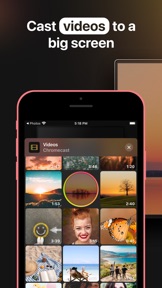
- Stream videos you have on your device.
- Listen to music on your Chromecast-enabled TV or speakers.
- Cast to Chromecast from iPhone or iPad: Broad compatibility with various Chromecast devices.
- Low-latency screen mirroring with delay lower than one second with a good Wi-Fi connection.
- No ads while you stream or use the app.
- Unlock unlimited casting and mirroring with the DoCast Premium Upgrade.
- Exclusive gift available for users who opt for the Yearly or Lifetime Premium Upgrade.
Note: Make sure all your devices are connected to the same Wi-Fi network.
Seamless Media Casting:
Cast memories from your iPhone or iPad's photo library to Chromecast with iPhone, with no limits on pictures. Stream music to your TV’s speakers, up to 15 minutes per session in the free version. As for videos, the free DoCast version limits you to 3 minutes per session. Easily display your videos on the big screen with just a few taps, ensuring they're as vivid as when captured. To cast photos, videos, or music, choose the required option from the main screen and select the content you want to stream.
Screen Mirroring Perfected:
With the help of DoCast, you can demonstrate work presentations on a large screen, mirror games, websites, scroll your social network feed on the TV. In the free version, screen mirroring sessions are limited to 15 minutes. For uninterrupted and extended mirroring, try the DoCast Premium Upgrade. To mirror iPhone to Chromecast, choose “Screen” button from the app’s main screen and then tap “Start mirroring”.
Broad Compatibility:
Regardless of your TV brand or device, DoCast has you covered. It's the perfect Chromecast app for iPhone and iPad. Compatible with Chromecast, Chromecast Ultra, Chromecast with Google TV (HD and 4K), as well as certain TV models by Sony, Vizio, Hisense, Sharp, and other brands that have Chromecast built-in. Additionally, the app also works with other devices like Xiaomi Mi Box and Nvidia Shield TV.
Auto-Renewable Subscription Terms:
Access uninterrupted and ad-free experiences with the DoCast Premium Upgrade.
- Subscription Duration: Available as Monthly, Weekly, or Yearly auto-renewable subscriptions, as well as a one-time Lifetime purchase.
- Payment will be charged to your Apple ID account at the confirmation of purchase.
- Subscriptions renew automatically unless canceled at least 24 hours before the end of the current period.
- Manage and cancel subscriptions in your App Store account settings.
- More details on in-app pricing for your region can be found within the app.
By opting for a subscription, you agree to our Terms of Use and Privacy Policy.
Terms of Use: https://www.electronic.us/company/policies/terms
Privacy Policy: https://www.electronic.us/company/policies/docast/
Disclaimer: This app is not affiliated with Google or any other trademarks mentioned.
Note: Screen Mirroring iPhone to Chromecast with DoCast won't work for copyrighted content from platforms such as Apple TV+, Apple Fitness+, Netflix, Amazon Prime, and more due to streaming service restrictions. Also, the app will see available Apple Music tracks, but will not be able to play some of them due to DRM protection or if they're in the cloud. These are limitations of services, not DoCast.
Thank you for choosing and supporting our Chromecast iOS app! We appreciate your feedback and rating.