Updating


iPhone Screenshots



iPad Screenshots


Description
Are you tired of spending hours importing and culling through thousands of photos in your favorite editors like Lightroom, Capture One, and Camera Raw? Meet PhotoPicker – the ultimate tool designed with professional photographers in mind, offering lightning-fast photo culling with unparalleled convenience.
Key Features:
1. Instant Full-Sized Preview: Experience the speed of PhotoPicker as you immediately view full-sized photos, streamlining your culling process for maximum efficiency.
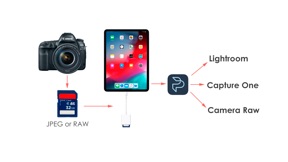
2. Swift Import and Export: Save time with a seamless import and export process that lets you cull through thousands of photos within minutes. Say goodbye to time-consuming tasks and hello to productivity.
3. Start Culling on the Spot: No need to pre-import photos into your Lightroom catalog. With PhotoPicker, you can begin the culling process right after your photoshoot, ensuring a quick and hassle-free workflow.
4. Effortless Results: Your culling results are saved in XMP files, ready to be copied into the folder with the RAW originals of your photos. Upon importing into Lightroom, Capture One, or Camera Raw, witness immediate access to your culling results.
Why PhotoPicker:
1. Designed for Professionals: Crafted with the needs of professional photographers in mind, PhotoPicker is tailored to optimize your workflow, giving you more time to focus on what you do best – capturing stunning moments.
2. Universal Compatibility: Whether you're using Lightroom, Capture One, or Camera Raw, PhotoPicker seamlessly integrates with your favorite photo editors, ensuring a smooth transition from culling to editing.
3. Unmatched Speed: Experience a new level of efficiency as PhotoPicker empowers you to cull through photos at unparalleled speeds, transforming your post-shoot process.
Download PhotoPicker now and revolutionize the way you cull and edit your photos. Maximize speed, optimize workflow – because every moment matters.
Instruction of the application is available at
https://photopicker.gitbook.io/manual
Reviews of professional photographers:
5* Igor Tsaplin
Super app! Very convenient and useful. I can pick out shooting about 3-4 times faster than on a computer! Plus it can be done anywhere. On the road, in the park, comfortably lying on the couch and so on! Super! I advise everyone to those who take a lot of photos and appreciate their time.
5* Yanna Levina
The application helps to pick out a large number of photos, if you do not have a computer or laptop at hand. Works smartly, an accessible toolbar, everything is pretty simple and straightforward. It is convenient even to work in a dead traffic jam.
5* Pavel Ivanov
In my opinion PhotoPicker is the best program for pick out photos, sorting them and dropping them on the ipad! Installing PhotoPicker, I became free! Now I can easily select photos outside the workplace. You can sit on the beach or go somewhere and work in parallel! Class! Many thanks to the developers. Now I have more free time))
Lightroom, XMP are registered trademarks of Adobe Systems, Inc. Capture One is a registered trademark of Phase One A/S.
What's New in Version 2.12.1
Optimized import of photos from external media
Seller
Name
Roman Gishtimulat
Information
Developer
Categories
Version
2.12.1
Size
57.4 MB
Game Center
No
VPP Device Licensing
Yes
Rating
Rated: 4+
Compatibility
iOS 14.0 or later
Devices
iPhone 5s, iPhone 6, iPhone 6 Plus, iPhone 6s, iPhone 6s Plus, iPhone SE, iPhone 7, iPhone 7 Plus, iPhone 8, iPhone 8 Plus, iPhone X, iPhone XR, iPhone XS, iPhone XS Max, iPhone 11, iPhone 11 Pro, iPhone 11 Pro Max, iPhone SE (2nd generation), iPhone 12, iPhone 12 Pro, iPhone 12 Pro Max, iPhone 12 mini, iPhone 13, iPhone 13 Pro, iPhone 13 Pro Max, iPhone 13 mini, iPhone SE (3rd generation), iPhone 14, iPhone 14 Plus, iPhone 14 Pro, iPhone 14 Pro Max, iPhone 15, iPhone 15 Plus, iPhone 15 Pro, iPhone 15 Pro Max, iPad (5th Generation) Wi-Fi, iPad (5th Generation) Wi-Fi + Cellular, iPad (6th generation) Wi-Fi, iPad (6th generation) Wi-Fi + Cellular, iPad Pro, iPad Pro (Cellular), iPad Pro (9.7-inch), iPad Pro (9.7-inch) (Cellular), iPad Pro 12.9-inch (2nd generation), iPad Pro 12.9-inch (2nd generation) Wi-Fi + Cellular, iPad Pro (10.5-inch), iPad Pro (10.5-inch) Wi-Fi + Cellular, iPad Pro (11-inch), iPad Pro (11-inch) Wi-Fi + Cellular, iPad Pro 12.9-inch (3rd generation), iPad Pro 12.9-inch (3rd generation) Wi-Fi + Cellular, iPad Air, iPad Air (Cellular), iPad Air 2, iPad Air 2 (Cellular), iPad Air (3rd generation), iPad Air (3rd generation) Wi-Fi + Cellular, iPad mini Retina, iPad mini Retina (Cellular), iPad mini 3, iPad mini 3 (Cellular), iPad mini 4, iPad mini 4 (Cellular), iPad mini (5th Generation), iPad mini (5th Generation) Wi-Fi + Cellular, iPad (7th generation) Wi-Fi + Cellular, iPad Pro 11-inch (2nd generation), iPad Pro 11-inch (2nd generation) Wi-Fi + Cellular, iPad Pro 12.9-inch (4th generation), iPad Pro 12.9-inch (4th generation) Wi-Fi + Cellular, iPad Air (4th Generation) (Wi-Fi), iPad Air (4th Generation) (Wi-Fi + Cellular), iPad (8th generation) Wi-Fi, iPad (8th generation) Wi-Fi + Cellular, iPad Pro 11-inch (3rd generation), iPad Pro 11-inch (3rd generation) Wi-Fi + Cellular, iPad Pro 12.9-inch (5th Generation), iPad Pro 12.9-inch (5th Generation) Wi-Fi + Cellular, iPad (9th Generation), iPad (9th Generation) Wi-Fi + Cellular, iPad mini (6th Generation), iPad mini (6th Generation) Wi-Fi + Cellular, iPad Air (5th generation), iPad Air (5th generation) Wi-Fi + Cellular, iPad Pro 11-inch (4th generation), iPad Pro 11-inch (4th generation) Wi-Fi + Cellular, iPad Pro 12.9-inch (6th generation), iPad Pro 12.9-inch (6th generation) Wi-Fi + Cellular, iPad (10th generation), iPad (10th generation) Wi-Fi + Cellular, iPod touch (6th Generation), iPod touch (7th generation)
Languages
English, Russian
App Store: Customer Ratings
Ratings & Reviews
0.0 of 5 (No rating)
App Store: Customer Reviews
No Entry