
AboutTermsPrivacyContact
 
Updating
DrawExpress Diagram

DrawExpress Diagram

Released: 2013-08-16
© DrawExpress Inc
DrawExpress Diagram - QR Code
Version 1.3.5
4+
Download on the App Store
Version 1.3.5
4+
Download on the App Store
Released: 2013-08-16
© DrawExpress Inc

iPhone Screenshots

Screenshot
Screenshot
Screenshot
Screenshot
Screenshot

iPad Screenshots

Screenshot
Screenshot
Screenshot
Screenshot
Screenshot

Description

DrawExpress is a fast gesture-recognition diagram application. With DrawExpress, you can draw diagrams and flowcharts in a simple and intuitive way. It's just as easy as using a pen and paper! Whether you work in software design, finance, business, law, or need it for school, DrawExpress is the ultimate solution to your diagramming needs. Try out the free DrawExpress Lite version before your purchase to see if DrawExpress is right for you!
Visit www.drawexpress.com for more details.
What can you can draw with DrawExpress?
Software UML and Network Designs:
- Use case Diagram
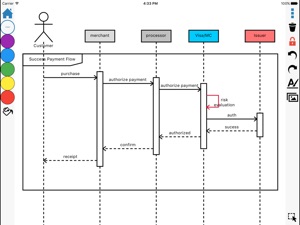
- Sequence Diagram
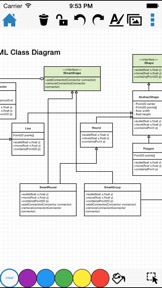
- Class Diagram
- State Diagram
- ER Diagram
- Data Flow Diagram
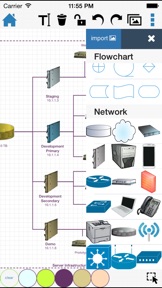
- Network Diagram
Business Processes and Mind Maps:
- Flowchart
- BPMN
- Organization Chart
- Process Flow
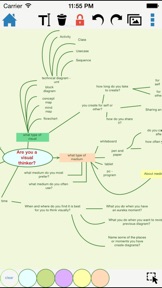
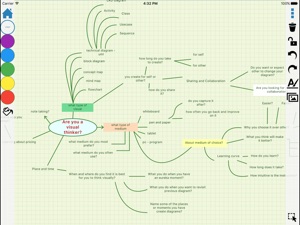
- Mind map
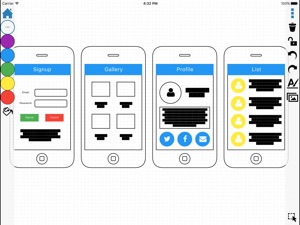
- Feature List
- Decision Tree
- Visual Notes
It's easier than it sounds and actions speak louder than words. Watch our tutorial video on www.drawexpress.com to see how easy it is to use our diagramming tool.
Also check out the tutorial slides on our website www.drawexpress.com.
NOTE: DrawExpress can be exported to PNG, PDF, SVG, and DE (DrawExpress) format and share with Dropbox, Box, GDrive and Email.

What's New in Version 1.3.5

- optimize UI for iphone X support
- add OneDrive cloud support
- fix PDF export bug

Seller

Name

DrawExpress Inc

URL

Information

Categories

Version

1.3.5

Size

33.2 MB

Game Center

No

VPP Device Licensing

Yes

Rating

Rated: 4+

Compatibility

iOS 9.0 or later

Devices

iPhone 11 Pro Max, iPad Air 2 (Cellular), iPad mini Retina (Cellular), iPad Pro (11-inch), iPad (5th Generation) Wi-Fi, iPad (6th generation) Wi-Fi, iPod touch (6th Generation), iPad Pro (11-inch) Wi-Fi + Cellular, iPad (6th generation) Wi-Fi + Cellular, iPad Pro 12.9-inch (3rd generation), iPad (5th Generation) Wi-Fi + Cellular, iPad mini (5th Generation) Wi-Fi + Cellular, iPad mini (5th Generation), iPad Pro, iPad mini 3, iPad mini 4 (Cellular), iPad mini 4, iPhone 11, iPod touch (7th generation), iPad mini 3 (Cellular), iPad Air, iPad Air 2, iPad Pro 12.9-inch (2nd generation), iPad Pro (Cellular), iPad Pro (9.7-inch) (Cellular), iPad Pro (10.5-inch) Wi-Fi + Cellular, iPad Pro (9.7-inch), iPad mini Retina, iPad Air (Cellular), iPad Air (3rd generation) Wi-Fi + Cellular, iPhone 6 Plus, iPad Air (3rd generation), iPad Pro (10.5-inch), iPad Pro 12.9-inch (2nd generation) Wi-Fi + Cellular, iPhone 6, iPhone XR, iPhone XS, iPhone 6s, iPhone SE, iPhone 7 Plus, iPhone 6s Plus, iPhone 5s, iPhone X, iPhone 8, iPhone XS Max, iPhone 8 Plus, iPhone 7, iPhone 5, iPad (7th generation) Wi-Fi, iPhone 5c, iPad (7th generation) Wi-Fi + Cellular, iPad Air3, iPad Air3Cellular, iPad Mini5, iPad Mini5Cellular, iPhone 11 Pro, iPad Pro 12.9-inch (3rd generation) Wi-Fi + Cellular

Languages

English

App Store: Customer Ratings

Ratings & Reviews

0.0 of 5 (No rating)

App Store: Customer Reviews

2017-08-24

Excellent UI and all the core functionality

This app provides easily the most intuitive and easy to use interface to create diagrams on the move - it provides the ease of a whiteboard with the ability correct as you go, update shapes and lines to be specific or re-organise, and tidy up from a presentation perspective so the exported images are ready for use in slides. Having tried many of the apps allowing creation of flow charts, organisation structures, sequence flows, or various IT architecture diagrams, this is the most responsive and simplest to work with, whilst covering all the main shapes and functionality required, and works fully offline.
Hoping future development will add Visio export and improve collaboration/sharing options - even the ability to have one iPad in charge projecting to a screen and a group in a room all able to contribute to the same drawing in real-time for example, via Bluetooth or WiFi.
adrenalex
Version 1.3.0
2015-03-09

Fantastic find, great customer support

Downloaded this app after shoulder surfing someone at a work meeting. Great gesture based interface allows for compelling diagrams to be created quickly and easily.
The customer support is also fantastic. Had one question on how to achieve something in a diagram and got a response in minutes.
Clokey74
Version 1.2.4
2014-04-11

Great Business Analyst tool!

This is instantly my favourite business diagram tool, until now I had found myself returning to pen and paper more often than not, but this app has changed that, I'm loving the gesture recognition. It's totally responsive and very easy to pick up. After trying the
lite version I had no hesitation in upgrading. Recommended.
Micd67
Version 1.1.0
2013-09-15

Brilliant promise

This is great for a first release. Very easy to use and intuitive interface. Visionaries finally have a real replacement for restraint napkins. Only a few things needed for it to be THE app for modelling on the fly.
1) Change the text entry keyboard to the default rather than the email keyboard. Can't even get the colon for class diagrams. I use the pipe but very annoying.
2) Needs the ability to set objects to foreground or background when they overlap.
3) importable image of environment/node blocks for deployment diagrams.
4) ability to save and import custom composite items.
This really is a great app and I look forward to giving 5 stars as soon as these minor fixes let me.
Sepowens
Version 1.0.1