AboutTermsPrivacyContact
 
Updating
Halloween Pinball

Halloween Pinball

Released: 2013-10-28
© Gameprom, 2013
Halloween Pinball - QR Code
Version 1.2.2
4+
Download on the App Store
Version 1.2.2
4+
Download on the App Store
Released: 2013-10-28
© Gameprom, 2013

iPhone Screenshots

Screenshot
Screenshot
Screenshot
Screenshot
Screenshot

iPad Screenshots

Screenshot
Screenshot
Screenshot
Screenshot
Screenshot

Description

That grave is moving! Something's rising! It's... it's... HALLOWEEN PINBALL!!!
A selection of utterly horrifying, panic-inducing, trauma-instilling (yet charmingly whimsical) pinball challenges to test your mettle. You'll meet a concocting witch, an awfully large spider, a creepy troll, plus a crowd of recently awoken zombies and a scarecrow (both desiring a brain but for different purposes).
Includes fantastic graphics and mechanisms with original artwork, soundtrack, and character voices, and of course Gameprom's popular, lifelike pinball physics.
IMPORTANT
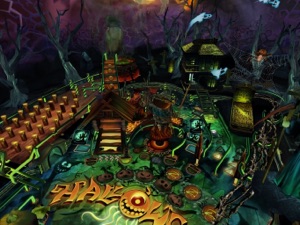
• Landscape mode - "full table" view
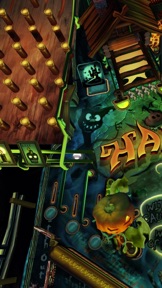
• Portrait mode - "flying-table" view
• In portrait mode slide up or down your both thumbs to toggle camera view from "flying-table" to "full table".
FEATURES
• pinball table with unique graphics, instructions, missions system, locations and characters
• Landscape mode shows a full table view. The games can be played in either landscape orientation with the button to the left or right of the screen.
• Portrait mode gives you a flying-table view with the camera panning and zooming over the action. This can only be played when holding the iPad with the button on the bottom. If you activate the screen orientation switch, the game only plays in portrait mode.
• A wonderful 3D engine that does true justice to the graphic capabilities of the iPad.
• Realistic physics.
• Built in help for each table. Tap the circled "I" at the bottom right of each table to get a display detailing instructions and descriptions of the features of each table. Make sure to swipe left and right when viewing since the instructions don't fit on one screen.
• Local and global high scores. Swiping right brings up a table of local high scores and further tapping brings up high scores from copies sold throughout
the world. At the end of each game you are prompted to enter your name and have your score included.
• Unique soundtrack with atmospheric music, sound effects and voices.
• Camera tilt brings dimensionality to the games offering a simulated 3D effect where the image changes depending upon how you tilt the iPad. Camera tilt only works in landscape mode.
• Stereoscopic imaging option (requires anaglyph eyeglasses). You can choose between red-cyan, green-magenta or yellow-blue lenses.
HOW TO PLAY
When running the app, you are presented with a 3D simulated camera zoom, pan and fly-over of one of the games. Tapping on a game's fly-over screen shows/hides main menu. Tap on Play button to start game on current table.
Controls in game:
• Tap ANYWHERE on the left side of screen to control the left flipper and ANYWHERE on the right side to control the right flipper.
• Shake your iPad to realistically nudge the pinball table, but not too much or you'll tilt.
• Tap on the "electronic caption" at the top of the screen to pause or resume your game.

What's New in Version 1.2.2

Bug fixes

Seller

Name

OOO Gameprom

Information

Developer

Categories

Version

1.2.2

Size

109.2 MB

Game Center

Yes

VPP Device Licensing

Yes

Rating

Rated: 4+

Compatibility

iOS 12.0 or later

Devices

iPhone 5s, iPhone 6, iPhone 6 Plus, iPhone 6s, iPhone 6s Plus, iPhone SE, iPhone 7, iPhone 7 Plus, iPhone 8, iPhone 8 Plus, iPhone X, iPhone XR, iPhone XS, iPhone XS Max, iPhone 11, iPhone 11 Pro, iPhone 11 Pro Max, iPhone SE (2nd generation), iPhone 12, iPhone 12 Pro, iPhone 12 Pro Max, iPhone 12 mini, iPhone 13, iPhone 13 Pro, iPhone 13 Pro Max, iPhone 13 mini, iPhone SE (3rd generation), iPhone 14, iPhone 14 Plus, iPhone 14 Pro, iPhone 14 Pro Max, iPhone 15, iPhone 15 Plus, iPhone 15 Pro, iPhone 15 Pro Max, iPhone 16, iPhone 16Plus, iPhone 16Pro, iPhone 16ProMax, iPad (5th Generation) Wi-Fi, iPad (5th Generation) Wi-Fi + Cellular, iPad (6th generation) Wi-Fi, iPad (6th generation) Wi-Fi + Cellular, iPad Pro, iPad Pro (Cellular), iPad Pro (9.7-inch), iPad Pro (9.7-inch) (Cellular), iPad Pro 12.9-inch (2nd generation), iPad Pro 12.9-inch (2nd generation) Wi-Fi + Cellular, iPad Pro (10.5-inch), iPad Pro (10.5-inch) Wi-Fi + Cellular, iPad Pro (11-inch), iPad Pro (11-inch) Wi-Fi + Cellular, iPad Pro 12.9-inch (3rd generation), iPad Pro 12.9-inch (3rd generation) Wi-Fi + Cellular, iPad Air, iPad Air (Cellular), iPad Air 2, iPad Air 2 (Cellular), iPad Air (3rd generation), iPad Air (3rd generation) Wi-Fi + Cellular, iPad mini Retina, iPad mini Retina (Cellular), iPad mini 3, iPad mini 3 (Cellular), iPad mini 4, iPad mini 4 (Cellular), iPad mini (5th Generation), iPad mini (5th Generation) Wi-Fi + Cellular, iPad (7th generation) Wi-Fi + Cellular, iPad Pro 11-inch (2nd generation), iPad Pro 11-inch (2nd generation) Wi-Fi + Cellular, iPad Pro 12.9-inch (4th generation), iPad Pro 12.9-inch (4th generation) Wi-Fi + Cellular, iPad Air (4th Generation) (Wi-Fi), iPad Air (4th Generation) (Wi-Fi + Cellular), iPad (8th generation) Wi-Fi, iPad (8th generation) Wi-Fi + Cellular, iPad Pro 11-inch (3rd generation), iPad Pro 11-inch (3rd generation) Wi-Fi + Cellular, iPad Pro 12.9-inch (5th Generation), iPad Pro 12.9-inch (5th Generation) Wi-Fi + Cellular, iPad (9th Generation), iPad (9th Generation) Wi-Fi + Cellular, iPad mini (6th Generation), iPad mini (6th Generation) Wi-Fi + Cellular, iPad Air (5th generation), iPad Air (5th generation) Wi-Fi + Cellular, iPad Pro 11-inch (4th generation), iPad Pro 11-inch (4th generation) Wi-Fi + Cellular, iPad Pro 12.9-inch (6th generation), iPad Pro 12.9-inch (6th generation) Wi-Fi + Cellular, iPad (10th generation), iPad (10th generation) Wi-Fi + Cellular, iPad Air 11-inch (M2) Wi-Fi, iPad Air 13-inch (M2) Wi-Fi, iPad Air 13-inch (M2) Wi-Fi + Cellular, iPad Pro 11-inch (M4) Wi-Fi, iPad Pro 11-inch (M4) Wi-Fi + Cellular, iPad Pro 13-inch (M4) Wi-Fi, iPad Pro 13-inch (M4) Wi-Fi + Cellular, iPod touch (6th Generation), iPod touch (7th generation)

Languages

English, German, Italian

App Store: Customer Ratings

Ratings & Reviews

5.0 of 5 (4 Ratings)

App Store: Customer Reviews

2015-05-20

Fab U Lous

I have only been playing for a few days so I am trying to work out how to play the game. Sound effects are good I will keep trying. Happy Halloween.😈😈😈😈😈
Nimrab*Lily!
Version 1.0
2014-09-01

pinball

a bit slow and boring table,no multi ball feature,not bad physics of ball,but needs to be made more exciting,sorry but please update and it will be a great table one day just not at the moment.
yellow//dog
Version 1.0
2014-04-20

Best Gameprom table yet !

Fantastic pinball table really captures the Halloween atmosphere - This is right up there with the best that Zen , Ask Homework and Farsight have to offer . Some of the best lighting effects I've seen in an iPad pinball game too !
loopingstar
Version 1.0
2014-03-01

Halloween Pinball

Another great pinball table!
Nfl touchdownnfl
Version 1.0
2014-01-26

Brilliant

I love this game. It's simple to learn and fairly quick to start scoring high points via the kitchen witch.
Then you have the more challenging four ball segments, the haunted house and coffin which brings an extra element of fun to the game!
Works great on the iPhone and iPad.
Thoroughly recommended.
JasonBa
Version 1.0
2014-01-05

Allan

Great graphics can't put it down
Caitlin/amelia
Version 1.0
2013-11-02

Halloween goodness!

Superb spooky atmospherics! & ultimately a great table to play
Leories
Version 1.0
2013-10-31

Simple missions but requires ball handling skills

Nice table with easy to understand missions. This table encourages good ball control techniques.
The lighting on this table is very good. If you set your brightness setting to third way up you get best results (when indoors).
Voice overs are varied and of good quality. Music is easy to listen to as well.
The 'toys' on this table look more like puppets which is something I like. On the Jungle Style table, the 'toys' look like animated gaming characters.
One problem still remains - as with all GameProm tables, it is too difficult to nudge the table. It is about time GameProm put an additional setting for adjusting the game's responsiveness to the device's gyros so that the player can set the movement threshold.
Generally, I think it is another good job by GameProm.
and_the_cat_came_back
Version 1.0