AboutTermsPrivacyContact
 
Updating
Videocraft - Video Editor 4K

Videocraft - Video Editor 4K

Released: 2013-11-24
© 2018 Mauricio Eastmond
Videocraft - Video Editor 4K - QR Code
Version 5.0.1
4+
Download on the App Store
Version 5.0.1
4+
Download on the App Store
Released: 2013-11-24
© 2018 Mauricio Eastmond

iPhone Screenshots

Screenshot
Screenshot
Screenshot
Screenshot
Screenshot
Screenshot
Screenshot
Screenshot
Screenshot

iPad Screenshots

Screenshot
Screenshot
Screenshot
Screenshot
Screenshot
Screenshot
Screenshot
Screenshot
Screenshot

Description

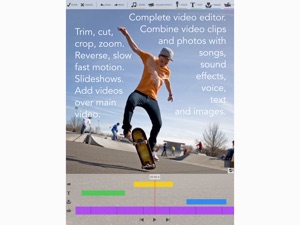
Videocraft is the complete multi-track video editor, photo slideshow and movie maker app. All features one needs to combine video clips and photos with songs, sound effects, voice over, images, and text. With a beautiful and simple design, anyone can create and share amazing videos in minutes.
Access all features in one app, no subscriptions, no in-app purchases.
Feature Highlights:
CHOOSE PROJECT ASPECT RATIO AND RESOLUTION
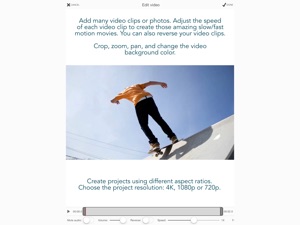
• Create square (1:1), standard (4:3), wide (16:9) or extra-wide (2:1) projects.
• Landscape or portrait orientation.
• 4K, 1080p or 720p resolution.
ADD MULTIPLE VIDEO CLIPS AND PHOTOS:
• Trim video clips to play just the segment you need.
• Crop, pan and zoom video clips and photos to fill or fit your project aspect ratio.
• Mute video clip audio or adjust its volume.
• Fade in/fade out and crossfade transitions.
• Set the duration of each photo.
• Change video background color.
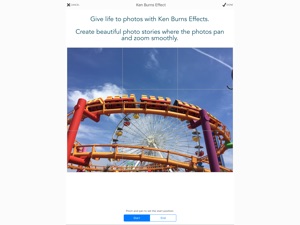
KEN BURNS EFFECT:
• Create beautiful photo stories where the photos pan and zoom smoothly.
REVERSE VIDEO:
• Reverse video clip to play it backwards.
SLOW/FAST MOTION:
• Adjust the speed to create slow/fast motion videos.
STOP MOTION:
• Convert long videos to stop motion videos.
• Import multiple photos and play then to create stop motion movies.
ADD VIDEO OVER VIDEO (B-ROLL, PICTURE-IN-PICTURE):
• Add many videos over the main video track.
• Size and position as you like. Play them side by side.
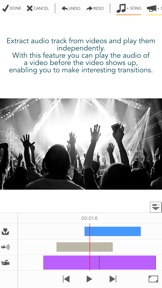
CREATE AUDIO TRACKS FROM VIDEO CLIPS:
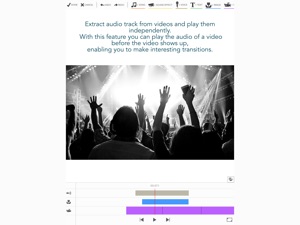
• Extract music from music videos to use it in your project.
• With this feature you can play the audio of a video before the video shows up, enabling you to make interesting transitions.
BLUR EFFECT:
• Apply blur to those "censored" parts of your video.
ADD MANY SONG TRACKS:
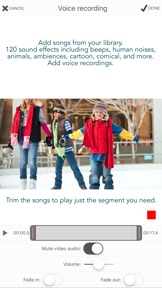
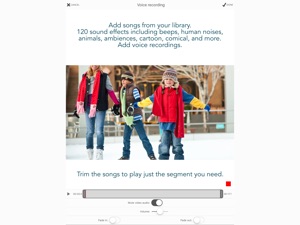
• Add songs from your music library.
• Trim the songs to play just the segment you want.
• Adjust the volume level.
• Option to mute the main video audio track while playing the song.
• Option to fade-in/fade-out for a smooth transition.
ADD SOUND EFFECTS:
• Add sound effects from the included sound effects library. 120 sound effects, including beeps, human noises, animals, ambiences, cartoon, comical, vehicles, weapons, explosions and more.
ADD VOICE OVER:
• Record your own audio to add narration to your project.
• Adjust the volume level.
• Option to mute the main video audio track while playing the recording.
ADD IMAGES OVER VIDEO:
• Add images from your photo library on top of the video.
• Incorporate your own watermarks, borders and overlays.
• Combine text with included images to create callouts.
• Many transitions including wipe, move, scale and fade.
ADD TEXT OVER VIDEO:
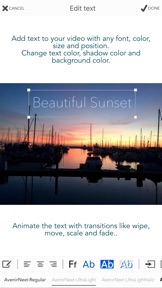
• Add text to your video with any font, color, size and position.
• Includes all fonts installed in the device.
• Change text color, shadow color and background color.
• Many transitions including wipe, move, scale and fade.
EASY TO USE VIDEO EDITOR TOOLS:
• Add tracks using the buttons in the toolbar.
• Each track is represented by a bar in the timeline.
• Access track options by tapping on its icon to the left.
• Drag the bar to change its position.
• Drag the bar handles to change the duration.
• Duplicate bars for easy re-use.
• Pinch the timeline to zoom in or out.
• Reorder video clips by dragging its purple bar.
• Undo/redo option.
GALLERY
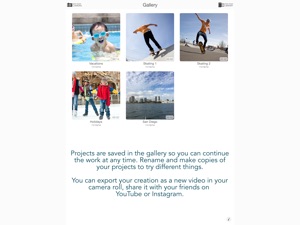
• Projects are saved in the gallery so you can continue the work at any time.
• Rename and make copies of your projects to try different things.
SHARE YOUR CREATION:
• Export your video project as a new video to your camera roll.
• Export the current frame as a new photo in your Photo library. It is perfect if you want to use the app to create memes by combining photos and text or simply to extract a frame from your video.
• Share it with your friends on YouTube or Instagram.
For any questions, feedback and support, please contact us:
Gamelarious: http://gamelarious.com
Feedback: feedback@gamelarious.com
Support: support@gamelarious.com
Twitter: @gamelarious
Facebook: facebook.com/Gamelarious
What's New in Version 5.0.1

• iOS 13 support.
• Bug fixes and performance improvements.
Thanks for all the feedback. Our goal is to make Videocraft the best video editor in the app store.
All features in one app, no subscriptions, no ads, no in-app purchases.
If you find a bug, please contact us at support@gamelarious.com and include device configuration and steps to reproduce.

Seller

Name

Mauricio Eastmond

URL

Information

Developer

Categories

Version

5.0.1

Size

25 MB

Game Center

No

VPP Device Licensing

Yes

Rating

Rated: 4+

Compatibility

iOS 11.0 or later

Devices

iPhone 5s, iPhone 6, iPhone 6 Plus, iPhone 6s, iPhone 6s Plus, iPhone SE, iPhone 7, iPhone 7 Plus, iPhone 8, iPhone 8 Plus, iPhone X, iPhone XR, iPhone XS, iPhone XS Max, iPhone 11, iPhone 11 Pro, iPhone 11 Pro Max, iPad (5th Generation) Wi-Fi, iPad (5th Generation) Wi-Fi + Cellular, iPad (6th generation) Wi-Fi, iPad (6th generation) Wi-Fi + Cellular, iPad Pro, iPad Pro (Cellular), iPad Pro (9.7-inch), iPad Pro (9.7-inch) (Cellular), iPad Pro 12.9-inch (2nd generation), iPad Pro 12.9-inch (2nd generation) Wi-Fi + Cellular, iPad Pro (10.5-inch), iPad Pro (10.5-inch) Wi-Fi + Cellular, iPad Pro (11-inch), iPad Pro (11-inch) Wi-Fi + Cellular, iPad Pro 12.9-inch (3rd generation), iPad Pro 12.9-inch (3rd generation) Wi-Fi + Cellular, iPad Air, iPad Air (Cellular), iPad Air 2, iPad Air 2 (Cellular), iPad Air (3rd generation), iPad Air (3rd generation) Wi-Fi + Cellular, iPad mini Retina, iPad mini Retina (Cellular), iPad mini 3, iPad mini 3 (Cellular), iPad mini 4, iPad mini 4 (Cellular), iPad mini (5th Generation), iPad mini (5th Generation) Wi-Fi + Cellular, iPad (7th generation) Wi-Fi + Cellular, iPod touch (6th Generation), iPod touch (7th generation)

Languages

English

App Store: Customer Ratings

Ratings & Reviews

5.0 of 5 (2 Ratings)

App Store: Customer Reviews

2017-08-16

Really good

Easy to get the hang of. Just play about with it for a few minutes and you'll get most of what it's all about. Makes editing videos really easy plus there are lots of things you can do to the videos within the app. There is a flaw though. When videoing on my iPad, the resultant image is reversed in the app. Very frustrating.
Bertie the Bee
Version 4.1.1
2017-04-06

Useful app

It's better for precision edits than the built in photo editor and it has a multitrack capability.
Visigothic Bishop
Version 4.1.1
2017-04-03

Great and easy to use !

Definitely worth the money! Simple and fun to use when you get the hang of it !
Only bit of feedback would be, make an obvious button to save as your editing, incase something happens and you loose your current edit, you might already have this but I haven't found it !
But overall a great app!
BasslineBmx
Version 4.1.1
2017-01-14

Only 100

Really annoying that you can only add 100 photos, lot of time wasted.
Walby200
Version 4.1.0
2016-10-28

Needs tweaking

Almost perfect, music fades needs to be either longer or adjustable as ends too abruptly, touch adjustments a bit too sensitive for fat fingers other that that, it's good.
ptrbee
Version 4.1.0
2016-09-11

Love it

This app is really good for editing keep up the good work
brassneck1971
Version 4.1.0
2016-07-17

Brilliant

This is absolutely fantastic. one feature that I would like is to add custom paths for how your text/images come in
SiL3nt GaMErZ
Version 4.1.0
2016-07-02

Not working

It could not import any of my cloud videos. Otherwise seems like quite a nice tool with good basic video editing features
nraj35h
Version 4.1.0
2016-05-16

Screen recorded

You should be able to edit screen recorded videos off of air shou. It's a good app but you should be able to see when to stop recording the audio because we can't see it so we don't know when to stop and be able to edit screen recorded videos
Draftiereight1
Version 4.0.1
2016-05-07

If i could put 0 stars i would

I worked really hard on an edit and it will not export, i can't believe this you need to to something about this, i paid.
Rhiannonbond
Version 4.0.1
2016-04-26

Good

It's easy to use but wish you could change the file size more easily for emailing
Sir Brian - Knight of Nee
Version 4.0.1
2016-03-28

Terrible

Wasted money as I cannot even open a 44 second video on the app without it giving up and shutting me me out!!
Yasmin, 13
Version 4.0.0
2016-02-13

BEST APP EEEEVVVEEERRR

This app is AMAZING for YouTube videos and even normal videos but nothing is normal (boring) in this app!
I wld recommend this app for all ages and definitely the ones who want to go PRO STYLE
every one should have this PRO STYLE APP NO MATTER WHAT 👍🏻👍🏻👍🏻👍🏻👍🏻👍🏻👍🏻👍🏻👍🏻👍🏻👍🏻👍🏻👍🏻👍🏻👍🏻👍🏻👍🏻👍🏻
St. Paul's schol
Version 4.0.0
2016-01-24

Always crashes

When ever I try to put slow-mo on or something like that the app just crashes, it's very frustrating.
I'm a bro 👍🏻
Version 4.0.0
2015-12-22

Does the job for me

Does what it says on the tin takes a while to render on some things like a crop but result is fantastic so worth the wait do wish there was support for colour correction then would be a great all rounder
Teddybear564
Version 4.0.0
2015-12-13

good functionality, ux could be improved

well rounded NLE for iOS mobile with a few minor niggles - eg, no presets when recording in-app - you have to manually select the video camera each time because it always defaults to photo.
GREAT THAT IT IS MULTITRACK with B-ROLL - the slicing and dicing bit is pretty intuitive, it's just the acquisition portion where my niggles are.
miker71
Version 4.0.0
2015-08-27

But...

Amazing but it would be a lot better if
1) you could change the saturation, brightness ,hue etc
2) be able to add effects like transitions and flashes etc
3) and not take so long to reverse video
Rhiannonbond
Version 3.2.0
2015-08-20

BEST THING I EVER BROUGHT!

I use this for my youtube vlogs!
10101jdjdjdyhdh
Version 3.2.0
2015-01-11

So far, so good

This is a great little app. Just downloaded, but I think it might become my go-to video app instead of iMovie. Many features yet to explore I think.
The voice recording facility works fine - I use an external mic for better quality. However, it would be nice if we could import previously made recordings done on exterior recording apps such as TwistedWave and Voice Record, into our Videocraft videos.
Oh, it would be nice also to be able to export our videos to Vimeo.
Overall, I'm quite happy and recommend this app! :-D
P.S. Have just taken iMovie off of my ipad for now.
voicy1stef
Version 1.0.6
2014-12-12

Great!

If you are an aspiring YouTuber (like myself) then this app is your best friend! It lets you do voice over, add pictures, sound effects, music, and even let's you speed up the video! Brilliant! ⭐️⭐️⭐️⭐️⭐️
Ameliarose16
Version 1.0.6
2014-12-06

Simply astonishing

So far, I've only ever used this brilliant ap to write short promotional videos for my business, or to show an Air-Scout group the possibilities that aviation can bring for them in the future. Either way, while I'm only tip-toeing round the edges of this clever bit of software, it is doing things I could never have forecast not so long ago. Making promotional videos used to cost a fortune. Now, I can make and edit my own, and the only limit is my imagination and photo-library.
Well done!
Goodwoodx
Version 1.0.6
2014-11-21

Amazing,everything I need in one piece!

Amazing,everything I need in one piece!
3000huangsha
Version 3.1.0
2014-10-25

Good app

I love this app, simple and easy to use. Only one thing I would add is dropbox compatibility so I could add my own intro and outro music. But I use it to edit videos on my phone then can upload them straight to youtube knowing they look good
Lyn draven
Version 1.0.6
2014-09-22

Waste of time downloading.

Crashes every time on load up. Specially after adding 5 videos onto one clip! 0/10 worst video app to date!
Nbalake
Version 1.0.6
2014-09-11

Very powerful tool

I used to edit my videos on my desktop computer but now with this editor I can edit all my videos on my iPad.
This editor is very powerful in that you can freely edit each video track from trimming the length to adding text or sound effects to adding multiple videos together to create a longer single video from your clips.
What else can I say this editor has replaced my desktop editor I now have the ability to create my holiday videos right on my iPad.
An easy five stars ⭐️⭐️⭐️⭐️⭐️
Peaceful-Space
Version 1.0.6
2014-09-09

Pants

Lasted five minutes before I deleted it . Doesn't work , doesn't let me do anything free apps will . Waste of money .
Chris2jz
Version 1.0.6
2014-09-06

Needs crash fixes!!

Great potential. Everytime I get into an edit with more than 5 videos in the edit it crashes, and then I can't open that project again. If I do, it crashes. Have to start new. So for that 1 star. Please fix the horrible crashes pleeeeease!
Underfeed
Version 1.0.6
2014-09-06

Amazing just what I needed for my ig vids😍

🙌🙌
Isaeb9b
Version 1.0.6
2014-09-03

Worst thing ever!!😡

I have spent my hard earned money on this to find out it does not let you save videos! Never buy this as a complete waste of money worst thing I have ever bought don't do it!!!😡😤
Sam Harris
Version 2.0.1
2014-06-01

Cannot save videos!!

This I thought was a great app until I realised you cannot save the videos you have made into your camera roll.. Really annoying!! Waste of time.
Samvarachia
Version 1.0.1