AboutTermsPrivacyContact
 
Updating
BankTree Personal Finance

BankTree Personal Finance

Released: 2014-04-08
© 2011 BankTree Software Ltd
BankTree Personal Finance - QR Code
Version 2.0.20
4+
Download on the App Store
Version 2.0.20
4+
Download on the App Store
Released: 2014-04-08
© 2011 BankTree Software Ltd

iPhone Screenshots

Screenshot
Screenshot
Screenshot
Screenshot
Screenshot

iPad Screenshots

Screenshot
Screenshot
Screenshot
Screenshot
Screenshot

Description

BankTree personal finance will help you to understand where your money goes, so you can plan to spend more wisely. Manage your personal and family finance on your iPhone or iPad. You don’t need a notebook and pen or Excel.
With this handy application, you can start to keep track of your spending, plan your budget to save your money. Money management is now intuitive, fun and stress free.
KEY FEATURES
1. Expense tracker & Money manager
Keep track of all spending on a daily basis in just a few minutes. You only need to key in a few details and choose a category, it's that simple.
2. Budget planner
Easy to manage budgets for all expenses or specific category for a week, month or even year. See when you reach a limit on a budget.
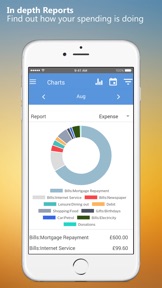
3. In-depth reports
We provides bar and pie charts, which give you an accurate picture of your total expense, income or balance for the month, week and more. Stay on top of your money.
4. Bill reminder
Never miss a bill because you can schedule for upcoming bills such as rental, Internet or monthly subscription, in just a few steps. See when the bill is due each month, and when to spend less and save more money.
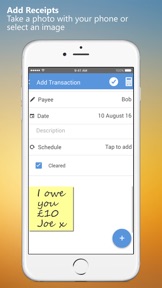
5. Receipt capture
Do you want to see your receipt on your computer? Take a picture of your receipt and attach to your transaction. Synchronize the mobile app with the desktop application and see your receipt added to your transaction on your computer.
6. Cloud Syncing with top-notch security level
If you have more than one device or are using both iPhone or iPad, you can rely on our app to record all of the transactions and manage your expenditure. It works seamlessly across devices and platforms. From iPhone, iPad to PC & laptop, securely access your data from anywhere and any devices so you can fully control your money, budgets, and finances. Link with the BankTree personal finance desktop application or the BankTree Online web application.
OTHER FEATURES
- Currency converter tool
- Multiple currencies, account transfers
- Schedule for future and recurring transactions
- Split transactions for multiple category transactions
- Backup and restore, link to Dropbox or Google Drive
- Export to CSV or QIF file
- Built in pass code protection
- Help & Support
Upgrade to PREMIUM for the following features:
- Link with Google Drive, Smart Sync across all devices
- Add schedule transactions and forecast bills
- Add budget planner for your spending and saving goals
- Add backup and restore and export to CSV and QIF
For further help and support please contact us http://www.banktree.co.uk/support
Clarification for Access Permissions:
-Photos / Media / Files
Attach your receipts and photos to each transaction.
-Storage
Save your images, transactions, backup and restore data files.
-Network / WiFi
Update files to cloud, and obtain currency exchange rates.
Note: To setup the Windows Desktop / Cloud synchronization follow the instructions provided after selecting 'Sync with BankTree desktop'.
What's New in Version 2.0.20

This app has been updated by Apple to use the latest Apple signing certificate.
ew version of BankTree Personal Finance for iPhone/iPad.
Update to screens to fix for long account names. Update to schedule to allow optional enable and disable, allow skip schedule entry. Allow saving of schedule transactions when running off line. Update to budgets to allow viewing of items with budgets only. Update to items shown on charts. Fix for synchronisation of skip schedules.

Seller

Name

BankTree Software Limited

Information

Developer

Categories

Version

2.0.20

Size

25.3 MB

Game Center

No

VPP Device Licensing

Yes

Rating

Rated: 4+

Compatibility

iOS 9.0 or later

Devices

iPhone 4S, iPhone 5, iPhone 5c, iPhone 5s, iPhone 6, iPhone 6 Plus, iPhone 6s, iPhone 6s Plus, iPhone SE, iPhone 7, iPhone 7 Plus, iPhone 8, iPhone 8 Plus, iPhone X, iPhone XR, iPhone XS, iPhone XS Max, iPhone 11, iPhone 11 Pro, iPhone 11 Pro Max, iPhone SE (2nd generation), iPhone 12, iPhone 12 Pro, iPhone 12 Pro Max, iPhone 12 mini, iPad 2 (Wi-Fi), iPad 2 (3G), iPad (3rd Generation) (Wi-Fi), iPad (3rd Generation) (4G), iPad (4th Generation) (Wi-Fi), iPad (4th Generation) (4G), iPad (5th Generation) Wi-Fi, iPad (5th Generation) Wi-Fi + Cellular, iPad (6th generation) Wi-Fi, iPad (6th generation) Wi-Fi + Cellular, iPad Pro, iPad Pro (Cellular), iPad Pro (9.7-inch), iPad Pro (9.7-inch) (Cellular), iPad Pro 12.9-inch (2nd generation), iPad Pro 12.9-inch (2nd generation) Wi-Fi + Cellular, iPad Pro (10.5-inch), iPad Pro (10.5-inch) Wi-Fi + Cellular, iPad Pro (11-inch), iPad Pro (11-inch) Wi-Fi + Cellular, iPad Pro 12.9-inch (3rd generation), iPad Pro 12.9-inch (3rd generation) Wi-Fi + Cellular, iPad Air, iPad Air (Cellular), iPad Air 2, iPad Air 2 (Cellular), iPad Air (3rd generation), iPad Air (3rd generation) Wi-Fi + Cellular, iPad mini (Wi-Fi), iPad mini (4G), iPad mini Retina, iPad mini Retina (Cellular), iPad mini 3, iPad mini 3 (Cellular), iPad mini 4, iPad mini 4 (Cellular), iPad mini (5th Generation), iPad mini (5th Generation) Wi-Fi + Cellular, iPad (7th generation) Wi-Fi + Cellular, iPad Pro 11-inch (2nd generation), iPad Pro 11-inch (2nd generation) Wi-Fi + Cellular, iPad Pro 12.9-inch (4th generation), iPad Pro 12.9-inch (4th generation) Wi-Fi + Cellular, iPad Air (4th Generation) (Wi-Fi), iPad Air (4th Generation) (Wi-Fi + Cellular), iPad (8th generation) Wi-Fi, iPad (8th generation) Wi-Fi + Cellular, iPad Pro 11-inch (3rd generation), iPad Pro 11-inch (3rd generation) Wi-Fi + Cellular, iPad Pro 12.9-inch (5th Generation), iPad Pro 12.9-inch (5th Generation) Wi-Fi + Cellular, iPod touch (5th generation), iPod touch (6th Generation), iPod touch (7th generation), Apple Watch Series 4, Apple Watch Series 5, Apple Watch Series 6 (GPS), Apple Watch Series 6 (GPS + Cellular), Apple Watch Series SE (GPS), Apple Watch Series SE (GPS + Cellular)

Languages

English

App Store: Customer Ratings

Ratings & Reviews

3.6 of 5 (43 Ratings)

App Store: Customer Reviews

2020-05-28

Really needs some basic functionality adding

While this works and syncs well with the Online cloud version it is lacking in some basic functionality. The ability to reconcile a transaction (without having to go to a pc) for starters. Adding a new category or payee is clunky and counter intuitive (why not save a new payee as you type the transaction in instead of having to go to + when you find out it doesn’t already exist, then make sure you put focus in the right box then confirm then go back to the transaction?) - so long winded. This app could really complement BankTree Online with a bit of thought
Mickeylick
Version 2.0.20
2020-05-15

So Easy

It’s so easy to keep track of finances...Online takes control so if you started on phone or tablet then go to do merge the online takes control and wipes all that you’ve done.. however I find it great to keep control on my iPad..
sptlight2
Version 2.0.20
2020-04-06

Difficult to import.

Been using BankTree 2 on PC for many years and use it religiously every day. Bought the premium version of this iPad app to allow me to use it on the go but it just won’t import the backup file from my pc using Google Drive or DropBox, also tried emailing the backup file and saving to my iPad to import from there but no joy. Then looked to see if there was a upgraded p.c. version but this costs £35.00. Tried the free trial to see if it was worth upgrading but it completely messed up all the account values on my p.c. when importing my backup file. Moral of the story, if starting from scratch it’s probably okay but if like me you need to import older files then don’t waste your time. Thank fully it’s only £4.99 down the drain.
Exmatlow
Version 2.0.20
2019-06-24

Excellent

One of the best apps. I use this with BankTree online - both work very well for me.
dhb26
Version 2.0.20
2019-05-25

App poor does not sync with online

Having paid for the Starter online package I find not all functionality in the app. It doesn’t recognise reconciled apps. Accounts don’t update unless the filter is on/off?? This is crazy. Surely you want the balance of all kept up to date???
App is very disappointing. Online BankTree is quite acceptable.
Excelkween
2019-03-13

Works for me

Took me a little time to get used to the web-based model rather than the previous incarnation. One problem I have is I wish I could determine when the system closes. I find it very infuriating to come back to my computer to have to login again. I realise this is done for a security measure play I feel I have the sense to be able to determine this myself. Perhaps it is something that can be looked at in the future release.
I have opted for share valuations but find it not much use because a significant number of shares have To have their values inputted by hand. I must admit therefore for monitoring shares there are better systems on the market.
Dermo22
Version 2.0.20
2019-01-16

Rubbish

At the moment, it’s not very good. I’m trying to sync with my bank, but every time I go to the HELP page, I just get a blank screen. I’ve tried logging out and back in, but that changes nothing. Very disappointed 😞
Kelaifu50
Version 2.0.13
2019-01-11

Couldn’t find opening balance or help

Set up accounts then tried to find out how to enter account opening balances a fairly basic requirement. Couldn’t find out how to do it so clicked help and there was no data just blank pages.
executivesaver
Version 1.2.5
2018-12-19

Brilliant App

Having been happy with the BankTree desktop software for a couple of years I have now moved to BankTree Online and the app and although I’ve only been using it a few weeks I already know it is exactly what I want. The app makes it easy to keep records up to date without having to use the computer, which is a big plus compared with having to do perhaps a week’s entries in one go if you don’t keep on top of things. Very satisfied.
Derby B
Version 2.0.17
2018-12-19

Found One at Last

So many accounting programs are to in depth for basic accounting and budgeting. Bank Tree is just perfect. Enough detail to keep accurate records, not so complicated that you get lost in detail. So easy to use, I have been using it for around 4 months now and I haven’t had to refer to the help function once. Highly recommended. 👌👌
Rick-N
Version 2.0.0
2018-10-15

Best personal finance app by far

I’ve tried many personal finance apps in the past and this is most definitely the best. Syncing with my PC is a must for me and this works perfectly.
Customer support is second to none. Had a problem which was sorted via their ticket system promptly and on a weekend.
Well done!
garynb
Version 2.0.2
2018-10-12

Good, not great

This would be 5 stars were it not for the problem of losing Cloud sync from time to time, then it takes a while to reset everything.
Apart from that Bank Tree does everything I need, great for entering finances by mobile or from desktop, then synchronising everything.
Bolo738
Version 2.0.20
2018-10-03

Awful

The app never shows any balances from the online accounts, they are always zero bar one account which seems to be accurate.
Pointless because if this.
davidkdissapointed
Version 2.0.6
2018-07-20

Excellent but room for improvement

I tried this software all be it on the desktop a few years ago and decided much to my regret to go for Quicken by importing the software. Quicken though will now not work on the mobile app outside of North America due to their insistence of having a North American bank to link. So of no use to those wanting to manually update their accounts via the desktop or by app on their iPads. Hence the rethink and how pleasantly surprised I am. The app is much better than Quicken to use with a very modern feel which is easy to follow and get use to. New categories, delete ones not needed, updating of budgets, new payees, very easy to do on the app. Reporting is a OK and I can cope with it because it gives me a guide. It could be improved with the ability to create a report on the desktop and make available on the app or the ability to modify. The dashboard is excellent and gives a picture of net worth as at current moment. Bank too is excellent because it enters future standing orders or regular payments in the bank, so very very easy to forecast cash flow through the month. Another issue which I think could be corrected is the regular payments created on the desktop will not edit in the app, they appear to do but will not save. The order in the app is great because the latest payments appear at the top. I like the ability to put a description in the app for an expense but peculiarly this option doesn’t seem to appear on the desktop. The app does link with the desktop (if you follow instructions and close the app down before opening the desktop), but this update can be a little slow, perhaps because it uses Dropbox and not BankTree servers
On the whole well done and look forward to improvements. Great to see someone interested in the UK market for personal finance software
Gromit of Lancashire
Version 1.2.9
2018-07-16

Reconcile function and Touch ID please

It is a great app already but would benefit from a reconcile function and able to login using Touch ID
CJay72
Version 2.0.7
2017-12-17

Finally a half decent finance app

I have been downloaded, literally, 12 apps looking for something that would do 2 simple things .. download bank/credit card transactions and let me forecast my cash flow. Oh - and it has to work properly in the UK. Finally, I have found one that does!
Well, almost - I still have a small problem with the perfect forecasted cash flow graph - but it might be user error. At least there is a help desk with actual people to give you help.
It would be 5 stars but the user interface isn’t as up to date as other apps. Come on guys ... a bit of a facelift of your UI should be roadmap for 2018 ... I could still choose a default expense category of “CDs and tapes”. When was the last time I needed this - 1999??!!!!! :)
char2007
Version 2.0.11
2017-10-27

It does what it says on the tin.

I've been using it for years and it does everything I want to. I can keep track of all my accounts, credit cards, foreign account. See the total at a glance and report on pretty much anything. Highly recommend .
Dippyden
2017-07-19

Great addition to main app

I do have problems with sync sometimes, reinstalling cure this.
JilliNana
2017-02-12

Works well

I looked at a number of different apps and software suites. This app with its desktop software works well suited my needs perfectly to control costs etc.
PCCMCC
2016-10-22

Mobile Accounting

Like the new functionality to see summary of financial data using the pay app. It took a while to fully understand the app on how to record new transactions as it quite different from previous versions
Tim1973iow
2016-10-02

Excellent bit of software

I've bought the desktop and mobile versions to replace Quicken 2002. BankTree does everything I need with the bonus of syncing between devices and desktop. Customer support is also very good, with an update released within days of reporting a bug.
Paulcbuk
2016-09-28

Works well

Still a bit basic but sync between desktop & iPhone works well. Any thought about making this automatic in the future?
Ganmaa
2016-09-26

Dropbox synch

If a little quirky, this program is superb value for money. The addition of cloud synchronisation via dropbox or Google is a winner. Even synchronises with my smart phone using the Bank Tree app.
Pub-crawler
2016-09-08

Great finance app

This a great improvement on the previous version - fairly easy to setup the cloud sync , even for a blonde. I bought the premium version as its so much easier to use the budgeting and direct debits while on the move. Well done BankTree a great little app.
JimoftheApps
2016-09-01

Desktop Sync

First you do not need to upgrade to the paid premium version if you are already running the Desktop program BUT you do have to reset the Cloud settings on your desktop to get this update to sync with your BankTree desktop program.
In the app go to Help & Support and select 'Cloud Synchronisation (updated 29 Aug 2016)' watch the video and follow the instructions given there.
This worked for me without incurring additional cost or sync issues. I hope this will help others.
BankTree could improve their advice with this update so clients aren't left feeling they've been screwed.
I'm not sure that I like the new mobile UI only time will tell!
BrianHT7
2016-09-01

Amazing app

It made my life much easier. Thanks to the developer. Recommend if 100%
Bashir Zarmast
2016-08-29

Bank tree Mobile 2

Vast improvement on previous version.
Pity they ask for payment for upgrade to premium on each device.
Option to use Fingerprint ID instead of passcode would be good.
Payment and Reference columns as per the desktop version would also be useful
tandjC
2015-01-17

Limited but useful

Syncs only cash accounts. Will be more useful when it handles Investment accounts and provides reports.
pj42uk