AboutTermsPrivacyContact
 
Updating
Autodesk SketchBook

Autodesk SketchBook

Released: 2014-10-09
© Autodesk Inc.
Autodesk SketchBook - QR Code
Version 4.3.1
4+
Download on the App Store
Version 4.3.1
4+
Download on the App Store
Released: 2014-10-09
© Autodesk Inc.

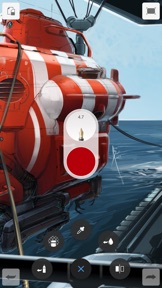
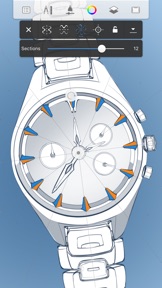
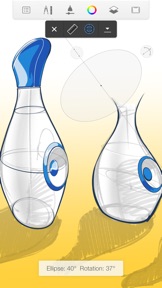
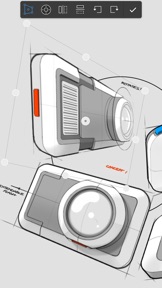
iPhone Screenshots

Screenshot
Screenshot
Screenshot
Screenshot
Screenshot

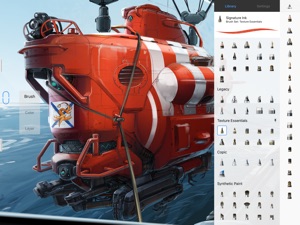
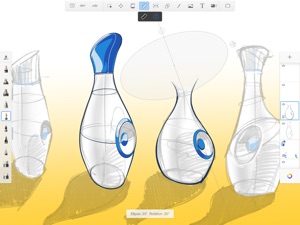
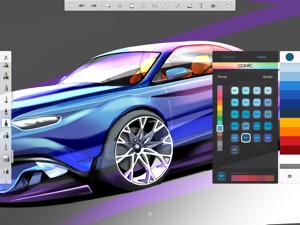
iPad Screenshots

Screenshot
Screenshot
Screenshot
Screenshot
Screenshot

Description

SketchBook for Everybody!
At Autodesk, we believe creativity starts with an idea. From quick conceptual sketches to fully finished artwork, sketching is at the heart of the creative process. You never know when a great idea will strike, so access to fast and powerful creative sketching tools is an invaluable part of any creative process.
For this reason, we are excited to announce that the fully featured version of SketchBook is now FREE for everyone!

What's New in Version 4.3.1

We've made some pretty impactful improvements, the biggest being the removal of the trial. You'll also find a fix or two, as well.
There is no more trial version.
We created a new **Welcome** splash screen, so there's no longer a need to log in to use SketchBook.
The Blog location changed under our noses, but it has been updated. You can access it, once again, from within the app.
Apple Pencil input now works within the Welcome screen.
The **No Network** message no longer appears prematurely, and we added a **Back** button to retry after a real network error.
Formatting issues on the account information dialog have been corrected.
We made clicking the Close button a bit easier for all popup dialogs (it was previously a bit small for fingers).

Seller

Information

Developer

Categories

Version

4.3.1

Size

173.8 MB

Game Center

No

VPP Device Licensing

Yes

Rating

Rated: 4+

Compatibility

iOS 10.0 or later

Devices

iPad Air 2 (Cellular), iPad mini Retina (Cellular), iPad Pro (11-inch), iPad (5th Generation) Wi-Fi, iPad (6th generation) Wi-Fi, iPod touch (6th Generation), iPad Pro (11-inch) Wi-Fi + Cellular, iPad (6th generation) Wi-Fi + Cellular, iPad Pro 12.9-inch (3rd generation), iPad (5th Generation) Wi-Fi + Cellular, iPad mini (5th Generation) Wi-Fi + Cellular, iPad mini (5th Generation), iPad Pro, iPad mini 3, iPad mini 4 (Cellular), iPad mini 4, iPad Air 2, iPad Pro 12.9-inch (2nd generation), iPad Pro (Cellular), iPad Pro (9.7-inch) (Cellular), iPad Pro (10.5-inch) Wi-Fi + Cellular, iPad Pro (9.7-inch), iPad Air (3rd generation) Wi-Fi + Cellular, iPhone 6 Plus, iPad Air (3rd generation), iPad Pro (10.5-inch), iPad Pro 12.9-inch (2nd generation) Wi-Fi + Cellular, iPhone 6, iPhone XR, iPhone XS, iPhone 6s, iPhone SE, iPhone 7 Plus, iPhone 6s Plus, iPhone 5s, iPhone X, iPhone 8, iPhone XS Max, iPhone 8 Plus, iPhone 7, iPhone 5, iPad (7th generation) Wi-Fi, iPhone 5c, iPad (7th generation) Wi-Fi + Cellular, iPad Air3, iPad Air3Cellular, iPad Mini5, iPad Mini5Cellular, iPad Pro 12.9-inch (3rd generation) Wi-Fi + Cellular, Watch4
Languages

English, Chinese, French, German, Italian, Japanese, Korean, Portuguese, Russian, Spanish

App Store: Customer Ratings

Ratings & Reviews

5.0 of 5 (1,721 Ratings)

App Store: Customer Reviews

2019-03-31

More option

I would more options like a duplication button.
Heart Pho
Version 4.3.1
2019-03-30

Suggestion

That bar is in my way when I paint
scpmag
Version 4.3.1
2019-03-30

Amazing!

This app has helped me so much because many apps included parts which you need to purchase, this has made my drawings have better effects. I’m so happy that this app was made :)
From Romeesa ^~^
ImTHEunicornnn
Version 4.3.1
2019-03-29

Brilliant!

I can use this to make pictures for my friends and this is so easy to use , I have it on all of my devices I own(even my PC and laptop!) thank you!
Cosmo the rater
Version 4.3.1
2019-03-27

Great app

Great for overlay editing drawing and passing time well pleased with the app
phil4later1
Version 4.3.1
2019-03-24

Sketchbook

Excellent
Quaser dog
Version 4.3.1
2019-03-24

Great app uwu

I’ve had this app for, I believe over 3 years? It’s the best drawing app I’ve used and has a lot of great tools (they’re especially amazing when using the Apple Pencil). I really don’t have a lot to say, but I think ages ago you had a blurring tool, which I vaguely remember but never used it as I was still new to the app. It’s not on the iPad (anymore) and would be great to add back. I searched up how to blur on Autodesk Sketchbook online and it did include the blur tool, just wasn’t available on iPad.
Laju maitra
Version 4.3.1
2019-03-24

Much better

You don’t need to pay to get a good experience and it’s not like them rubbish other drawing games👍🏻
pushgzgevjj
Version 4.3.1
2019-03-24

Wow wow wow

This app is so much better then I have expected 😱🥰🤓😱😮
rooster ace
Version 4.3.1
2019-03-23

Pretty good, but..

It is a very good app,but sometimes when I draw lines a good distance away from the brush size slider thing, it will change the width of the line, and it gets annoying after a while.
Laddy McLadson
Version 4.3.1
2019-03-23

👌

It was ok when it did not colour the lines and it just made me mad but it was 😎 (awesome)🤗🤔🤭🤫😺😺😺😸😸😸😻😻😻🧚🏻‍♂️🧚🏻‍♀️🤶🏻🎅🏻🧝🏻‍♀️🧝🏻‍♂️🧟‍♀️🧟‍♂️🧛🏻‍♀️🧛🏻‍♂️
PandaPete314🧝🏻‍♀️
Version 4.3.1
2019-03-23

great app

I love using this app on my iPad Pro
If I’m bored and there’s no WiFi then I will just create a picture. It’s great to enhance artistic skills especially for kids Xxx
livvy bluhm
Version 4.3.1
2019-03-20

👌

It’s an pretty good app for being free, I would recommend this to my friends and I have.
I do think though that at first it is confusing what does what therefore I think therefore should make videos like how to make a painting of a face...etc. As it demonstrates how to combine the different tools.
merlinpatchy
Version 4.3.1
2019-03-19

Great app for any designer

A great app for any designer. I can seamlessly sketch something out on my iPad export it to a pad file and then continue working on my laptop. Great app lovely brushes and details.
M..Allen
Version 4.3.1
2019-03-17

Amazing

Very easy to use and free. Love it
Dfghhhhhgfvvjgfvhg
Version 4.3.1
2019-03-17

Epic

This is the best drawing game ever created. Once you get into it is really easy to use you can even transfer images to your picture and add more detail! I definitely recommend this game! It is easier to do on a bigger screen like a iPad or tablet! But like I said definitely get it!
nandoed
Version 4.3.1
2019-03-16

Thankyou

Gets better with experience x
no it wont
Version 4.3.1
2019-03-15

Grids, Guides and Perspectives

Needs grids, guides and perspective fields
I highly suggest that Autodesk add this feature
In their next massive update, as it would help
Designers immensely.
Please please please, Autodesk please
Add the missing features that are on the desktop
...give the people what they want!
Patternista
Version 4.3.1
2019-03-15

Amazing!

This game is perfect for those creative minds but here is a suggestion can you please have an eye dropper so we can select the colour without finding it for ages?
Lilly_P0ps
Version 4.3.1
2019-03-13

It’s sooo good

Sketchbook is sooooo amazing and people will and love it!🥳
YEETAPHOBIA
Version 4.3.1
2019-03-11

Sketchbook

It’ll do ...
Red Cuffs
Version 4.3.1
2019-03-10

Love it

I loved this app for over 8 months. Until I found procreat. Although I paid for procreat. Auto desk is the equivalent. Don’t know all the features off this app. But from first impressions It holds up really well. Tell my cousin to get it
MacksLifeFromYoutube
Version 4.3.1
2019-03-10

Excellent!

We love this app! This is our go to app for all illustrations
Shentasia
Version 4.3.1
2019-03-10

An amazing app

I can’t draw but I think I can draw on this app. I highly recommend it. My best friend has it and she can make amazing drawings!
Xanmaster2
Version 4.3.1
2019-03-09

Most amazing app for drawing!!?

Honestly one of the best! Once you have gotten your head around all the unique and interesting functions, it is truly on of a kind. Create great art for free.
HB1080p YT
Version 4.3.1
2019-03-09

Amazing

It amazes me how well this app is developed I’m new and already loving it. No ads, it’s quick, holds a variety of tools and colours and is easy to use. Would 10/10 recommend for new artists and basically everyone. Thanks!
soPhI109
Version 4.3.1
2019-03-08

Best but lags

I can only say good things about this art app. It has everything I want in a design app. The only thing that lets it down is that it freezes very regularly. I’ve uninstalled, reinstalled, and my device is the new iPad Pro 12’ and is up to date with the latest software. Please fix this lagging/freezing problem.
BabyAbyss
Version 4.3.1
2019-03-05

Great drawing app, recommended!

Normally I don’t do reviews but I had to leave one here; it’s very easy to use once you get the hang of it. Works great with my Apple Pencil too. The UI is stable, fluid, bug-free and has a lot of textures to work with when I need them. Would recommend to any artist, whether beginner or advanced! ❤️🖊🖋🖌🖍✏️
Myfavouritenumberis42719
Version 4.3.1
2019-03-03

Love this app!!!!

I love this app but the only thing I would like to see done better would be a more detailed tour of the app when you first enter
boo2000😜
Version 4.3.1
2019-03-03

AMAZING...BUT

I love this game but all of a sudden I couldn’t draw so please fix this but amazing game 👍🏻
Alices7
Version 4.3.1
2019-02-28

Great!

Love using this for my Gacha Edits!
Hanako 🦄 Chan
Version 4.3.1
2019-02-28

Amazing!!!!!!!!!

This is the best
uk usa uk usa
Version 4.3.1
2019-02-25

Brill at art app

This app is brilliant. I am a cartoonist and illustrator and I could not function without this app. It has everything I need. It is very easy to use and and not too busy on the page. Cannot recommend highly enough. Have other art apps but this beats them all. Thank you!
deeshelly
Version 4.3.1
2019-02-23

LOVE IT

I’ve been using it for a week now and I love it because it’s FREE if it was not free I wouldn’t of bought it because I can’t afford a lot of things but this app has fixed all my problems🤩
The Girl On tv
Version 4.3.1
2019-02-22

Great

This is a great app to do gradients
JJ12Julia
Version 4.3.1
2019-02-21

Cool pencils

I’ve been painting and sketching with 3 apps this one, ArtRage and Procreate out of the 3 this has the best pencils for sketching found in the fine art set so 5 stars for that, I’m finding the paint a bit more difficult and need more time before I can comment on them, but overall this app has plenty of tools that the other apps don’t have.
Freaky head
Version 4.3.1
2019-02-20

Amazing

It’s amazing for free there is everything even mirrored art , there is an app just like this for £10.00! but this app is free and better ❤️
beth_and_luna
Version 4.3.1
2019-02-18

Awesome

Love this to the moon and back.❤️
drogonthedragon
Version 4.3.1
2019-02-17

It’s great but...

The app is amazing and fantastic only one thing is that it’s annoying to draw with with no Apple Pencil that’s not why I’m giving it 4 stars. It’s because it gets boring after a while maybe you should add some new mediums besides that it is amazing
Sn3kySnake
Version 4.3.1
2019-02-17

I love it

I hate drawing on paper this is better
bkjgjj
Version 4.3.1
2019-02-16

Amazing

All i got to say
SUB 2 PEWDIEPIE
Tedmyster777
Version 4.3.1
2019-02-16

I’m liking this

I love it and I’m nearly six
Cat girl 6
Version 4.3.1
2019-02-16

Utterly amazing!

Utterly amazing!
batman786687
Version 4.3.1
2019-02-16

Good but I don’t know how to to this...

This app is amazing, but I can’t trace. I watched tutorials on YouTube but they do not work. Why is this?
iwantmynametobelizzielol
Version 4.3.1
2019-02-11

NO. TRIALS. UNLIKE. ANY. BAD. APP. I'VE. SEEN.

It’s free drawing. No cost. No pay. I would rate this 999999999999 if I could. When downloading this app i thought “this is probs gonna be like a paid trial or something” but to my surprise it was free. I was confused. But that’s the qualities of sketchbook. I really recommend the app.
ChillyPong
Version 4.3.1
2019-02-10

Amazing

This is an incredible piece of software for the iPad. About as good as you can get for a screen this size.
sandy6401
Version 4.3.1
2019-02-09

Great

This app is great for being creative. This app also lets your imagination run free and wild.😎🤩🤩🤩🤩
salmonfish101
Version 4.3.1
2019-02-08

I made a drowning polar bear

Amazing quality
DestroyTIME
Version 4.3.1
2019-02-05

I love it!

I love Autodesk Sketchbook because it is a great drawing app and includes lots of cool features. It has really improved my art work and comics and all of the cool effects really help. But as a suggestion, I would like it if instead of adding colour swatches over colours in the palette at the side, can u add blank spaces so we don’t have to keep replacing other colours that we use. If unlimited spaces was added it would be 10 star worthy! And could you maybe also add a glitter brush as well and make the screen less pixelated when zoomed in?(I have an iPad mini) And if it’s not too much could you maybe add a shadow and lighting guide, yknow the thingy that lets u adjust the Lightning and concentrate it on a particular area (like what Facetune has) Once again, this is a fantastic app, and has almost everything for FREE!😻💕💕 but if these suggestions were added then it would be even better!! Thank u once again! 💗💝💕💞💖💓💘
cauliflower😂
Version 4.3.1