AboutTermsPrivacyContact
 
Updating
Handwriting Keyboard

Handwriting Keyboard

Released: 2014-10-12
© Catalystwo Ltd
Handwriting Keyboard - QR Code
Version 2.5.1
4+
Download on the App Store
Version 2.5.1
4+
Download on the App Store
Released: 2014-10-12
© Catalystwo Ltd

iPhone Screenshots

Screenshot
Screenshot
Screenshot

iPad Screenshots

Screenshot
Screenshot
Screenshot
Screenshot

Description

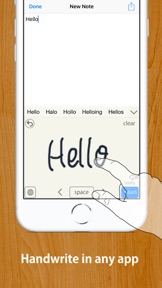
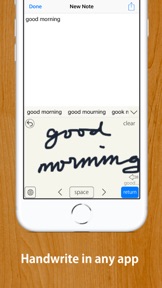
Quick and easy to turn your handwriting into inputted text in any app.
Works with any app, such as Safari, Mail, Notes, etc.
MyScript® engine converts your handwriting to typed text in any app.
Works offline. No need to be online to use or activate online.
Compatible with Apple Pencil if your device supports it.
【HOW TO USE】
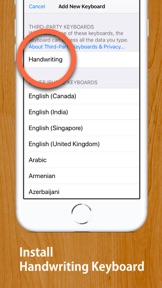
STEP 1: Install this Handwriting Keyboard (U.S. English or Japanese, or both) from "Keyboard" section in "Settings" app.
Open Settings App ▶ Handwriting(This app's settings section) ▶ Keyboards ▶ Turn "English (US)" on.
…or
Open Settings App ▶ General ▶ Keyboard ▶ Keyboards ▶ Add New Keyboards... ▶ Choose "Handwriting" ▶ Turn "English (US)" on.
STEP 2: When inputting, such as when writing a mail message, long-press "Globe Button" on the keyboard to switch to this Handwriting Keyboard. 
(Tap "Globe Button" to switch to a next keyboard, long-press "Globe Button" to show keyboard list.)
* When inputting password, the iOS keyboard automatically switches to default keyboard.
【Note】
• For some apps that have original inputting area, such as "Slack", disable inline inputting.
• If you have enabled "Scribble", the button to activate a keyboard has a bug. Please tap "3 times" to activate this keyboard from Scribble.
Functionalities: [Tap gear button on the keyboard to customise]
• Auto enter after customsed delay
• Choose input area size from three sizes
• Choose enter button location from three options
• 2 finger scroll or 2 finger cursor move gesture
• Supports Apple Pencil with finger touch rejection
• Option to disable inline inputting
• Choose three line widths, four background color
• Supports Text Replacement
• Supports iOS13's dark mode and floating keyboard
Supported Languages: 
• English (U.S.)
• Japanese (including hiragana to kanji conversion)
This app does not recognize other languages than U.S. English and Japanese. This app does not recognise UK English. Diese App erkennt kein Deutsch. Esta aplicación no reconoce español. Este aplicativo não reconhece português. Denna app känner inte igen svenska. Cette application ne reconnaît pas le français. 이 응용 프로그램은 한글을 인식하지 않습니다.
MyScript® is a trademark of MyScript

What's New in Version 2.5.1

Maintenance update

Seller

Name

Catalystwo Limited

Information

Categories

Version

2.5.1

Size

68.6 MB

Game Center

No

VPP Device Licensing

Yes

Rating

Rated: 4+

Compatibility

iOS 13.6 or later

Devices

iPhone 5s, iPhone 6, iPhone 6 Plus, iPhone 6s, iPhone 6s Plus, iPhone SE, iPhone 7, iPhone 7 Plus, iPhone 8, iPhone 8 Plus, iPhone X, iPhone XR, iPhone XS, iPhone XS Max, iPhone 11, iPhone 11 Pro, iPhone 11 Pro Max, iPhone SE (2nd generation), iPhone 12, iPhone 12 Pro, iPhone 12 Pro Max, iPhone 12 mini, iPhone 13, iPhone 13 Pro, iPhone 13 Pro Max, iPhone 13 mini, iPhone SE (3rd generation), iPhone 14, iPhone 14 Plus, iPhone 14 Pro, iPhone 14 Pro Max, iPad (5th Generation) Wi-Fi, iPad (5th Generation) Wi-Fi + Cellular, iPad (6th generation) Wi-Fi, iPad (6th generation) Wi-Fi + Cellular, iPad Pro, iPad Pro (Cellular), iPad Pro (9.7-inch), iPad Pro (9.7-inch) (Cellular), iPad Pro 12.9-inch (2nd generation), iPad Pro 12.9-inch (2nd generation) Wi-Fi + Cellular, iPad Pro (10.5-inch), iPad Pro (10.5-inch) Wi-Fi + Cellular, iPad Pro (11-inch), iPad Pro (11-inch) Wi-Fi + Cellular, iPad Pro 12.9-inch (3rd generation), iPad Pro 12.9-inch (3rd generation) Wi-Fi + Cellular, iPad Air, iPad Air (Cellular), iPad Air 2, iPad Air 2 (Cellular), iPad Air (3rd generation), iPad Air (3rd generation) Wi-Fi + Cellular, iPad mini Retina, iPad mini Retina (Cellular), iPad mini 3, iPad mini 3 (Cellular), iPad mini 4, iPad mini 4 (Cellular), iPad mini (5th Generation), iPad mini (5th Generation) Wi-Fi + Cellular, iPad (7th generation) Wi-Fi + Cellular, iPad Pro 11-inch (2nd generation), iPad Pro 11-inch (2nd generation) Wi-Fi + Cellular, iPad Pro 12.9-inch (4th generation), iPad Pro 12.9-inch (4th generation) Wi-Fi + Cellular, iPad Air (4th Generation) (Wi-Fi), iPad Air (4th Generation) (Wi-Fi + Cellular), iPad (8th generation) Wi-Fi, iPad (8th generation) Wi-Fi + Cellular, iPad Pro 11-inch (3rd generation), iPad Pro 11-inch (3rd generation) Wi-Fi + Cellular, iPad Pro 12.9-inch (5th Generation), iPad Pro 12.9-inch (5th Generation) Wi-Fi + Cellular, iPad (9th Generation), iPad (9th Generation) Wi-Fi + Cellular, iPad mini (6th Generation), iPad mini (6th Generation) Wi-Fi + Cellular, iPad Air (5th generation), iPad Air (5th generation) Wi-Fi + Cellular, iPad Pro11FourthGen, iPad Pro11FourthGenCellular, iPad ProSixthGen, iPad ProSixthGenCellular, iPad TenthGen, iPad TenthGenCellular, iPod touch (6th Generation), iPod touch (7th generation)

Languages

English, Japanese

App Store: Customer Ratings

Ratings & Reviews

3.9 of 5 (31 Ratings)

App Store: Customer Reviews

2020-08-29

iPad Pro 12.9 3rd gen

Work
kemebion
Version 2.1.9
2020-08-21

Great

Works well
Raffc
Version 2.1.8
2020-06-27

Clumsy, clunky, slow

I write very slowly with my smartphone keyboard, so I bought this, hoping it would be quicker. It's 300 times slower! It just doesn’t get me..... If this is the best app available, I’ll just go back to laborious tapping on the keyboard!
ad vita
Version 2.1.7
2020-05-15

Review written with the keyboard. Judge for yourselves!

I'm quite imperial! You will see from the hut sentence that the keyboard isn't 100% accurate, but it's better than most, ant I will freely admit that my handwriting is pretty Lemker r
So, some issues, as you Can no doubt see, but overall, quite Impressive. (Not Imperial.)
Capemarsh
2020-05-01

Useful tool

I’ve used numerous note taking apps before, but none of them would let me use MS office. This is a game changer as it can be used with virtually any app that uses the keyboard. Simple to activate and well worth £3.99.
twosiesue
Version 2.1.1
2020-03-23

Poor text manipulation (and even recognition)

It does well in recognising numbers and known words, however the moment I tried to write down certain abbreviations it has started to have problems.
Easy example, an email. First line, no huge problems. Then, once we got past the @, it struggled to recognise “uk” initially. Which is perfectly fine as my handwriting is not perfect, yet, the pain I had to get through to correct it was astonishing.
I scribbled over the unwanted text and it deleted right away - ‘perfect’ I thought. Well... no. Once I rewrote what I meant in the middle of the section, it started to try to merge everything together and twist letters to god knows what. It became a nightmare trying to correct anything.
Going back to my email example, the software seemed ecstatic about saturating my text with spaces, even though all my letters were as tight as skinny jeans. I again tried to rewrite it, but it kept on malfunctioning here or there. I never got the chance to explore how to manually delete those spaces or correct any spelling mistakes. And frankly, I am not planning to try.
I absolutely love the concept and I know that many people would be buzzing to have it, but at this point in time, this is not it. I see this as a good starting point, but a lot more needs to be done for me to consider this as a good investment. I want my money back.
qqshadowpp
Version 2.1.5
2020-03-22

Great but Sometimes annoying but not in a terrible way.

This app is great however, sometimes when I'm writing it adds random symbols which can be a problem when I'm in a rush. Overall this app is the best as its the only one out of duzzens that actually does what I want. Giving it a 5/5 because the cheap es & best SO far!!!
Liz%zzzzzzz123
2020-02-14

Breaks Dvorak layout for Hardware keyboard!

When this is enabled the Dvorak layout for the hardware keyboard stops working. The hardware keyboard reverts back to qwerty layout regardless of the hardware keyboard being set to Dvorak layout. If you disable the handwriting keyboard then Dvorak works again but you then can’t switch between hardware keyboard and handwriting without changing enabling and disabling the handwriting keyboard in the settings.
SuRfDeMoN
2020-02-13

Unique

Just wish the back button Was bigger and that You don't need to Clear just to use the back key. I am not sure why random letters Capitalise while using this keyboard. Other than that it's good.
sarahgrace1177
2020-01-14

Handwriting

I can’t get kit to work. I would like a refund.
Thank you
joybel
2019-10-11

Brilliant.

Works superbly well. Handwriting recognition quality is perfectly usable, even with my scribble. App is well-thought out and intuitive.
This is one of those game-changing apps that ought to be built in. Feels as though it’s made by Apple.
grahamo1
2019-09-28

great app

Fantastic app wed worth the money. well done
Beestaj